
The samsung dryer cooling light stays on usually because the machine hasn’t reached the end of its programmed cycle or a sensor is detecting trapped moisture. This light indicates the appliance is in the final stage of its process, which typically lasts for 5 to 10 minutes to reduce static and make clothes easier to handle. If the light remains active long after the cycle should have finished, the control board may be stuck, or the airflow through the venting system is restricted.
Common reasons for persistent cooling lights
The following table ranks the most likely causes for this issue based on common service reports. You can verify most of these by checking the display or the physical condition of your vent.
| Cause | How common | How to confirm it | Fix it yourself? |
|---|---|---|---|
| Clogged dryer vent | Very common | Check outside vent cap | Yes |
| Moisture sensor dirty | Common | Wipe with damp cloth | Yes |
| Faulty door switch | Occasional | Light stays on open | Yes with care |
| Stuck relay on board | Occasional | Clicking sound persists | No |
| Control board glitch | Rare | Power cycle the unit | Yes |
| Main sensor failure | Rare | Error code display | No |
If your dryer vent is clogged, check the external flap while the machine runs. If it fails to lift, the airflow resistance is likely overheating the internal sensors. You must clear the entire duct run, not just the wall cap, to prevent a fire hazard.
When troubleshooting the moisture sensor, look for a thin film of fabric softener residue. This coating acts as an insulator, preventing the sensor from detecting dry clothes. Wipe the metal bars with white vinegar to restore conductivity.
A common mistake is assuming a door switch failure is purely mechanical. If the light stays on even when the door is firmly latched, the switch plunger may be physically broken or misaligned. If the switch clicks but the light remains lit, the issue is likely a shorted wire in the door frame.
If you suspect a stuck relay, listen closely to the control panel during a cycle. A rapid, rhythmic clicking sound indicates a relay that has fused in the closed position. Don’t attempt to solder this yourself, as the board is often potted in resin to protect against moisture. Replacing the entire control assembly is the only reliable fix.
Clogged exhaust venting
A blocked vent is the most frequent reason the dryer fails to complete its cycle. When air can’t escape, moisture stays inside the drum, and the machine keeps running the cooling phase because it thinks the clothes are still damp.
Disconnect the flexible hose from the back of the dryer and the wall. Use a vacuum or a long-handled brush to remove lint buildup from the pipe. If you have a duct run exceeding ten feet or one with more than two ninety-degree turns, a simple vacuum won’t suffice. You must use a specialized rotary brush kit to scour the interior walls of the pipe.
Most homeowners make the mistake of only cleaning the first few feet of the duct. This leaves a dense, compacted plug further down the line that restricts airflow just as severely as a full blockage. If you feel air pressure at the exterior vent hood but the clothes remain damp, the obstruction is likely a hidden nest or a crushed section of flexible pipe behind the wall.
If the exterior vent hood doesn’t open when the dryer is running, the blockage is at the exit point. Check the flap for rust or debris that prevents it from swinging freely.
If the flap stays shut under the force of the dryer’s exhaust, you’re forcing the motor to overheat, which can trigger a thermal fuse failure. Replacing that fuse is inexpensive relative to the alternative, a price you pay for ignoring a vent that takes only forty minutes to clear.
Dirty moisture sensor bars

The moisture sensors are two metal strips located inside the drum near the lint filter. If these bars are covered in a thin film from fabric softener or dryer sheets, they can’t detect the dryness of the load. The machine continues to run because it assumes the clothes are still wet, keeping the cooling light active.
Wipe the sensor bars with a clean cloth dampened with white vinegar or rubbing alcohol. This removes the waxy buildup that prevents the sensors from reading correctly. If you use dryer sheets, try to stop for a few cycles to see if the problem returns. If the light stays on after cleaning, the sensor wiring might be loose, which requires a professional to inspect the internal connections.
You can verify if the sensors are the culprit by running a load of towels with a half-cup of white vinegar in the wash cycle. If the dryer stops correctly afterward, the issue was merely a buildup of residue on the bars. If the dryer still runs indefinitely, the sensor bars are likely physically damaged or disconnected.
Most users make the mistake of using abrasive scouring pads to clean these strips. This scratches the metal surface, which permanently ruins the sensor’s ability to conduct a current. Always use a soft microfiber cloth instead. If you see deep grooves or oxidation on the metal, the bars must be replaced entirely to restore the automatic cycle function.
Samsung dryer cooling light stays on sensor errors
Sometimes the control board enters a loop and can’t finish the cooling phase. If the dryer runs indefinitely, unplug the power cord for 60 seconds to reset the internal computer. This clears minor electronic errors caused by power surges. If the dryer fails to stop after a reset, the main control board likely has a stuck relay.
If you aren’t comfortable with electrical repairs, don’t open the control panel housing. A capacitor on the board can hold a lethal electrical charge even when the power is disconnected. Always unplug the dryer and wait several minutes for internal capacitors to discharge before touching internal components.
If the dryer displays an error code like “dE” or “tE,” consult your manual to see if it indicates a hardware failure. A “tE” code often points to a faulty thermistor rather than the board itself. Have a technician test the thermistor for the correct resistance at room temperature. If the reading is outside the manufacturer’s specified resistance range for room temperature, the sensor is likely faulty.
Many users mistakenly replace the entire control board when a simple sensor swap would solve the issue. Replacing a board is expensive relative to the alternative, while a thermistor is inexpensive. If the code persists after replacing the sensor and performing a hard reset, the control board has failed. At this stage, you must call a certified service technician to avoid damaging the wiring harness or the new board during installation.
Rare mechanical issues
-
Faulty door switch: If the dryer thinks the door is open, it might stop the heat but keep the cooling fan running. Check the switch for physical damage or a loose wire. If the switch clicks when you press it but the dryer still fails to start, use a multimeter to test for continuity. A faulty switch is inexpensive to replace yourself, but ignoring it can lead to a blown thermal fuse.
-
Heating element failure: A broken element stops the heat, which can trick the machine into staying in a cooling cycle. If your clothes are damp after a full hour, check the element for visible breaks in the coil. If you see a clean break, replace the entire housing assembly.
-
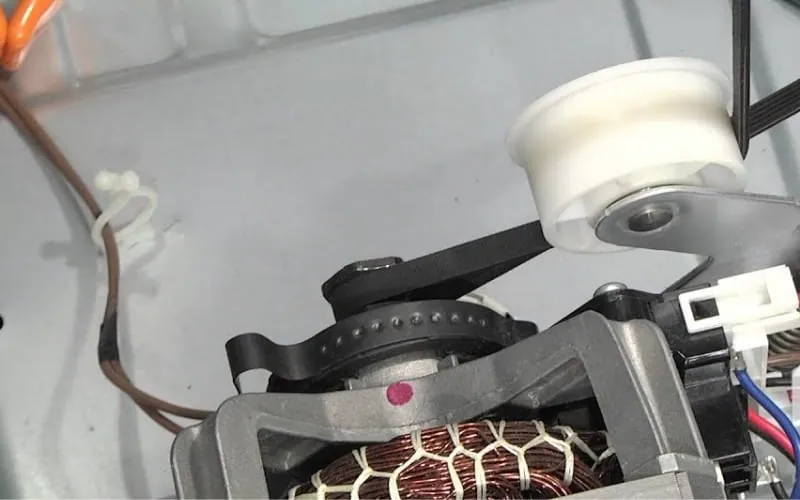
Drive motor failure: An overheating motor can trigger a safety stop that stalls the cycle. If you hear a low humming sound but the drum refuses to spin, the motor is likely seized. This requires a technician to replace the motor unit.
-
Control panel damage: Liquid spills or heavy impact can break the buttons, causing the cycle to lock. If the display flashes an error code or becomes unresponsive, try power-cycling the unit by unplugging it for ten minutes. If the board remains frozen, a full control board replacement is the only reliable fix.
What a typical repair requires
Fixing a cooling light issue usually involves basic cleaning or a simple reset. If the problem is just a dirty sensor or a clogged vent, you only need a vacuum, a screwdriver for the hose clamps, and a cloth. These fixes cost nothing but your own time, which might be an hour for a deep vent cleaning.
If the issue is a faulty sensor or a bad control board, you’ll need to purchase spare parts. These parts vary in cost, but a new sensor is much cheaper than a main control board.
You can find the exact part number by looking at the sticker inside the door frame or the back of your dryer. Always use the model-specific number to ensure the part fits your machine. If you need a technician, the cost depends on your local labor rates and the time required for a diagnosis.
Related guides
- Sub Zero Refrigerator Troubleshooting: Fix Cooling Issues Fast in 2026
- Motion Detector Light Troubleshooting: Fixes for Common Issues in 2026
- Samsung Electric Range Troubleshooting: Fix Common Issues Fast in 2026
Frequently asked questions
Can I use the dryer if the cooling light stays on?
You should stop using the dryer until you fix the issue. Running the machine when it can’t finish a cycle often means the venting is blocked, which creates a fire hazard due to trapped lint. Check your vent path for obstructions before running another load to ensure the air can move freely.
How long should the cooling cycle last?
The cooling phase typically runs for 5 to 10 minutes at the end of every automatic cycle. If your dryer runs for more than 15 minutes in this state, it’s likely that the moisture sensors aren’t reading the load correctly or the air isn’t venting properly.
Is it safe to reset the dryer?
It’s safe to reset your dryer by unplugging it from the wall for 60 seconds. This is a standard troubleshooting step that clears the memory of the control board. Don’t open the metal housing or touch internal wires, as those parts are for professional technicians only.
Why does the light stay on with a small load?
Small loads sometimes fail to trigger the moisture sensors because the clothes don’t touch the metal bars enough. Try adding a few dry towels to the load, which helps the sensors detect the moisture level better. If the problem continues with larger loads, the sensors likely need a cleaning.
Does the cooling light mean the dryer is broken?
The light staying on doesn’t always mean the dryer is broken, as it’s often caused by a dirty sensor or clogged vent. These are maintenance issues that you can resolve yourself. If cleaning the sensors and vents doesn’t help, then the issue could be a faulty control board.
What happens if I ignore the cooling light?
Ignoring the light can lead to longer drying times and increased energy costs because the machine runs longer than necessary. More importantly, if the light stays on because the vent is clogged, your dryer will overheat and potentially start a fire. Always ensure your exhaust path is clear of lint.
Conclusion
If the issue persists despite checking your vents, it’s time to contact a professional technician for a deeper inspection. They’ll be able to tell if your control board needs a simple reset or a full replacement. Don’t hesitate to reach out, as you shouldn’t have to deal with a malfunctioning appliance.