
Are you frustrated because your Harbor Breeze ceiling fan isn’t working the way it should? You’re not alone.
When your fan stops spinning, makes strange noises, or won’t respond to the remote, it can throw off the comfort of your entire room. But before you reach for the phone to call a repair service, there’s good news—you can often fix these problems yourself.
This guide will walk you through simple troubleshooting steps that anyone can follow. By the end, you’ll feel confident knowing how to get your ceiling fan back in perfect working order. Ready to solve the issue and bring cool comfort back to your space? Keep reading!

Credit: www.ebay.com
Common Harbor Breeze Fan Issues
Harbor Breeze ceiling fans are popular for good reasons. They keep rooms cool and add style. Still, fans can have issues. Knowing common problems helps fix them fast. This saves time and avoids extra costs.
Below are frequent Harbor Breeze fan issues. Understanding these helps you get your fan working right.
Fan Not Turning On
Sometimes the fan won’t start. Check if the power is on. Look at the circuit breaker or fuse box. A loose connection can stop the fan from working. Make sure the wall switch is on. Also, test the fan’s pull chain if it has one. If the fan still won’t turn, the motor or wiring might be faulty.
Unusual Noises
Fans should run quietly. Strange sounds mean trouble. Rattling or buzzing can come from loose screws or parts. Tighten all screws on the fan and blades. Noise may also come from dirty or bent blades. Clean and straighten them. A worn motor can cause humming or grinding sounds. This usually needs professional help.
Remote Control Problems
Remote controls make fans easy to use. They stop working sometimes. Check the batteries first. Replace old ones. Make sure the remote and fan are paired correctly. Interference from other devices can block signals. Try moving closer to the fan. If the remote still fails, the receiver inside the fan could be broken.
Fan Wobbles Or Vibrates
Wobbling fans look bad and can be unsafe. Balance is the main cause. Check if blades are loose or bent. Tighten all screws on blades and mounting brackets. Dust on blades can unbalance the fan too. Clean the blades. Use a balancing kit to fix uneven weight. If wobbling continues, the fan might be installed incorrectly.
Power And Wiring Checks
Power issues are common reasons why Harbor Breeze ceiling fans stop working. Checking the power and wiring is an essential first step. It helps find simple problems that you can fix fast. This section covers basic power and wiring checks. Follow each step to diagnose and solve power problems safely.
Inspecting The Power Source
Begin by checking the power source that feeds your ceiling fan. Make sure the fan is plugged in or connected to a live power line. Use a voltage tester to confirm power at the fan’s wiring box. No power here means a wiring or supply problem. Check the wires for any visible damage or loose connections. Tighten loose wires and replace damaged cables before testing the fan again.
Checking The Circuit Breaker
Next, examine the circuit breaker in your home’s electrical panel. Sometimes breakers trip and cut power to the fan. Find the breaker labeled for the fan or room. If it is in the off position or looks tripped, switch it off and then on again. This can restore power. If the breaker trips repeatedly, call an electrician. Avoid forcing or bypassing the breaker for safety.
Verifying Wall Switch Functionality
Wall switches control the power flow to your ceiling fan. Test the switch by turning it on and off. If the fan does not respond, the switch might be faulty. Use a multimeter to check for continuity when the switch is on. A lack of continuity means the switch needs replacing. Installing a new switch is often simple and restores fan operation quickly.
Remote Control Troubleshooting
The remote control is key to using your Harbor Breeze ceiling fan smoothly. Sometimes, the remote might stop working properly. This section helps fix common remote control problems. Follow these simple steps to get your remote back in action.
Replacing Batteries
Old or weak batteries often cause remote issues. Open the battery cover on the back. Remove the old batteries carefully. Insert new batteries with the correct polarity. Close the cover tightly. Test the remote to see if it works now.
Resetting The Remote
Resetting can fix many remote problems. Remove the batteries from the remote. Press all buttons once to clear any stored signals. Wait for 30 seconds. Put the batteries back in. Try using the remote again to check if it responds.
Re-syncing The Remote And Receiver
The remote and fan receiver may lose connection. Turn off the fan power at the circuit breaker. Wait 30 seconds before turning it back on. Press and hold the fan’s receiver reset button. While holding, press any button on the remote. Release both buttons. The remote and fan should now be paired again.
Fixing Fan Motor Issues
Fan motor problems can cause your Harbor Breeze ceiling fan to stop working properly. Fixing these issues can restore smooth operation and quiet performance. The motor might be dirty, loose, or have a bad capacitor. Simple steps can fix most motor troubles without expensive repairs.
Start by checking the motor’s cleanliness and lubrication. Dust and dirt can block motor parts and cause noise or slow spinning. Next, inspect all screws and bolts. Loose parts can make the fan wobble or stop. Lastly, test the capacitor. A weak capacitor can prevent the motor from starting or running well.
Cleaning And Lubricating The Motor
Turn off power to the fan before cleaning. Use a soft brush or cloth to remove dust from the motor. Avoid using water or harsh cleaners. Apply a few drops of light machine oil to the motor shaft. This reduces friction and helps the motor run smoothly. Clean and oil the motor every few months for best performance.
Tightening Loose Components
Check all screws, nuts, and bolts on the fan. Tighten any that feel loose using a screwdriver or wrench. Pay special attention to the mounting bracket and motor housing. Loose parts can cause noise and unsteady spinning. Secure parts keep the fan balanced and quiet.
Replacing The Capacitor
Locate the capacitor inside the fan’s motor housing. It looks like a small cylinder or oval. Use a multimeter to test the capacitor’s electrical charge. If it reads low or zero, replace it. Purchase a capacitor that matches your fan’s model. Disconnect the power and swap the old capacitor with the new one carefully. This often solves starting and running issues.
Balancing And Stabilizing The Fan
Balancing and stabilizing your Harbor Breeze ceiling fan is key to smooth operation. A wobbling fan can cause noise and wear out parts faster. Fixing balance issues improves comfort and fan life. Small adjustments often stop the wobble and keep your fan running quietly.
Adjusting Blade Alignment
Check each blade to see if it is bent or uneven. Slightly bend a blade back to match the others. Ensure all blades sit at the same angle. Use a ruler or straight edge to compare blade tips. Proper alignment reduces wobbling and noise.
Using A Fan Balancing Kit
Most Harbor Breeze fans come with a balancing kit. It includes clips and weights to adjust blade balance. Attach a clip to a blade and turn on the fan. Move the clip until wobbling decreases. Secure a weight on the blade with the least wobble. This method helps balance uneven blades quickly.
Securing Mounting Hardware
Loose screws or mounting parts cause fan wobble. Turn off the power before checking hardware. Tighten screws on the fan motor housing and mounting bracket. Inspect the ceiling plate and downrod connection. Firm mounting stops movement and keeps the fan steady.
Dealing With Lighting Problems
Lighting problems with Harbor Breeze ceiling fans can be frustrating. Lights may flicker, not turn on, or glow dimly. These issues often have simple fixes. Understanding common causes helps restore your fan’s light quickly.
Start by checking basic parts. Faulty bulbs, loose wiring, or damaged light kits cause most problems. Step-by-step, you can solve these issues safely and effectively.
Changing Light Bulbs
First, turn off the fan and power supply. Remove the old bulb carefully. Check the bulb type needed for your fan model. Replace it with a new, compatible bulb. Make sure the bulb fits tightly. Test the light after installation. A new bulb often solves the problem.
Inspecting Light Kit Wiring
Loose or damaged wiring can stop the light from working. Turn off the power before inspecting. Remove the light kit cover to see wires clearly. Look for disconnected or broken wires. Tighten any loose connections gently. If wires look damaged, they may need repair. Proper wiring ensures the light works safely.
Replacing The Light Kit
Sometimes, the light kit itself is faulty. If changing bulbs and fixing wiring fail, try a new light kit. Buy a kit that matches your fan model. Turn off power and remove the old kit carefully. Connect the new kit wires as instructed. Attach the new light kit securely. Test the lights to confirm the fix.
When To Call A Professional
Knowing when to call a professional is important in Harbor Breeze ceiling fan troubleshooting. Some problems are easy to fix. Others need expert help. Avoid risks and save time by choosing the right approach.
Identifying Complex Electrical Issues
Electrical problems can be dangerous. Faulty wiring or power surges need special care. Professionals spot hidden wiring faults quickly. They use tools and knowledge to fix issues safely. Do not touch wires if unsure. Leave complex electrical problems to experts.
Handling Motor Replacements
Motor replacement is tricky. It needs exact parts and skills. Removing and installing a motor requires care. Wrong steps can harm the fan or cause injury. Professionals ensure the motor fits and works well. They check all connections and test the fan after replacement.
Ensuring Safety During Repairs
Safety is the top priority in repairs. Professionals follow rules to avoid shocks and falls. They turn off power and use proper tools. Repairing fans on ceilings needs balance and caution. Experts know how to protect themselves and your home during work.

Credit: www.ebay.com
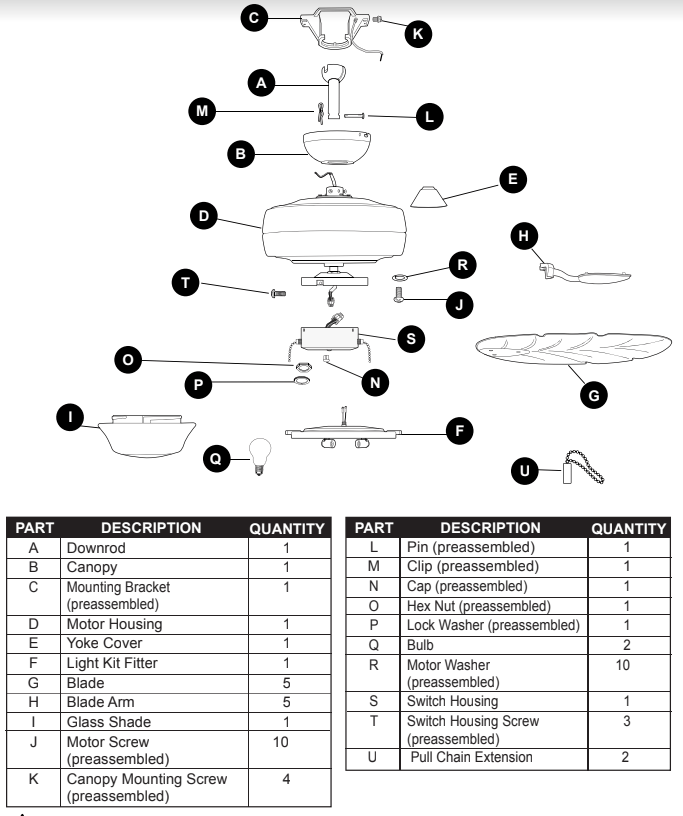
Credit: manualsfile.com
Frequently Asked Questions
How Do I Fix A Harbor Breeze Ceiling Fan That Won’t Start?
Check the power source and the fan’s wiring connections first. Ensure the remote control has fresh batteries. Also, inspect the fan’s capacitor for damage.
Why Is My Harbor Breeze Fan Making A Loud Noise?
Loose screws or unbalanced fan blades often cause noise. Tighten all screws and clean the blades. Replace any warped blades to reduce noise.
How Can I Reset My Harbor Breeze Ceiling Fan Remote?
Remove the remote batteries, wait 10 seconds, then reinsert them. Press the reset button if available. This often clears minor remote issues.
What Causes Harbor Breeze Ceiling Fans To Wobble?
Wobbling usually comes from unbalanced blades or loose mounting. Use a blade balancing kit or tighten blade screws. Check the ceiling mount for stability.
Why Won’t My Harbor Breeze Fan Light Turn On?
Check if the light bulb is burnt out or loose. Verify the wall switch and remote settings. Replace bulbs with correct wattage if needed.
How Do I Clean And Maintain My Harbor Breeze Ceiling Fan?
Turn off power before cleaning. Use a soft cloth to wipe blades and motor housing. Regular cleaning prevents dust buildup and extends fan life.
Conclusion
Harbor Breeze ceiling fans can have simple fixes. Check power sources and remote batteries first. Clean fan blades and tighten screws for better performance. Listen for unusual sounds or wobbling. These signs help spot problems early. Regular care keeps fans running smoothly.
Small efforts save time and money. You can enjoy cool air without hassle. Troubleshooting helps avoid calls to repair services. Stay calm and follow these easy tips. Your fan will work well again in no time.