
Are you frustrated by your Samsung dishwasher suddenly showing an error code? You’re not alone.
These codes can seem confusing and stressful, especially when you just want your dishes clean. But don’t worry—understanding what these error codes mean can save you time, money, and hassle. You’ll learn how to quickly identify and fix common Samsung dishwasher error codes so your appliance works smoothly again.
Keep reading, and you’ll feel confident tackling these issues yourself.

Credit: www.samsung.com
Common Samsung Dishwasher Errors
Samsung dishwashers are reliable but can show error codes. These codes help you find problems fast. Understanding common errors saves time and avoids bigger issues.
Errors may stop the dishwasher or make it work poorly. Knowing what each code means helps fix the problem right away. Watch for signs that show an error is present.
Error Code Meanings
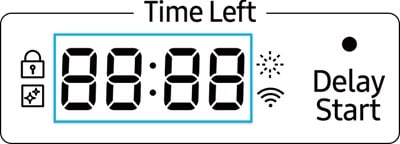
Each Samsung dishwasher error code has a specific meaning. For example, “4C” means water supply issues. “5C” shows a drain problem. “OE” signals water is not draining properly. “HE” means a heating error. These codes point to exact troubles inside the machine.
Checking the code helps choose the right fix. It avoids guesswork and wasted effort. Keep your user manual or Samsung’s website handy. They list all common error codes and their meanings clearly.
Symptoms To Watch For
Several signs can show dishwasher errors. The machine may stop mid-cycle. Water might not fill or drain. Dishes could come out dirty or wet. Strange noises or flashing lights also warn of issues.
Noticing these symptoms early helps prevent damage. Pay attention to how your dishwasher acts during use. Quick action can keep your dishwasher working longer.
Credit: www.samsung.com
Troubleshooting E1 And E2 Errors
Troubleshooting Samsung dishwasher error codes E1 and E2 helps fix common problems fast. These errors usually point to water supply or drainage issues. Fixing them yourself saves time and avoids service calls. Understanding each error lets you know what to check first.
Water Supply Issues
Error E1 means the dishwasher has trouble getting water. Check if the water tap is fully open. The hose might be bent or blocked. Clean the inlet filter to remove dirt or debris. Ensure the water pressure is strong enough. Low pressure can cause the dishwasher to stop filling.
Drainage Problems
Error E2 shows a drainage problem inside the dishwasher. The drain hose could be clogged or twisted. Clear any blockages to allow water to flow out. The drain pump might be faulty or stuck. Listen for strange noises during draining. Clean the dishwasher filter regularly to avoid buildup.
Fixing E3 And E4 Heater Errors
Samsung dishwasher error codes E3 and E4 point to heater issues. These errors stop your dishwasher from heating water properly. Fixing these errors can restore your dishwasher’s cleaning power quickly. Simple checks can help identify the problem.
Heater Element Check
Start by unplugging your dishwasher for safety. Locate the heater element at the bottom of the dishwasher tub. Look for any visible damage or breaks in the element. Use a multimeter to test its electrical resistance. A reading of zero or infinite means the element is faulty. Replace the heater element if it shows damage or no continuity.
Temperature Sensor Tips
The temperature sensor monitors water heat during cycles. Check the sensor’s wiring for loose or broken connections. Use a multimeter to test the sensor’s resistance. Compare the reading to the values in your dishwasher manual. A wrong reading means the sensor needs replacement. Clean the sensor area to remove any dirt or buildup. This helps the sensor work correctly and avoid false errors.
Resolving E5 And E6 Water Leakage
Samsung dishwashers sometimes show error codes E5 and E6. These codes mean the machine has detected water leakage. Water leaks can cause damage to your floor and dishwasher. Fixing these errors quickly keeps your dishwasher working well. Start by checking common problem areas. Two main parts often cause leaks: the door seals and the water inlet valve.
Inspecting Door Seals
The door seals stop water from leaking out during a wash cycle. Dirt or damage can make seals less effective. Open the dishwasher door and look closely at the rubber seals. Check for cracks, tears, or bits of food stuck in them. Clean the seals gently with a damp cloth to remove grime. If the seals look worn or broken, replace them. New seals create a tight barrier and stop leaks.
Checking Water Inlet Valve
The water inlet valve controls the water flow into the dishwasher. A broken valve can cause water to leak inside or outside the machine. Locate the valve near the back or bottom of the dishwasher. Look for signs of water pooling or dripping. Test the valve by running a cycle and watching for leaks. Replace the valve if it looks damaged or faulty. A good valve helps keep the dishwasher dry and safe.
Quick Steps For F1 And F2 Control Errors
Samsung dishwashers show error codes F1 and F2 to indicate control problems. These errors often stop the dishwasher from working properly. Quick steps can help fix these issues and get the machine running again. Follow simple actions to reset and check the control system. This saves time and avoids costly repairs.
Resetting The Dishwasher
Start by turning off the dishwasher. Unplug it from the power source. Wait for about five minutes. Plug it back in and turn it on. This resets the control board and clears some errors. Watch for error codes on the display. If the error remains, try other steps.
Control Board Inspection
Check the control board for visible damage. Look for burnt marks or loose wires. Make sure all connections are tight and clean. Use a flashlight to see small details. If the board looks damaged, it may need replacement. A faulty control board can cause F1 and F2 errors.
Credit: amarappliance.ca
Maintenance Tips To Prevent Errors
Keeping your Samsung dishwasher in good shape helps avoid error codes. Routine care can stop many common problems. Small efforts can save time and repair costs later.
Here are simple maintenance tips to keep your dishwasher running smoothly. Follow these to reduce errors and improve cleaning results.
Regular Cleaning Routines
Clean the filter at least once a week. Food particles can block water flow and cause errors.
Wipe the door edges and seals. Dirt buildup can prevent the door from closing properly.
Run an empty cycle with dishwasher cleaner once a month. This removes grease and limescale inside the machine.
Check spray arms for clogs. Clear holes help water reach all dishes evenly.
Proper Loading Techniques
Place dishes so water can reach every surface. Avoid overlapping plates or pots.
Keep large items away from the spray arms. They can block water and cause cleaning errors.
Do not overload the dishwasher. Overcrowding reduces cleaning power and may trigger error codes.
Use the correct racks for different items. Cups, bowls, and silverware have designated spots for best results.
When To Call A Professional
Knowing when to call a professional for your Samsung dishwasher saves time and stress. Some error codes signal simple fixes. Others warn of complex problems. Trying to fix advanced issues alone may cause damage or safety risks. Trusting a skilled technician ensures the job gets done right and safely.
Identifying Complex Issues
Some error codes mean serious problems inside the dishwasher. Examples include motor failure, electrical faults, or water leakage. These issues need expert tools and knowledge. If the dishwasher won’t drain or keep water, it might need professional help. Complex errors often repeat despite resets or basic fixes. Calling a technician prevents further damage and costly repairs.
Safety Precautions
Dishwashers use electricity and water, a risky mix. Avoid opening the machine during a cycle. Unplug the dishwasher before any inspection. Never touch wires or internal parts without training. Faulty repairs can cause shocks or fire hazards. Professionals follow safety rules and use proper gear. Your safety matters most, so don’t attempt risky repairs yourself.
Frequently Asked Questions
What Do Samsung Dishwasher Error Codes Mean?
Error codes show specific problems in your dishwasher. They help identify issues quickly for easy repair.
How Can I Reset Samsung Dishwasher Error Codes?
Unplug the dishwasher for 5 minutes. Plug it back in to clear most error codes.
Why Does My Samsung Dishwasher Show The 4c Error?
The 4C error means water supply is weak or blocked. Check the water valve and hose.
What Does The 5e Error Indicate On My Dishwasher?
5E error means water is not draining properly. Clean the drain pump and filter to fix.
How Do I Fix The He Error On Samsung Dishwasher?
HE error signals a heating problem. Check the heating element and wiring for damage or faults.
Conclusion
Samsung dishwasher error codes help you find problems fast. Knowing these codes saves time and effort. You can fix simple issues yourself. This avoids long waits for repair services. Remember to check the user manual often. Clean filters and check water supply regularly.
These steps keep your dishwasher running well. Understanding error codes gives you more control. Keep your dishwasher working smoothly and stress-free.