
You can fix most issues with your window treatments by using this Hunter Douglas Troubleshooting Manual to identify common power, pairing, or alignment errors. If your shades don’t move, the most common cause is a dead battery or a loose connection at the battery pack. You should check the power source first before attempting any complex resets. If the shade remains unresponsive after confirming the power supply, it’s likely a signal interference issue or a motor fault that requires professional support.
Why this happens
Most window shade malfunctions stem from simple electrical or mechanical interruptions. The most frequent cause is a depleted power source. If your shades use a battery wand, the cells inside may have lost their charge or developed corrosion on the contacts. This prevents the motor from receiving the voltage it needs to operate. Even if the batteries are fresh, a loose wire or a disconnected plug at the headrail will stop the shade from working entirely.
Another common cause is signal loss between the remote and the shade. If you have recently moved your router or added new wireless devices, radio frequency interference might be blocking the command. This is especially true for systems using older protocols that share the same frequency as common household Wi-Fi. Sometimes, the remote simply loses its pairing to the shade’s receiver. This happens if the power was cut during a firmware update or if the remote was dropped, causing the internal memory to lose its sync settings.
Finally, physical obstruction causes the motor to engage a safety stop. If the fabric is caught on a window latch or if the bottom rail is uneven, the motor senses extra resistance and cuts power to protect its internal gears. This varies by model—check the label on your rail to see if your system has an “auto-stop” feature that requires a manual reset after a jam. Never force the shade to move by hand if it feels stuck, as this can strip the internal drive gears and lead to permanent damage.
Hunter Douglas Troubleshooting Manual: Power Supply
This fix is for users with battery-operated or DC-powered shades. If your shade is hardwired to a wall outlet, skip this section and check your circuit breaker instead. First, remove the battery wand from the headrail. Inspect the metal contact points at the end of the wand and inside the headrail. If you see white or green powder, clean it gently with a dry, soft cloth. If the contacts look clean, replace all batteries with fresh, high-quality alkaline cells. Don’t mix old and new batteries, as this causes voltage imbalances that lead to motor failure.
Once the new batteries are in, reinsert the wand firmly until you hear a click. If the shade doesn’t respond to your remote, look for a small indicator light on the headrail. A blinking red light usually signals a low-power state, while a solid light indicates the motor has power but isn’t receiving a signal. If the shade moves slightly and then stops, the battery voltage is likely too low to support the full weight of the fabric. This is a common trade-off in larger shades; they require higher current than smaller ones. If you have a large shade, use lithium batteries to provide a more consistent energy output. If the shade still doesn’t move after these steps, the issue is likely internal and requires a visit from a certified specialist.
Reset the remote pairing
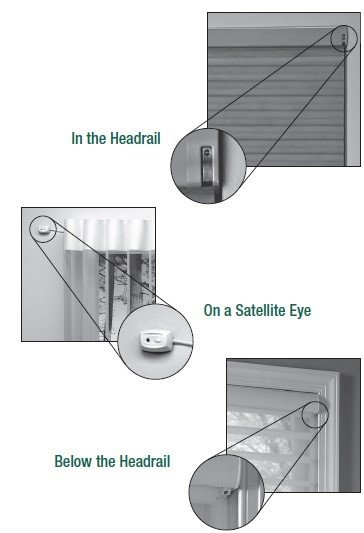
This fix is for when the remote light blinks but the shade doesn’t react. You must be standing within three feet of the shade to perform this pairing process. First, locate the programming button on the shade’s headrail. This is typically a small, recessed button that you can press with a paperclip. Press and hold this button for about five seconds until the shade jogs—a quick up-and-down movement. This confirms the motor is in “learning mode.”
Once the shade jogs, immediately press the “stop” or “program” button on your remote. The shade should jog again to confirm it has accepted the new signal. If you have multiple shades on one remote, make sure you only have the target shade powered on during this process. If you can’t get the shade to jog, the internal receiver might be damaged. At this point, stop the process and contact Hunter Douglas technical support to verify if your specific motor model requires a specialized factory reset. This isn’t a task for a DIY repair, as opening the internal motor housing will void your warranty and could cause the fabric to drop unexpectedly.
Clear the path of travel
This fix is for shades that move partially but stop before reaching the top or bottom. First, inspect the window frame and the area around the bottom rail for any debris, loose screws, or window hardware that might be catching the fabric. If you have a cellular shade, look for any snagged cords inside the pleats. If the bottom rail is tilted, gently guide it back to a level position with your hands while pressing the “up” button on the remote.
If the shade stops at the same spot every time, it has likely “lost” its limit settings. This happens if the shade was manually pulled or pushed while the motor was engaged. To fix this, you must reset the travel limits. Consult your specific user guide for the sequence of button presses required for your model, as the process for a roller shade is different from a honeycomb shade. If you don’t have the manual, look for the serial number on the headrail to find the correct digital version online. If the shade continues to stop at the same point despite a full reset, the internal limit sensor is faulty. This is a non-repairable hardware failure. Don’t attempt to take the headrail apart to reach the sensors. If the unit is still under warranty, contact your dealer to arrange for a professional repair or replacement.
What not to do
- Never spray lubricants like WD-40 into the headrail or onto the fabric, as this stains the material and attracts dust that will eventually clog the motor.
- Don’t try to force a stuck shade to move by pulling it downward, because this puts extreme tension on the internal cords and can snap the lift mechanism.
- Never attempt to open the motor housing or the internal circuit board, as these components contain electrical parts that aren’t user-serviceable and could cause a fire if handled incorrectly.
- Don’t ignore a shade that makes a grinding or clicking noise, because this indicates a stripped gear that will fail completely if you continue to operate it.
- Avoid using rechargeable batteries unless the manufacturer’s manual specifically states they’re compatible with your motor, as they often provide a different voltage output that can damage the internal electronics.
How to stop it happening again
Regular maintenance ensures your shades operate smoothly for years. Keep the area around the window clear and ensure the fabric doesn’t rub against the window handle or lock.
| If you’re doing this | Do this instead | Why |
|---|---|---|
| Leaving batteries in for years | Prevents acid leaks and corrosion | |
| Pulling the shade by hand | Always use the remote | Prevents stripping the motor gears |
| Ignoring tilted bottom rails | Level them immediately | Prevents uneven cord tension |
| Letting dust build up | Vacuum with a soft brush | Prevents grit from entering the headrail |
| Using random battery brands | Use high-quality lithium cells | Provides stable voltage for the motor |
Frequently asked questions
Can I fix a broken cord myself?
No, you shouldn’t attempt to repair internal lift cords yourself. These cords are part of a complex, factory-calibrated tension system. Re-threading them often causes uneven tension, leading to crooked shades or retraction failure.
Why is my shade moving on its own?
Your shade is likely experiencing signal interference or an accidental smart home routine. Check your hub for timers or interference from nearby wireless devices. Re-syncing your remote to the shade can establish a secure connection that ignores outside signals.
How long should the batteries last?
Most battery-operated shades last between one and two years with standard daily use. This estimate assumes you open and close the shade twice each day. Heavy shades or those in extreme sunlight may drain power faster.
Is it safe to leave the shade stuck?
Yes, it’s safe to leave a stuck shade in place, provided it isn’t obstructing a fire exit. Don’t force the shade, as this can snap internal components. Wait for a professional technician to resolve the issue safely.
What happens if I lose the remote?
You can purchase a replacement remote from the manufacturer’s website or a local dealer using your product’s serial number. Once the remote arrives, pair it using the headrail’s programming button. You may be able to use a mobile app in the meantime.
Final Thoughts
If you still can’t get your shades working properly, don’t hesitate to reach out to your local dealer for extra help. They’ve got the right tools to handle tricky motor repairs or warranty claims. It’s worth giving them a call today so you can get back to enjoying your home’s perfect lighting.
Related guides
- Hart Lawn Mower Troubleshooting Manual: Fix Common Issues in 2026
- Panasonic Phone Troubleshooting Manual: Fix Common Issues in 2026
- E Z Go Golf Cart Troubleshooting Manual: Fix Common Power Issues in 2026