
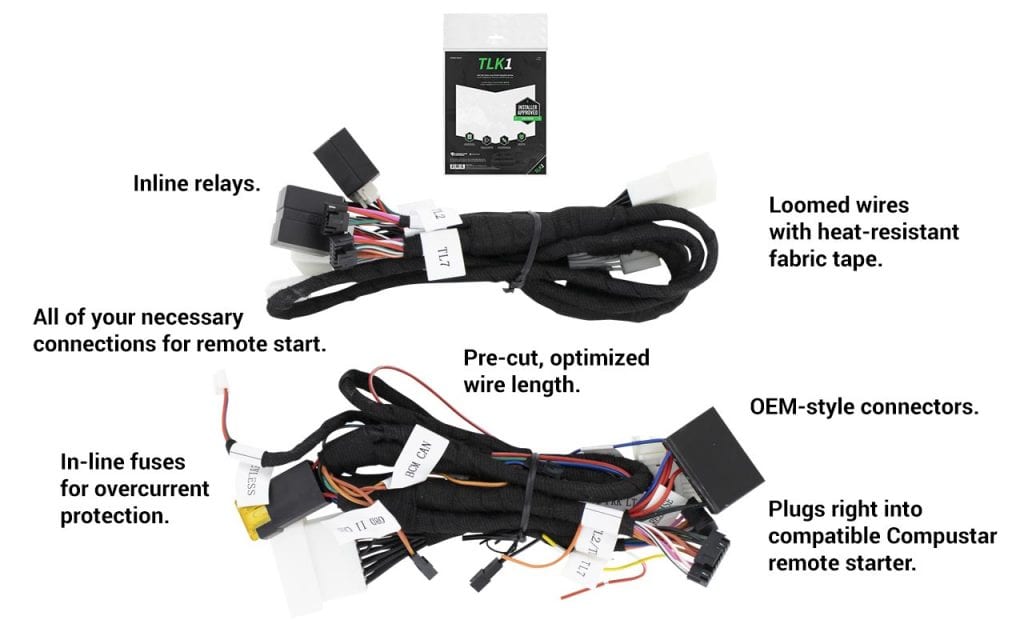
Credit: www.compustar.com
Common Compustar Starter Issues
Compustar remote starters offer great convenience. Sometimes, they do not work as expected. This section helps you fix common problems. We will explore frequent issues. You can get your starter working again.
No Crank, No Start
Your car does not make any sound. The engine will not turn over. This is a common problem. The remote start system might not get power. Check the remote starter’s battery. Make sure it is charged. The car’s battery could be dead. A loose connection is also possible. Inspect the wiring to the starter. Ensure it is secure. Sometimes, the starter itself fails.
Remote Not Responding
Your remote does not do anything. You press buttons. Nothing happens. The remote’s battery is often the cause. Replace the old battery. Try a new one. The remote might be out of range. Move closer to your vehicle. Obstructions can block the signal. Walls or other cars interfere. The remote might need reprogramming. Consult your Compustar manual.
Intermittent Starting
The starter works sometimes. It fails at other times. This can be frustrating. A weak car battery can cause this. It might not have enough power. Check your vehicle’s battery health. Loose connections are another culprit. Vibrations can loosen wires. Inspect all connections carefully. The remote starter module might be faulty. Sometimes, extreme temperatures affect it.
Alarm Triggering Unexpectedly
Your car alarm goes off randomly. This is unsettling. The hood pin switch might be bad. It tells the car if the hood is up. A faulty hood pin causes false alarms. Check the switch’s mounting. Ensure it is clean. Door pin switches can also cause issues. Make sure they are working correctly. The remote starter’s sensitivity might be too high. Adjust the settings in the manual.

Credit: www.youtube.com
Power And Battery Checks
Check your remote starter’s battery. A weak battery causes many issues. Ensure the remote is fully charged.
Your Compustar remote starter needs power. This is true for the remote itself. The car’s battery matters too. These checks are essential. They solve many starting problems.Remote Battery Replacement
Is your remote not working? The battery might be dead. This is a common issue. Open your remote. Find the battery compartment. Carefully remove the old battery. Insert a fresh one. Make sure it’s the right size. Test the remote again. It should work now.Vehicle Battery Health
A weak car battery causes trouble. Your Compustar needs a strong connection. Check your car’s battery terminals. Are they clean and tight? Corrosion can block power. Clean them if needed. A battery tester can check health. A dead car battery stops everything.Fuse And Circuit Breaker Inspection
Fuses protect your car’s systems. Your remote starter has fuses. Find the fuse box. It is usually under the dashboard. Check the remote starter’s fuses. Look for a blown fuse. A blown fuse is dark or broken. Replace it with a new one. Use the same amperage rating. Circuit breakers can also trip. Reset them if necessary. These checks help your starter.Remote And Receiver Signals
Remote and receiver signals are key. They let your car start. A strong signal is essential. Problems here stop your remote starter. We will look at common issues. Fixing them is often simple. Understand these signals. Troubleshooting becomes easier.
Range Problems
Your remote starter range is short. This is a common problem. The remote feels far away. Your car won’t respond. Several things cause this. Batteries are often low. Check your remote’s battery. Replace it if needed. Obstacles block the signal. Buildings can interfere. Metal structures are worse. Try a more open area. The antenna on your car might be damaged. This is less common. Inspect it carefully.
Signal Interference
Other signals can interfere. Radio frequencies are busy. Your remote signal might be weaker. Other devices cause this. Think about nearby electronics. Cell towers are powerful. Some industrial equipment causes noise. This noise jams your signal. It makes your remote useless. Try starting the car again. Move to a different spot. This often clears interference.
Pairing The Remote
Your remote needs to connect. This is called pairing. The remote and car must sync. Sometimes they lose connection. You need to re-pair them. This process varies. Consult your Compustar manual. It has specific steps. Follow them exactly. You might need a helper. The car’s ignition is involved. Ensure the car is safe. Proper pairing fixes many issues.
Vehicle-specific Connections
Remote starters are fantastic. They make starting your car easy. But sometimes they don’t work. Many issues relate to your car’s specific wiring. Understanding these connections is key. This helps fix many problems.
Wiring Harness Issues
Your car’s wires are complex. The remote starter connects to them. A loose wire causes trouble. A damaged wire can too. Check all connections carefully. Ensure they are secure. Look for any signs of wear. This is a common culprit.
Immobilizer Bypass
Modern cars have security. An immobilizer prevents starting. The remote starter needs to bypass this. A proper bypass is crucial. If not done right, it fails. This prevents the engine from running. Verify the bypass module is correct. Ensure it’s wired properly.
Hood Pin Switch Functionality
Safety is important. The hood pin switch stops starting. It tells the system the hood is open. This prevents accidental starting. A faulty pin switch causes issues. It might think the hood is always open. Test the switch’s operation. Make sure it works well.
System Resets And Reboots
Sometimes your Compustar system acts up. A simple reset can fix many issues. Rebooting the module clears temporary glitches. This often restores normal operation. It is a good first step. Don’t worry. It is not complicated.
Performing A System Reset
Your Compustar needs a fresh start. You can perform a system reset. This process is straightforward. It often solves minor problems. Locate your vehicle’s fuse box. Find the Compustar system fuse. Carefully remove the fuse. Wait about thirty seconds. Reinsert the fuse firmly. Your system will restart. Test its functions. This might be all you need.
Re-initializing The Compustar Module
The Compustar module sometimes needs re-initialization. This ensures it communicates correctly. Locate the main Compustar control module. It is usually under the dashboard. You will see a small button. Press and hold this button. Do this for about ten seconds. Release the button. The module will re-boot. This process realigns its settings. Try using your remote again. This often resolves connection issues.
Credit: help.compustar.com
Advanced Troubleshooting Steps
Standard fixes sometimes fall short. You need more. These advanced steps help. They target tricky issues. Get your Compustar working again.
Diagnostic Codes
Your Compustar system has codes. These codes signal problems. Check your Compustar manual. It lists the codes. It explains their meaning. Some systems show codes visually. Others use light patterns. Learn what the codes mean. This guides your next steps. It points to the exact fault.
Firmware Updates
Software runs your starter. This software is firmware. Sometimes it needs an update. Outdated firmware causes issues. Check the Compustar website. Look for firmware updates. Follow the update instructions carefully. Updates can fix bugs. They can improve performance. This is a vital step.
Professional Assistance
Some problems are complex. You may need expert help. Compustar dealers are trained. They understand the systems well. They have special tools. They can diagnose tough issues. Do not hesitate to ask them. It saves time and frustration. Get your system fixed right.
Frequently Asked Questions
Why Won’t My Compustar Remote Start Work?
Check your car’s battery. A weak battery can prevent starting. Ensure the car doors are fully closed. The system needs a secure lock.
How Do I Reset My Compustar Remote Starter?
Try disconnecting the car battery for a minute. Reconnect it to reset the system. This often resolves minor glitches.
Is My Compustar Remote Starter Broken?
First, check the remote’s battery. A dead remote battery is common. Also, ensure the car’s hood is closed. The safety switch prevents starting otherwise.
How To Fix Compustar Remote Start Error Codes?
Consult your Compustar manual for codes. Each code points to a specific issue. This will guide your troubleshooting steps.
Can Compustar Remote Start Be Reprogrammed?
Yes, Compustar systems can be reprogrammed. This is often done by a professional installer. They can update settings or re-pair remotes.
Why Is My Compustar Remote Not Responding?
The remote might need new batteries. Try replacing them with fresh ones. Ensure you are within range of your vehicle. Obstructions can also cause signal issues.
What If Compustar Remote Start Drains Battery?
Check for any accessory drain. Sometimes lights or modules stay on. A professional can help diagnose the drain. This prevents future battery problems.