
Are your Allen Roth motorized shades not working the way they should? You’re not alone, and the good news is many common issues have simple fixes.
Whether your shades won’t move, respond slowly, or the remote isn’t working, this guide will help you get them back on track quickly. Keep reading to learn easy troubleshooting tips that save you time, frustration, and money. Your perfect window treatment experience is just a few steps away.
Common Issues With Allen Roth Shades
Allen Roth motorized shades offer convenience and style, but like any device, they can face issues. Understanding common problems helps fix them quickly. This saves time and avoids extra costs.
Below are frequent issues users report with Allen Roth shades. Each problem has simple explanations and tips to guide you.
Shade Not Responding To Remote
Shades that do not respond may have a dead remote battery. Replace batteries and check again. Sometimes, the remote loses connection with the shade. Try re-pairing the remote. Obstacles between the remote and shade can block signals. Ensure a clear path for the signal.
Motor Makes Noise But Shade Doesn’t Move
A noisy motor with no movement often means the shade is stuck. Check for fabric jams or objects blocking the shade’s path. The motor gear could be stripped or damaged. In this case, professional repair may be needed. Avoid forcing the shade to prevent damage.
Shade Moves Slowly Or Jerky
Slow or jerky movement may result from motor strain. Dust or dirt in the tracks can cause resistance. Clean the shade tracks gently using a soft cloth. Lubricate moving parts with manufacturer-approved products. Ensure the motor is not overheating or overloaded.
Remote Control Problems
Remote controls may fail due to weak batteries or internal faults. Test the remote with fresh batteries first. If problems persist, reset the remote by following the user guide. Keep the remote away from water and extreme heat. Replace the remote if it remains unresponsive.
Power Supply Failures
Power issues often arise from loose connections or faulty adapters. Check all power cords and plugs for secure connections. Test the outlet with another device to confirm power supply. Replace damaged cords or adapters immediately. Avoid using extension cords unless recommended.
Quick Fixes For Motor Issues
Motor issues with Allen Roth motorized shades can stop your shades from working properly. Quick fixes often solve these problems fast. These simple steps save time and avoid costly repairs.
Try these easy checks before calling a technician. Most motor problems happen because of power or small blockages. Fixing these can bring your shades back to life quickly.
Resetting The Motor
Resetting the motor can clear minor glitches. Turn off the power to the shades. Wait for 30 seconds. Then turn the power back on. This simple reset can restore normal motor function.
Look for a reset button on the motor or remote. Press and hold it for a few seconds. Release the button and test the shades. This may solve common motor errors.
Checking Power Connections
Loose or broken power connections cause motor failure. Unplug the motor from the outlet. Check the cord and plug for damage. Plug it back in firmly.
Verify the power source works by testing another device. Replace faulty cords or outlets. Secure all connections to avoid interruptions.
Inspecting The Motor For Obstructions
Obstructions can block the motor from moving the shades. Look around the motor for dirt or objects. Remove anything that blocks the motor’s path.
Check inside the shade track for debris or tangled cords. Clear any obstacles carefully. A clean motor area helps the motor run smoothly.
Remote Control Troubleshooting
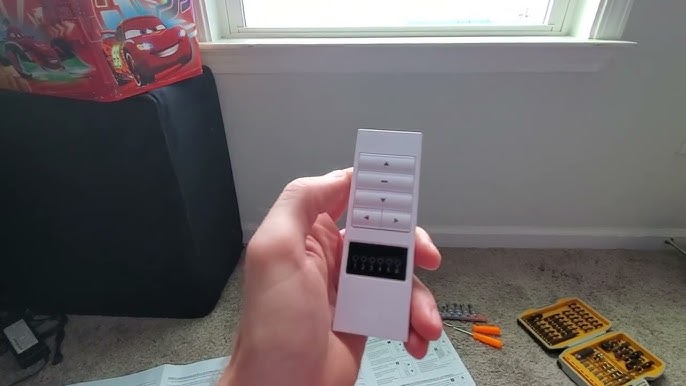
Remote controls are the main way to operate Allen Roth motorized shades. Sometimes, the remote might not work properly. This can cause frustration. Troubleshooting the remote can solve many common problems quickly. This guide will help you fix issues with your remote control.
Replacing Batteries
Dead batteries are a common reason for remote failure. Open the battery compartment carefully. Remove the old batteries and replace them with fresh ones. Use the correct battery type recommended in the manual. Ensure the batteries are installed with the right polarity. Close the compartment securely. Test the remote after changing batteries to check if it works.
Reprogramming The Remote
The remote may lose its connection to the shades. Reprogramming the remote can restore control. Start by pressing the setup button on the motor. Follow the instructions in the user guide for pairing. Usually, this involves holding specific buttons on the remote. Wait for a confirmation signal, such as a light flash. Test the remote to confirm the shade responds correctly.
Testing Signal Range
Distance or obstacles may block the remote signal. Stand closer to the shades and try the remote again. Remove any objects that might block the signal path. Walls, furniture, and electronic devices can interfere with the signal. Test the remote at different angles and distances. If the range is poor, consider repositioning the motor or remote. This can improve remote performance significantly.

Credit: www.ebay.com
Electrical And Wiring Checks
Electrical and wiring issues often cause Allen Roth motorized shades to stop working. Checking these parts can help find the problem fast. Start by examining the wires and power supply. Then, move on to testing voltage and resetting circuit breakers. These steps often fix common electrical problems.
Inspecting Wiring For Damage
Look closely at all wiring connected to the motorized shades. Check for cuts, frays, or loose ends. Damaged wires can stop power flow or cause shorts. Make sure wires are firmly connected and not pinched or twisted. Replace any wires that seem broken or unsafe.
Testing Voltage And Power Supply
Use a voltage tester to check power at the motor’s connection. Confirm that the power supply is working and delivers correct voltage. A low or no voltage reading means a power problem. Check the power outlet and plug for faults. Ensure the power source matches the shade’s requirements.
Resetting Circuit Breakers
Find the circuit breaker linked to the shade’s power line. Switch it off and then back on to reset. Sometimes, breakers trip due to power surges or shorts. Resetting restores power and clears minor faults. If the breaker trips again, call an electrician for safety.
Shade Alignment And Track Issues
Shade alignment and track issues often cause motorized shades to stop working properly. Misaligned shades can get stuck or not move smoothly. Track blockages also prevent shades from sliding correctly. These problems affect the shade’s function and your comfort.
Fixing these issues usually takes simple steps. Realigning the shade, clearing blockages, and lubricating moving parts can restore smooth operation. These tasks do not require special tools or skills.
Realigning The Shade
Start by gently removing the shade from the track. Check if the shade is crooked or off its path. Carefully place it back, making sure it fits straight inside the track. Press the shade firmly to ensure it sits well. Test the movement to see if it runs smoothly.
Clearing Track Blockages
Inspect the track for dirt, dust, or small objects. Use a soft cloth or a brush to clean inside the track. Remove anything that blocks the shade’s path. Make sure the track is clear and smooth. This helps the shade move without any trouble.
Lubricating Moving Parts
Apply a small amount of silicone spray or dry lubricant to the track and moving parts. Avoid oil-based lubricants as they can attract dust. Spread the lubricant evenly along the track. Move the shade a few times to distribute it well. This reduces friction and improves movement.

Credit: www.lowes.com
When To Call A Professional
Knowing when to call a professional for Allen Roth motorized shades can save time and money. Some problems need expert help. Trying to fix complex issues alone can cause more damage. It is important to recognize signs that show you need a technician.
Signs Of Motor Burnout
If the shades do not move at all, the motor might be burnt out. Strange smells or smoke near the motor are clear warning signs. A motor that makes loud grinding noises also needs checking. These signs mean the motor is damaged and needs professional repair or replacement.
Complex Electrical Problems
Motorized shades rely on electrical systems. Faulty wiring or power supply issues can cause them to stop working. If your shades flicker or move erratically, it may be an electrical problem. Complex wiring problems should only be handled by qualified technicians. This keeps you safe and avoids further damage.
Warranty And Service Options
Allen Roth motorized shades often come with a warranty. Calling a professional ensures you do not void this warranty. Certified technicians know the right service procedures. They can fix problems under warranty terms. Always check your warranty before attempting repairs. Professional service helps maintain your warranty coverage.
Credit: www.youtube.com
Frequently Asked Questions
How Do I Reset Allen Roth Motorized Shades?
To reset, unplug the power source for 10 seconds. Plug it back in and press the reset button. This clears any errors and restarts the shades.
Why Won’t My Allen Roth Shades Respond To The Remote?
Check if the remote batteries are dead or weak. Also, ensure the shades are powered on and in range. Re-pair the remote if needed.
How To Fix Motorized Shades That Stop Mid-motion?
A blockage or motor overload may cause this. Clear any obstacles and try again. If it persists, the motor might need service.
Can I Program My Allen Roth Shades Myself?
Yes, programming is simple with the manual. Follow the step-by-step guide to set limits and sync remotes. No special tools required.
What Causes Motorized Shades To Move Slowly?
Slow movement can result from low battery or mechanical issues. Charge or replace batteries and check for stuck parts. Cleaning tracks helps too.
How Do I Know If My Motorized Shades Need Repair?
Unusual noises, jerky movement, or no response indicate problems. Frequent issues or failure to reset means professional help is needed.
Conclusion
Troubleshooting Allen Roth motorized shades can save time and money. Check batteries and remote control first. Clean the shades gently to avoid damage. Test the motor and wiring for issues. Follow simple steps to fix common problems. Seek help from a professional if needed.
Keep your shades working smoothly for comfort and style. Regular care makes a big difference. Enjoy easy control over your window shades every day.