
Is your Howard Miller battery clock not keeping time like it used to? You rely on this clock to stay punctual, but a simple issue can disrupt your routine.
Don’t worry—you’re not alone, and fixing it might be easier than you think. In this guide, you’ll discover clear, step-by-step solutions to get your clock ticking perfectly again. Keep reading to save time, avoid frustration, and bring your Howard Miller clock back to life.
Credit: frankenmuthclock.com
Common Battery Issues
Battery issues cause most problems with Howard Miller clocks. Simple battery mistakes stop the clock from working. Knowing common battery problems helps fix the clock fast. This saves time and avoids buying new parts.
Identifying Dead Batteries
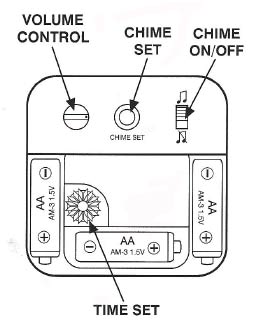
Dead batteries are the main cause of clock failure. The clock hand stops moving or skips seconds. Sometimes the clock makes no sound at all. Test the battery with a battery tester or try a new one. Replace dead batteries immediately to keep the clock running.
Checking Battery Orientation
Placing the battery the wrong way stops the clock. The positive (+) and negative (-) ends must match the clock’s contacts. Check the markings inside the battery compartment. Reinsert the battery carefully to ensure correct placement.
Battery Type Recommendations
Use the right battery type for your clock. Most Howard Miller clocks use AA alkaline batteries. Avoid rechargeable or low-quality batteries. High-quality alkaline batteries last longer and perform better. Always check the clock manual for specific battery needs.
Clock Not Running
Howard Miller battery clocks may stop running for simple reasons. Most often, the issue comes down to power or connection problems. Fixing this can be quick and easy with a few checks and steps. Follow these tips to get your clock working again.
Resetting The Clock
Start by removing the battery from the clock. Wait about 30 seconds before putting it back in. This helps clear any small errors in the clock’s system. After reinserting the battery, set the time again. See if the clock starts running normally.
Inspecting Battery Contacts
Check the metal contacts inside the battery compartment. They must touch the battery firmly. Sometimes, these contacts bend or get dirty. Bent contacts can stop the power flow. Make sure they are straight and clean for a good connection.
Cleaning Battery Terminals
Use a soft cloth or an eraser to clean the terminals. Dirt or corrosion can block the battery’s power. Gently rub the terminals to remove any build-up. This simple cleaning can restore the clock’s function quickly.
Timekeeping Problems
Howard Miller battery clocks are known for their accuracy. Yet, timekeeping problems can still arise. These issues often cause the clock to run fast, slow, or stop altogether. Troubleshooting these problems can restore your clock’s proper function.
Adjusting The Time
Start by setting the time correctly. Use the dial on the back or the knob on the side. Turn it slowly and avoid moving the hands backward. This prevents damage to the clock’s mechanism. Make small adjustments and watch if the clock keeps time properly.
Replacing The Movement Mechanism
If the clock does not keep time despite adjustments, the movement may be faulty. Movement mechanisms wear out over time. Purchase a compatible replacement from Howard Miller or a trusted dealer. Carefully remove the old movement and install the new one. Follow instructions closely for best results.
Avoiding Magnetic Interference
Magnetic fields can disrupt your clock’s movement. Keep your clock away from magnets and electronic devices. Items like speakers, phones, and refrigerators can cause interference. Place your clock in a stable, magnet-free area for consistent timekeeping.
Credit: clocks-blog.theclockdepot.com
Clock Hands Issues
Clock hands problems are common in Howard Miller battery clocks. These issues affect the clock’s accuracy and appearance. Fixing them can bring your clock back to perfect working order. The hands might stop moving, get misaligned, or feel loose. Each problem needs a simple, careful approach to fix it.
Fixing Stuck Hands
Stuck hands stop your clock from showing the right time. Dust or debris can cause the hands to jam. Remove the clock’s glass cover gently. Check if the hands touch each other or the clock face. Move them slightly apart with your fingers or a small tool. Test the clock to see if the hands move freely. Clean the hands and the clock face with a soft cloth to prevent future jams.
Realigning Misaligned Hands
Misaligned hands show the wrong time and look odd. Carefully remove the clock’s glass cover first. Gently pull the minute hand away from the clock face. Rotate it until it points exactly at the correct minute mark. Adjust the hour hand to match the correct hour. Press both hands back into place without forcing them. Check if they move smoothly and show the right time.
Handling Loose Hands
Loose hands wobble or fall off easily. This problem makes the clock inaccurate and fragile. Remove the glass cover carefully. Press the loose hand gently towards the clock face. Make sure it fits tightly on the shaft. If the hand is still loose, use a tiny drop of clear glue on the shaft. Let it dry completely before reassembling the clock. Test the clock to confirm the hands stay firm and move well.
Preventive Maintenance Tips
Preventive maintenance helps keep your Howard Miller battery clock working well. Simple steps can avoid common problems and extend the clock’s life. Small efforts now save time and frustration later.
Regular Battery Replacement
Change the battery every year to keep the clock accurate. Old batteries can leak and damage the clock parts. Use high-quality alkaline batteries for best results. Remove the battery if you won’t use the clock for a long time.
Proper Clock Placement
Place the clock away from direct sunlight and heat. Avoid areas with high humidity or dust. Choose a stable surface or wall to prevent falls. Proper placement helps the clock stay accurate and lasts longer.
Routine Cleaning Practices
Dust the clock regularly with a soft cloth. Avoid using water or cleaning sprays on the clock face. Clean battery contacts gently to prevent corrosion. Keeping the clock clean helps it run smoothly and look nice.
Credit: shaunagraham.com
Frequently Asked Questions
Why Is My Howard Miller Battery Clock Not Working?
Check if the battery is dead or inserted incorrectly. Clean the battery contacts to ensure good connection. Reset the clock hands if they are stuck.
How Do I Change The Battery In A Howard Miller Clock?
Open the back panel gently. Remove the old battery and replace it with a new one. Make sure the battery is the correct size and inserted with the right polarity.
What Causes A Howard Miller Clock To Lose Time?
Low battery power or dirty contacts often cause time loss. Mechanical issues inside the clock can also affect accuracy. Regular maintenance helps keep time precise.
How Do I Reset The Hands On My Howard Miller Clock?
Gently move the minute hand clockwise to reset time. Avoid moving the hour hand directly to prevent damage. Stop when the clock shows the correct time.
Why Does My Howard Miller Clock Stop Suddenly?
Dead or weak batteries are the most common reason. Dust or debris inside the clock may block movement. Clean the clock and replace the battery if needed.
Can A Howard Miller Clock Be Repaired At Home?
Minor issues like battery replacement and hand reset can be done at home. Complex mechanical problems require professional repair. Always handle the clock parts carefully to avoid damage.
Conclusion
Troubleshooting your Howard Miller battery clock can be simple and quick. Check the battery first, then clean the contacts. Make sure the clock hands move freely and reset the time. Small fixes often solve common problems. Keep your clock in a dry place and replace batteries regularly.
Doing these steps helps your clock work well longer. Enjoy the charm and reliability of your Howard Miller clock every day.