
Is your Hunter irrigation controller not working the way it should? You rely on it to keep your lawn green and healthy, but when it malfunctions, frustration sets in fast.
Don’t worry—you’re not alone, and fixing it might be easier than you think. In this guide, you’ll discover simple troubleshooting steps that can save you time and money. Keep reading, and you’ll get your irrigation system back on track before you know it.

Credit: www.youtube.com
Common Hunter Controller Issues
Hunter irrigation controllers are reliable but can face common problems. These issues affect watering schedules and system performance. Knowing the typical problems helps in fixing them quickly. This saves water and keeps plants healthy.
Power And Display Problems
Controllers often show no power or a blank screen. Check if the unit is plugged in correctly. Inspect the circuit breaker or fuse for damage. A weak battery can cause display errors or reset the controller. Replace the battery if needed. Dirt or moisture inside the controller may cause display issues. Clean and dry the unit carefully to fix this.
Valve Activation Failures
Valves may fail to open or close as programmed. Check if the wiring to the valves is loose or broken. Dirt in the valve solenoid can block water flow. Remove and clean the solenoid if stuck. Sometimes, valves wear out and need replacement. Test valves manually to find if the problem is electrical or mechanical.
Scheduling Errors
The controller may run at wrong times or skip watering. Incorrect date and time settings cause scheduling errors. Reset the clock and calendar to the correct time. Overlapping programs can confuse the controller. Delete any extra programs that are not needed. Firmware updates can fix bugs in scheduling functions. Update the controller’s software if available.
Basic Troubleshooting Steps
Troubleshooting your Hunter irrigation controller can be simple with a few basic steps. These steps help identify common issues quickly. Start with easy checks before calling for professional help. Follow the guide below to get your system working again.
Checking Power Supply
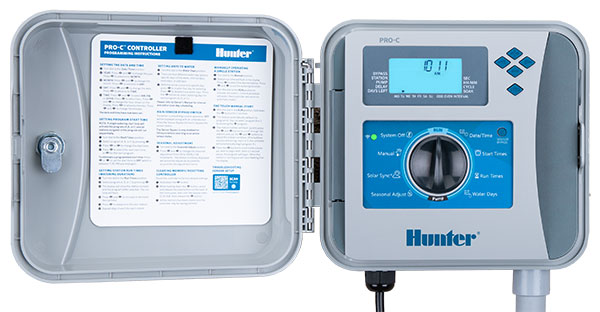
First, ensure the controller has power. Check if the display lights up. If not, confirm the power outlet is working. Try plugging another device into the same outlet. Look for a blown fuse or tripped breaker. Replace or reset as needed. Without power, the controller cannot operate.
Resetting The Controller
Resetting can fix many minor problems. Find the reset button or switch on the controller. Press and hold it for a few seconds. This action clears temporary errors. After reset, the controller restarts fresh. Monitor the display for normal operation. Resetting does not erase saved programs in most models.
Inspecting Wiring Connections
Loose or damaged wires often cause issues. Turn off power before inspecting wires. Check all wiring terminals for tightness. Look for corrosion or broken wires. Repair or replace faulty wiring as needed. Proper connections ensure signals reach the valves correctly. Secure wires prevent shorts or disconnections.
Fixes For Valve And Zone Issues
Valve and zone issues can stop your Hunter irrigation controller from working right. These problems often cause some zones not to water at all. Fixing these issues helps your system run smoothly and keeps your plants healthy.
Below are simple steps to troubleshoot and fix valve and zone problems. Follow these tips to find the cause and get your irrigation back on track quickly.
Testing And Replacing Solenoids
Start by testing the solenoids. These small parts open and close the valves. Use a multimeter to check for electrical resistance. A reading of zero or infinite means the solenoid is bad. Replace faulty solenoids with new ones that match your model. This often solves valve opening problems.
Clearing Valve Blockages
Blockages can stop water flow in the valves. Turn off the water supply before checking. Remove the valve cover and clean any dirt or debris inside. Flush the valve with water to clear small particles. Reassemble the valve and test it. Clear valves help restore normal watering.
Adjusting Zone Settings
Incorrect zone settings can cause watering issues. Check the controller for the right zone times and days. Adjust the schedule to match your garden’s needs. Make sure no zones overlap or conflict. Proper settings ensure each zone gets enough water at the right time.
Resolving Programming And Scheduling Errors
Programming and scheduling errors in your Hunter irrigation controller can cause watering issues. These problems often lead to overwatering or underwatering your plants. Fixing these errors ensures your irrigation system runs smoothly and saves water.
Start by checking the controller’s programmed settings. Small mistakes in timing or duration can disrupt your watering schedule. Adjusting these settings can often resolve common problems quickly.
Verifying Start Times And Durations
Check each zone’s start time carefully. Make sure the times do not overlap or conflict with other zones. Overlapping times can cause the system to water too much or skip zones.
Next, verify the watering duration for every zone. Duration should match the needs of your plants and soil type. Too long can waste water; too short may leave plants dry.
Managing Seasonal Adjustments
Seasonal changes affect watering needs. Use the seasonal adjustment feature on your controller. This setting adjusts watering times automatically based on the time of year.
Increase watering in hot months and reduce it during cooler periods. This helps keep your garden healthy and conserves water.
Using Manual Watering Overrides
Manual watering overrides let you water outside the normal schedule. Use this function to address dry spots or new plants. It allows immediate watering without changing the programmed schedule.
Manual overrides can also test if sprinkler heads work properly. Remember to turn off manual mode when done to avoid extra watering.
Advanced Tips For Reliable Operation
Advanced tips help keep your Hunter irrigation controller working well. These tips improve reliability and prevent many common issues. Regular attention to your system ensures smooth and efficient irrigation. Here are some key ways to maintain reliable operation.
Using Diagnostic Tools
Diagnostic tools can identify problems early. Hunter controllers often have built-in diagnostics. Use these tools to check wiring, sensors, and valves. Some controllers connect to apps for easy troubleshooting. Early detection saves time and repair costs.
Updating Firmware
Firmware updates improve controller performance. They fix bugs and add new features. Check Hunter’s website for the latest firmware versions. Follow the instructions carefully to update your controller. Updated firmware keeps your system running smoothly.
Preventive Maintenance Practices
Regular maintenance extends controller life. Clean the controller’s exterior to avoid dust buildup. Inspect wiring and connections for corrosion or damage. Test sensors and valves to ensure proper function. Replace worn parts before they fail. Preventive care reduces unexpected breakdowns.

Credit: www.reddit.com
When To Call A Professional
Knowing when to call a professional for your Hunter irrigation controller can save time and prevent damage. Some problems may look simple but need expert care. This helps keep your system working well and avoids costly repairs.
Identifying Complex Electrical Issues
Electrical problems can be tricky and dangerous. If your controller has no power or shows strange behavior, it might be an electrical fault. Professionals have tools and skills to find and fix these safely. Avoid trying to fix wiring or circuit boards yourself.
Handling Controller Replacement
Replacing a Hunter irrigation controller requires careful setup. Incorrect installation can cause watering issues or damage. A professional ensures the new controller matches your system and works properly. They also adjust settings to fit your landscape needs.
Ensuring Warranty Compliance
Many Hunter controllers come with a warranty. Doing repairs or replacements yourself might void this warranty. Hiring a certified professional protects your warranty rights. They follow the manufacturer’s rules and use approved parts during repairs.
Credit: www.hunterirrigation.com
Frequently Asked Questions
How Do I Reset My Hunter Irrigation Controller?
To reset your Hunter irrigation controller, press and hold the reset button. This clears all settings and restores factory defaults. Use this if the controller is not responding.
Why Is My Hunter Controller Not Turning On?
Check the power source and make sure the controller is plugged in. Inspect the circuit breaker or fuse for damage. Replace any faulty parts to restore power.
How Can I Fix A Hunter Controller That Won’t Water?
Verify the watering schedule and zone settings. Check for broken wires or valve issues. Repair or replace damaged components to resume watering.
What Does The Error Code On Hunter Controller Mean?
Error codes indicate specific problems, like wiring faults or sensor errors. Refer to the manual for exact meanings. Address the issue based on the code instructions.
How Do I Update The Time On My Hunter Irrigation Controller?
Use the controller’s menu to find the time settings. Adjust the hour and minute using the buttons. Save the changes to keep the correct time.
Can A Power Surge Damage Hunter Irrigation Controllers?
Yes, power surges can harm the controller’s electronics. Use a surge protector to prevent damage. If damaged, some parts may need replacement.
Conclusion
Troubleshooting your Hunter irrigation controller can save time and water. Check power sources and wiring first. Make sure the settings match your watering needs. Clean sensors and test valves regularly. Small fixes often solve common problems quickly. Staying calm and following steps helps a lot.
Keep your system working well all season long. Simple care keeps your garden green and healthy.