
If you’ve noticed your LG refrigerator’s water isn’t tasting as fresh as it used to, it might be time to change the water filter. Knowing how to replace the LT1000P water filter yourself can save you time and money.
Plus, it ensures your water stays clean and healthy for you and your family. In this guide, you’ll find simple, step-by-step instructions to make the process quick and hassle-free. Keep reading to learn exactly how to change your LG refrigerator’s water filter and keep your water tasting great every day.
Credit: www.lg.com
Identify Your Lg Refrigerator Model
Knowing the exact model of your LG refrigerator is important. It ensures you use the right water filter. Using the wrong filter can cause leaks or poor water quality.
Finding your model number is easy. It only takes a few minutes. This number helps you confirm the filter type your fridge needs.
Locate Model Number
Open your refrigerator door. Look inside the fridge compartment on the side wall. Check near the top or bottom edges. The model number is on a sticker or label.
It may also be on the door frame or inside the freezer. The number looks like a mix of letters and numbers. Write it down to avoid mistakes.
Confirm Filter Type Lt1000p
After finding the model number, check the filter type. The LT1000P is a common LG water filter model. It fits many LG refrigerators.
Check your user manual or LG’s website to match your model number with the LT1000P filter. This step ensures you buy the correct replacement filter.
Gather Necessary Tools
Gathering the right tools is the first step to changing the water filter in your LG refrigerator LT1000P. Having everything ready makes the process smooth and safe. It saves time and prevents mistakes. Before you start, check that you have all the necessary items.
What You’ll Need
You will need a new LG LT1000P water filter. Make sure it matches your fridge model. Keep a clean cloth or towel nearby to catch any drips. A pair of gloves can protect your hands. Sometimes, a small flathead screwdriver helps if the filter cover is tight. Have a bowl or container ready to hold the old filter after removal.
Safety Precautions
Always unplug the refrigerator before changing the filter. This stops electrical accidents. Turn off the water supply to avoid leaks. Use gloves to keep your hands clean and safe. Work slowly and carefully to avoid breaking parts. Keep children and pets away during the process. A safe work area helps prevent slips and falls.
Prepare The Refrigerator
Preparing your LG refrigerator before changing the LT1000P water filter is important. It makes the process safe and smooth. Take a few simple steps to get ready.
Turn Off Water Supply
Locate the water valve behind or under the fridge. Turn it clockwise to stop water flow. This step prevents leaks during the filter change. Double-check if the water supply is fully off.
Power Down The Refrigerator
Unplug the refrigerator from the power outlet. This protects you from electric shock. It also resets the system for the new filter. Wait a few minutes before plugging it back in.

Credit: www.youtube.com
Remove The Old Water Filter
Removing the old water filter from your LG refrigerator model LT1000P is the first step to ensure fresh and clean water. This process is simple and quick. Follow the steps carefully to avoid any damage.
Start by finding the exact location of the filter. Then, gently release the filter from its housing. These steps will prepare your fridge for the new filter installation.
Locate The Filter Housing
Open the refrigerator door fully. Look inside the fresh food compartment. The filter housing usually sits in the upper right corner. Sometimes, it can be near the top left. It is a small, round or rectangular cover.
Check for a label or icon that shows a water drop or filter symbol. This marks the filter’s position. Knowing the location helps in removing the filter safely.
Release The Filter
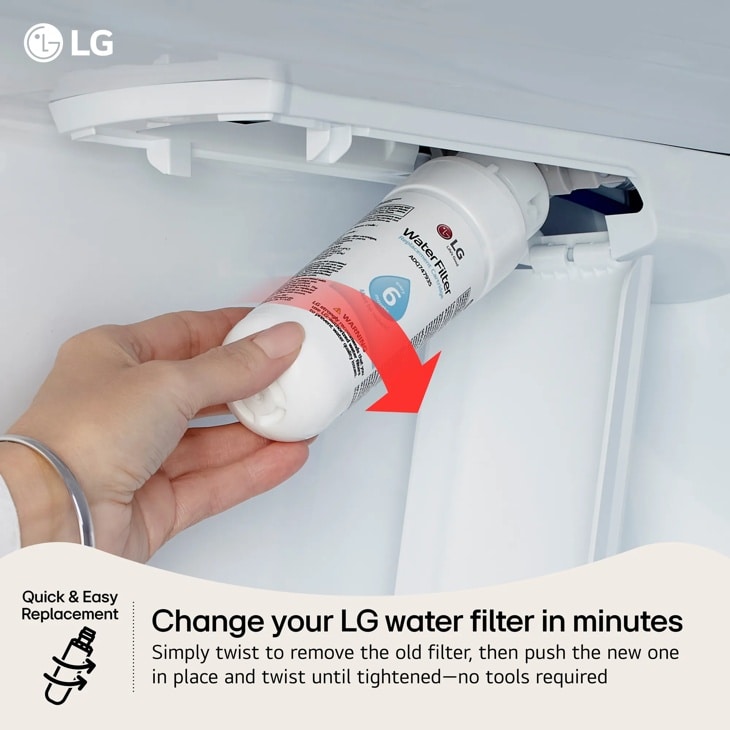
Hold the filter cover firmly. Turn the filter counterclockwise. This action unlocks the filter from its slot. Pull the filter out carefully. Avoid using force to prevent breaking it.
If water leaks slightly, keep a cloth nearby. Dispose of the old filter properly. Your refrigerator is now ready for the new filter.
Install The New Lt1000p Filter
Installing the new LT1000P water filter in your LG refrigerator is simple. Follow these steps carefully to ensure clean, fresh water. Proper installation helps the filter work effectively and avoid leaks. Take your time and handle the filter gently during the process.
Align The Filter Correctly
Hold the new filter with the LG logo facing you. Match the filter’s tabs with the slots inside the filter housing. Gently push the filter in until it fits snugly. Do not force it, or you may damage the filter or the housing. Proper alignment ensures water flows through the filter properly.
Secure The Filter In Place
Turn the filter clockwise until it locks firmly in place. You will feel it click or stop turning. Check that the filter is tight and stable. A secure filter prevents leaks and keeps the water clean. Wipe away any water drips after installation to keep the area dry.
Restart Water Supply And Refrigerator
After changing the water filter in your LG refrigerator model LT1000P, restarting the water supply and the refrigerator is a key step. This process ensures the water flows properly and the fridge works as expected. It helps clear any air trapped in the water line. It also resets the system for smooth operation.
Turn On Water Valve
Locate the water valve behind or under your refrigerator. Slowly open the valve to restore water flow. Listen for any unusual sounds. Water should flow smoothly without leaks. This step moves water into the filter and dispenser lines. It also helps remove air pockets that cause sputtering or weak flow.
Power Up The Refrigerator
Plug the refrigerator back into the power outlet. Press the power button if your model has one. Allow the fridge to run for a few minutes. This lets the system reset fully. Check that the water dispenser works correctly. Ensure the ice maker starts producing ice again. Restarting the fridge helps it detect the new filter.
Flush The New Filter
Flushing the new water filter is an important step after installation. It clears out any loose particles and ensures clean water. This process helps your LG refrigerator deliver fresh tasting water and ice.
Run Water Through Filter
Turn on the water dispenser to start flushing the filter. Let the water run for about 5 minutes. This removes any air and debris inside the filter. Use a large container to catch the water while flushing. The water may look cloudy at first. This is normal and will clear up soon.
Check For Leaks
After flushing, check the filter area for leaks. Look closely where the filter connects to the refrigerator. If you see water dripping, turn off the water supply. Tighten the filter by turning it a little more. Turn the water back on and check again. No leaks mean the filter is installed correctly.
Reset Filter Indicator
The reset filter indicator on your LG refrigerator LT1000P shows when the water filter needs changing. After replacing the filter, reset this indicator. This keeps your fridge running smoothly and ensures clean water.
Resetting the indicator helps track the filter’s lifespan. It also stops the warning light from showing unnecessarily. The process is quick and simple.
Locate Reset Button
Find the reset button on the control panel. It is usually near the water filter indicator light. The button might be small and round. Check your fridge’s user manual if you cannot find it.
Steps To Reset
Press and hold the reset button for about 3 seconds. The filter indicator light will blink or turn off. This means the reset is complete. Your fridge now recognizes the new filter.
Do not forget to reset after every filter change. This keeps the water clean and safe to drink. Regular resets help maintain your refrigerator’s performance.
Troubleshooting Tips
Changing the water filter in your LG refrigerator LT1000P is simple. Sometimes, small problems can occur during the process. These troubleshooting tips help fix common issues quickly. Follow them to keep your fridge working well.
Filter Not Fitting Properly
Check the filter type first. Use only the LT1000P model for your fridge. Align the filter with the slot carefully. Turn the filter slowly until it clicks. Do not force it in. If it feels tight, pull it out and try again. Dirt or debris inside the slot can block the filter. Clean the area gently with a soft cloth. Make sure the seal on the filter is not damaged. A broken seal can stop the filter from fitting well.
Water Flow Issues
Slow or no water flow can mean a clogged filter. Replace the filter if it is old. Check the water line for kinks or bends. Straighten any bent tubes. The water valve might be closed or stuck. Open the valve fully to allow water flow. Air trapped inside the water line can cause problems. Run water from the dispenser for a few minutes to clear air. If water flow is still poor, call a technician to inspect the system.
Credit: www.nfm.com
Frequently Asked Questions
How Do I Know When To Change Lg Lt1000p Filter?
You should change the filter every six months or when the water tastes odd. Some models show a filter alert light. This helps you remember to replace it on time.
What Tools Are Needed To Change Lg Lt1000p Filter?
No special tools are needed. Just your hands to twist and remove the old filter. Simple and quick.
Can I Use Any Filter For Lg Lt1000p?
Use only LG LT1000P or compatible filters. Other filters may not fit properly or filter water well. Always check for model compatibility.
How Do I Remove The Old Water Filter Safely?
Turn off the water supply first. Twist the filter counterclockwise gently to remove it. Avoid forcing to prevent damage.
How To Install The New Lg Lt1000p Water Filter?
Align the new filter with the slot and twist it clockwise. Push until it locks in place. Then, turn on the water supply.
How Do I Reset The Filter Indicator Light?
Press and hold the reset button for three seconds. The light will turn off. This shows the filter status is updated.
Can I Change The Filter Without Turning Off Water?
It’s better to turn off the water to avoid leaks. Changing without turning off can cause water spills. Safety first.
How Long Does The Lg Lt1000p Filter Last?
It lasts about six months or 300 gallons of water. Replace sooner if water tastes or smells different. Regular changes keep water fresh.
What If Water Flow Slows After Filter Change?
Check if the filter is installed correctly and fully locked. Flush the new filter with water for a few minutes. This clears air and debris.
Can I Reuse The Old Lg Lt1000p Filter?
No, reuse is not safe. Old filters lose their ability to clean water properly. Always replace with a new filter for health.
Conclusion
Changing the water filter in your LG refrigerator LT1000P keeps water fresh and clean. It helps your fridge work well and lasts longer. Follow the steps carefully to avoid any mistakes. Regular filter changes protect your health by removing impurities.
Don’t wait until water tastes bad or flow slows down. Keep a new filter handy for easy replacement. This simple task saves money and improves water quality. Stay on top of filter changes for a safer kitchen and better-tasting water every day.