
Is your Maytronics Dolphin pool cleaner not powering up like it should? You rely on your Dolphin to keep your pool sparkling clean, but a faulty power supply can bring everything to a halt.
Don’t let this small issue turn into a big headache. In this guide, you’ll discover simple and effective troubleshooting steps to get your Dolphin back in action quickly. Keep reading to save time, avoid costly repairs, and enjoy a crystal-clear pool all season long.
Common Power Supply Issues
Power supply issues are common with Maytronics Dolphin cleaners. These problems can stop your cleaner from working properly. Knowing the signs helps you fix the problem fast. This keeps your pool clean and your cleaner safe.
No Power To The Cleaner
The cleaner may not turn on at all. This happens if the power supply is faulty. Check the power cord and plug for damage. Make sure the outlet works by testing with another device. Sometimes, resetting the power supply unit helps restore power.
Intermittent Power Loss
The cleaner may turn off and on randomly. This shows unstable power flow. Loose connections or a damaged cable can cause this. Inspect the power supply cable for cuts or wear. Secure all plugs and connections firmly to avoid power drops.
Overheating Symptoms
The power supply may get hot during use. Overheating can damage the unit and stop the cleaner. Check for blocked vents or dust buildup on the power supply. Allow it to cool down before restarting. Avoid using the cleaner for long periods without breaks.
Basic Troubleshooting Steps
Troubleshooting the Maytronics Dolphin power supply starts with simple checks. These basic steps help find common issues fast. Follow these steps to ensure your pool cleaner gets the power it needs.
Checking The Power Outlet
Start by testing the power outlet. Plug in another device to see if it works. No power? Try a different outlet near the pool area. Make sure the outlet is not controlled by a switch. A faulty outlet can stop your cleaner from charging.
Inspecting The Power Cord
Look closely at the power cord for any damage. Cracks, cuts, or bends can cause power loss. Check both ends of the cord. Make sure the connections are tight and clean. A damaged cord needs repair or replacement to work safely.
Resetting The Power Supply
Unplug the power supply from the outlet. Wait about 30 seconds before plugging it back in. This resets the internal system. Press the reset button if your model has one. Resetting can fix minor glitches and restore power flow.
Diagnosing Internal Power Supply Problems
Diagnosing internal power supply problems in your Maytronics Dolphin is key to restoring its function. The power supply is the heart of the system. It sends electricity to all parts of the cleaner. Troubleshooting this area requires careful steps.
Start by identifying symptoms that suggest a power supply issue. Then test simple components like the fuse. Next, inspect the circuit board for visible damage. These steps help find faults quickly.
Signs Of Component Failure
Look for signs like the cleaner not turning on. Flickering lights or unusual noises also indicate problems. Overheating or a burning smell points to internal damage. These clues help narrow down the cause.
Testing The Fuse
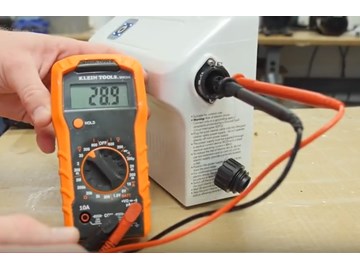
The fuse protects the power supply from overload. Use a multimeter to check if the fuse is intact. A blown fuse will show no continuity. Replace a damaged fuse with the exact type to avoid harm.
Examining The Circuit Board
Carefully check the circuit board for cracks or burnt spots. Loose or broken wires may cause power loss. Swollen or leaking capacitors need replacement. Clean the board gently to remove dust or debris.
Credit: www.inyopools.com
Quick Fixes For Common Issues
Maytronics Dolphin pool cleaners rely on a steady power supply to work well. Sometimes, small problems cause the power supply to stop working. These issues are often easy to fix without calling a technician. Quick fixes save time and money. They also keep your pool cleaner running smoothly.
Replacing The Fuse
The fuse in the power supply protects the device from power surges. If the power supply does not turn on, the fuse may be blown. Find the fuse holder on the power supply. Remove the old fuse carefully. Replace it with a new fuse of the same rating. Do not use a fuse with a higher rating. After replacing, test the power supply to check if it works.
Securing Loose Connections
Loose connections can cause power interruptions. Check all cables connected to the power supply. Make sure each plug fits tightly in its socket. Look for any visible damage or frayed wires. Press the connectors firmly to secure them. Tight connections ensure consistent power flow to the cleaner.
Cleaning Dust And Debris
Dust and debris can block vents and cause overheating. Unplug the power supply before cleaning. Use a soft brush or cloth to remove dust from vents and surfaces. Avoid using water or liquid cleaners. Keep the power supply in a clean, dry area to prevent dust buildup. Regular cleaning helps maintain proper airflow and prevents damage.
When To Contact Professional Support
Knowing when to contact professional support for your Maytronics Dolphin power supply saves time and prevents damage. Some issues need expert help to fix safely and correctly. Recognizing these signs helps protect your equipment and ensures smooth operation.
Persistent Power Failures
If your Dolphin power supply keeps failing despite basic checks, it needs professional attention. Constant power loss or sudden shutdowns can harm the unit. Professionals can diagnose hidden problems and fix them properly. Do not keep trying to restart the device repeatedly.
Warranty And Repair Options
Check if your power supply is still under warranty before attempting repairs. Opening the unit yourself may void the warranty. Contact authorized service centers to handle repairs. Professionals provide genuine parts and reliable service, preserving your warranty benefits.
Safety Precautions
Power supply issues can pose electrical hazards. Avoid opening or repairing the unit unless trained. Unplug the device immediately if you notice sparks or burning smells. Professional technicians have the right tools and knowledge to work safely with electrical components.

Credit: www.eztestpools.com
Preventive Maintenance Tips
Preventive maintenance helps keep your Maytronics Dolphin power supply working well. Small actions can stop big problems. Regular care extends the life of your device. It also saves time and money on repairs.
Proper Storage Practices
Store the power supply in a dry, cool place. Avoid areas with high heat or moisture. Keep it away from direct sunlight. Use a protective cover to keep dust out. Make sure the storage area is clean and stable. This prevents damage and keeps the power supply safe.
Regular Inspection Schedule
Check the power supply often for signs of wear. Look for cracks, frayed wires, or loose connections. Test the output voltage with a meter regularly. Early spotting of issues helps fix problems fast. Write down inspection dates and results. Follow this routine every few weeks or months.
Avoiding Power Surges
Power surges can harm the power supply and pool cleaner. Use a surge protector to block sudden voltage spikes. Unplug the power supply during storms or when not in use. Avoid plugging it into overloaded outlets. These steps protect your equipment from electrical damage.

Credit: www.youtube.com
Frequently Asked Questions
What Are Common Signs Of Maytronics Dolphin Power Supply Issues?
The pool cleaner may stop working or run slowly. Power lights might not turn on. Strange noises can also indicate power problems.
How Can I Reset My Maytronics Dolphin Power Supply?
Unplug the power supply from the outlet. Wait for 30 seconds, then plug it back in. This can clear minor errors.
Why Does My Dolphin Power Supply Overheat Frequently?
Blocked vents or dirty filters reduce airflow. Make sure the power supply is in a cool, open space. Clean vents regularly.
Can A Faulty Power Supply Damage My Dolphin Robot?
Yes, a bad power supply can cause the robot to stop working. It might also cause electrical shorts or errors.
How Do I Test If The Maytronics Power Supply Is Working?
Use a voltage tester on the power supply output. Check if it matches the required voltage. No voltage means a problem.
When Should I Replace My Dolphin Power Supply?
Replace if there are visible damages or no power output. Frequent overheating or error messages also mean replacement is needed.
Conclusion
Troubleshooting your Maytronics Dolphin power supply helps keep your pool cleaner. Simple checks can fix many common issues fast. Regular care prevents damage and extends the device’s life. Stay patient and follow each step carefully. This approach saves time and avoids costly repairs.
Trust your skills—you can handle most problems alone. Keep your pool robot running smoothly all season long.