
Is your Philips Sonicare DiamondClean not working the way it should? You rely on it every day for a bright, healthy smile, so when it acts up, it’s frustrating.
But don’t worry—you’re not alone, and many common issues have simple fixes. In this guide, you’ll find easy troubleshooting tips that get your toothbrush back to perfect in no time. Keep reading to save time, avoid extra costs, and make sure your Sonicare stays in top shape.
Common Issues
Philips Sonicare DiamondClean is a popular electric toothbrush. Many users enjoy its powerful cleaning and sleek design. Still, some common problems may occur during use. Understanding these issues helps keep your brush working well.
Below are some frequent problems and tips to fix them.
Brush Not Charging
The brush may not charge due to poor contact with the charger. Check if the brush is placed correctly on the base. Clean the charging contacts on both the brush and the charger with a dry cloth. Avoid using water or liquids. Make sure the power outlet works by testing another device.
Brush Head Not Spinning
If the brush head does not spin, it could be loose or dirty. Remove the head and clean it thoroughly. Check the connection between the brush head and handle for debris. Reattach the brush head firmly. If spinning still fails, try replacing the brush head with a new one.
Battery Draining Quickly
Rapid battery drain may happen if the brush is used too often or on high power modes. Lower the intensity setting to save battery. Avoid leaving the brush on the charger continuously. Battery age can also affect performance. Consider replacing the battery after long use.
Brush Stopping Suddenly
The brush might stop suddenly due to a safety feature activating. This prevents damage if the brush is pressed too hard. Reduce the pressure while brushing. Another cause is overheating; let the brush cool down. Check for any blockages or debris around the brush head.
Indicator Lights Not Working
Indicator lights may fail because of a power issue or internal fault. Confirm the brush is charging correctly. Reset the toothbrush by turning it off and on. If lights remain off, consult the user manual or contact customer support for assistance.
Charging Problems
Charging problems with the Philips Sonicare DiamondClean can be frustrating. The toothbrush may not charge properly or stop charging altogether. This issue can happen for several reasons. Knowing how to troubleshoot charging problems helps you fix them quickly. This section covers common checks and fixes to get your toothbrush charging again.
Cleaning The Charging Base
Dust and dirt can block the charging contacts. Wipe the charging base with a dry cloth. Avoid using water or liquid cleaners. Check the metal charging pins for dirt or corrosion. Clean gently with a soft brush if needed. A clean base improves the connection between the charger and toothbrush.
Checking Power Source
Verify the power outlet is working. Plug another device into the same outlet. Confirm the power is on and stable. Avoid using power strips that may be switched off. Try a different outlet if the charger still does not work. A steady power source is essential for charging.
Using Correct Charger
Use only the charger that came with your Sonicare DiamondClean. Other chargers may deliver wrong voltage or current. Using an incorrect charger can prevent charging or damage the battery. Check the charger’s specifications match the toothbrush requirements. Always use genuine Philips accessories for best results.
Resetting The Charger
Unplug the charger from the power outlet. Leave it unplugged for one minute. Plug it back in and place the toothbrush on the base. The reset can clear minor faults in the charger. Check if the charging light turns on. This simple step often solves charging issues.
Brush Head Issues
Brush head issues are common with Philips Sonicare DiamondClean. They affect cleaning performance and user comfort. Understanding these issues helps maintain your toothbrush well. This section covers key problems and fixes related to the brush head.
Replacing The Brush Head
Replace the brush head every three months. Worn bristles clean less effectively. Remove the old brush head by pulling it straight off. Snap on a new one firmly until it clicks. Regular replacement keeps your teeth cleaner and healthier.
Ensuring Proper Attachment
Check the brush head fits tightly on the handle. A loose head can cause poor vibrations and weak cleaning. Align the brush head with the handle’s metal shaft. Press down firmly until it stays in place. Proper attachment ensures strong brushing power.
Cleaning The Brush Head
Rinse the brush head after every use under running water. Remove toothpaste and debris from bristles and base. Occasionally soak the brush head in mouthwash for extra cleaning. Dry it well to prevent bacteria growth. Clean brush heads last longer and work better.
Choosing The Right Brush Head
Select a brush head that matches your dental needs. Philips offers options like Sensitive, Gum Care, and Whitening. Each type targets specific issues like sensitivity or plaque. Using the right brush head improves brushing comfort and results.

Credit: www.amazon.com
Battery And Power
The Philips Sonicare DiamondClean toothbrush relies on a strong battery to work well. Proper care of the battery keeps the toothbrush ready and efficient. Knowing how to manage battery and power issues helps avoid interruptions in your dental care routine.
Extending Battery Life
Charge the toothbrush fully before first use. Avoid running the battery completely down. Use the brush regularly to keep the battery active. Store the brush in a cool, dry place to protect battery health.
Battery Replacement Options
The DiamondClean battery is not user-replaceable. Contact Philips support for battery service or replacement. Using third-party batteries can damage the toothbrush. Always choose official parts for safety and performance.
Calibrating The Battery
Calibrate the battery to improve its accuracy. Charge the toothbrush fully, then let it run until empty. Repeat this cycle twice to reset battery readings. This helps the brush show the correct battery level.
Avoiding Overcharging
Unplug the charger after the battery is full. Leaving it on charge too long may reduce battery life. Use the original charger to avoid power issues. Regularly check the charging base for damage or dirt.
Performance Troubleshooting
Performance issues with the Philips Sonicare DiamondClean can affect your daily brushing routine. This section helps you fix common problems. Follow these simple steps to improve your toothbrush’s performance.
Resetting The Toothbrush
Resetting the toothbrush can solve many problems. To reset, place the brush on the charger. Hold the power button for 10 seconds. Release the button and wait for the brush to restart. This clears any minor glitches and restores normal function.
Firmware Updates
Firmware updates improve the toothbrush’s features and fix bugs. Connect your brush to the Philips Sonicare app. Check for updates in the app settings. Follow the instructions to install the latest firmware. Regular updates keep your brush working smoothly.
Dealing With Unusual Noise
Unusual noise can indicate a problem. Make sure the brush head is attached properly. Clean the brush head and handle with a dry cloth. If noise continues, try replacing the brush head. Persistent noise may require contacting customer support.
Handling Water Damage
Water damage can affect performance. Remove the battery if possible and dry the brush fully. Avoid using a hairdryer or heat source. Let it air dry for at least 24 hours. If the brush still does not work, seek professional repair advice.
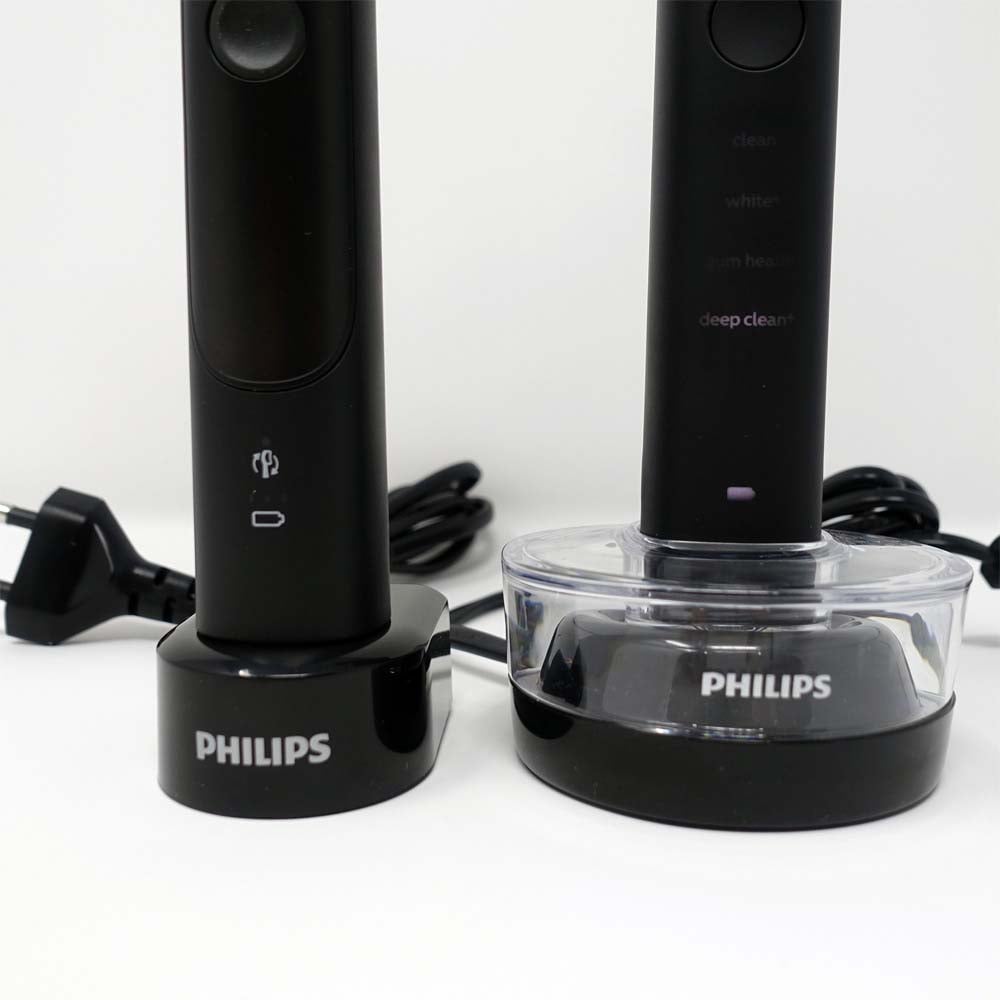
Credit: www.electricteeth.com
Maintenance Tips
Proper maintenance keeps your Philips Sonicare DiamondClean working well. It helps avoid common issues and extends the toothbrush’s life. Follow these simple tips to keep your device clean and ready to use every day.
Regular Cleaning Routine
Rinse the brush head thoroughly after each use. Remove toothpaste and debris from the bristles. Wipe the handle with a damp cloth to clean off dirt. Avoid using harsh chemicals that can damage the surface. Clean the charging base regularly to prevent buildup.
Storing The Toothbrush Properly
Store the toothbrush in a dry place to stop mold growth. Keep the brush head upright to let it air dry. Avoid placing the toothbrush in closed containers. Ensure good ventilation around the device to keep it fresh.
Replacing Parts Timely
Change the brush head every three months for best results. Replace worn or damaged brush heads immediately. Check the charging base and handle for any signs of damage. Promptly replace parts to keep the toothbrush working well.
When To Contact Support
Knowing when to contact support for your Philips Sonicare DiamondClean is key. Some issues need expert help to avoid damage or voiding the warranty. Other problems you can fix on your own. Here’s how to decide when to reach out for professional support.
Warranty And Repair Services
Your Sonicare DiamondClean comes with a limited warranty. It covers defects in materials and workmanship for a set time. Check your warranty period before requesting repairs. Unauthorized repairs may void the warranty. Use repair services approved by Philips to keep the warranty valid.
Finding Authorized Service Centers
Philips offers authorized service centers worldwide. These centers have trained staff and genuine parts. Use the official Philips website to locate a nearby service center. Avoid third-party repair shops. They may not use original parts or follow Philips repair guidelines.
Preparing For Customer Support
Before contacting support, gather key information. Have your model number and purchase receipt ready. Note down any error messages or unusual behavior. Describe the problem clearly and calmly. This helps the support team assist you faster and better.

Credit: www.amazon.com
Frequently Asked Questions
Why Is My Philips Sonicare Diamondclean Not Charging?
Check if the charger is plugged in correctly and the power outlet works. Clean the charging base and toothbrush bottom to ensure good contact. Replace the charger if it still won’t charge.
How To Fix Philips Sonicare Diamondclean Blinking Lights?
Blinking lights often mean a charging issue or brush head problem. Remove and reattach the brush head firmly. Clean the connection points and try charging again.
What To Do If Philips Sonicare Stops Mid-brush?
A loose brush head or low battery usually causes this. Tighten the brush head and fully charge the toothbrush. If it continues, reset the device by turning it off and on.
Why Does My Philips Sonicare Diamondclean Vibrate Weakly?
Weak vibrations often signal a low battery or motor problem. Charge your toothbrush fully and check the brush head for wear. Replace the brush head if needed.
How To Reset Philips Sonicare Diamondclean Toothbrush?
Press and hold the power button for 10 seconds to reset the device. This clears minor glitches and restores normal function. If issues persist, contact Philips support.
What Causes Philips Sonicare Diamondclean Brush Head Not Spinning?
A stuck or dirty brush head can cause this issue. Remove the brush head and clean the connection area. Replace the brush head if it still doesn’t spin.
Conclusion
Philips Sonicare DiamondClean issues can feel frustrating. Simple steps often fix common problems quickly. Keep your toothbrush clean and charged regularly. Check the brush head and replace when needed. Follow the guide to enjoy smooth brushing again. Small efforts save money and extend your brush life.
Stay patient, and your smile will thank you. Troubleshooting helps you use your device with ease. Don’t give up on better oral care today.