
Are you staring at your Aqua Rite chlorine generator, wondering why there are no lights showing up? It’s frustrating when your pool’s key piece of equipment suddenly stops working, leaving you unsure of what to do next.
But don’t worry—you’re not alone, and this problem can be fixed. Understanding why your Aqua Rite generator isn’t lighting up is the first step to getting your pool back in perfect shape. Keep reading, and you’ll discover simple troubleshooting tips that can save you time, money, and stress.
Your pool deserves to shine, and you’re just a few easy steps away from making that happen.
Common Causes Of No Lights
When the Aqua Rite chlorine generator shows no lights, it signals a problem. This issue stops the system from working properly. Several common causes might lead to this problem. Identifying these causes helps fix the issue quickly.
Power Supply Issues
Power supply problems are a frequent cause of no lights. Check if the unit is plugged in correctly. A tripped breaker or blown fuse might cut power. Sometimes, a faulty outlet causes power failure. Ensuring stable power is the first step in troubleshooting.
Control Board Problems
The control board manages all functions of the generator. A damaged or faulty board may stop the lights from turning on. Exposure to moisture or electrical surges can harm the board. Testing the control board can reveal if it needs replacement.
Salt Cell Malfunctions
The salt cell produces chlorine by electrolysis. A defective salt cell can cause the system to shut down. Scaling, corrosion, or wear can damage the cell. Cleaning or replacing the salt cell might restore the lights and operation.
Wiring And Connection Faults
Loose or broken wires affect the generator’s power flow. Corroded connectors can interrupt signals and cause no lights. Inspect all wiring and connectors carefully. Tightening or fixing connections often resolves the problem.

Credit: www.youtube.com
Initial Checks To Perform
When your Aqua Rite Chlorine Generator shows no lights, start with basic checks. These simple steps help find easy fixes. Avoid jumping to complex repairs.
Careful initial checks save time and effort. They ensure your system is safe and ready to work again.
Verify Power Source
Check if the generator is plugged in properly. Look for loose or disconnected power cords. Test the outlet with another device to confirm it works. A faulty power source often causes no lights.
Inspect Circuit Breakers
Find your home’s circuit breaker panel. Look for tripped breakers linked to the generator. Reset any tripped switches by flipping them off and on. A tripped breaker stops power flow to the unit.
Check Timer Settings
Review the timer controls on the generator. Ensure the timer is set to run during the current time. Incorrect timer settings can prevent the generator from turning on. Adjust the timer to the correct schedule.
Examine Control Panel
Look closely at the control panel for damage or loose buttons. Clean any dirt or debris on the panel surface. A damaged or dirty panel may fail to light up. Press buttons gently to test response.
Resetting The Aqua Rite System
Resetting the Aqua Rite system is a key step in fixing no light issues. This process helps clear minor glitches and restores normal operation. Resetting can save time and prevent costly repairs. It is simple and safe to do at home.
Follow these clear steps to reset your Aqua Rite system correctly. Understanding when and how to reset avoids further problems. Keep your system running smoothly with proper resets.
Power Cycle Procedure
Start by turning off the power to the Aqua Rite system. Switch off the circuit breaker or unplug the power source. Wait for at least 30 seconds to allow the system to fully power down. Turn the power back on and check if the lights return. This process refreshes the system’s electronics and clears minor errors.
Factory Reset Steps
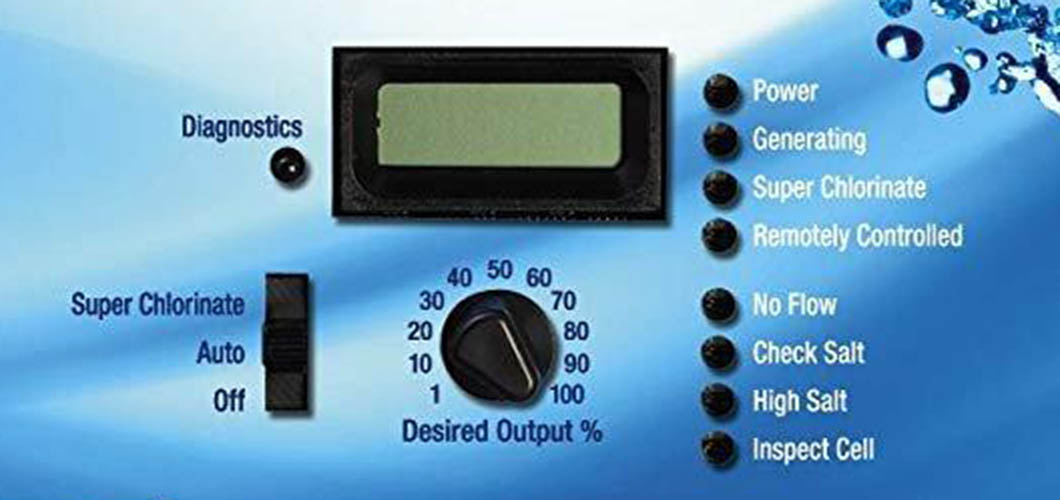
Locate the reset button on the Aqua Rite control panel. Press and hold the button for about 10 seconds until the display turns off. Release the button and wait for the system to restart. The factory reset restores default settings and clears all custom configurations. Use this step only if the power cycle does not fix the issue.
When To Reset
Reset the system if the Aqua Rite shows no lights or errors persist. Try a power cycle first. If lights remain off, perform a factory reset. Avoid resetting too often as it can erase important settings. Use resets as a troubleshooting step, not a regular fix.
Credit: lesliespool.com
Cleaning And Maintaining The Salt Cell
Cleaning and maintaining the salt cell is key to keeping your Aqua Rite Chlorine Generator working well. The salt cell makes chlorine by turning salt into sanitizer. Over time, minerals and scale can build up on the cell. This causes the generator to stop working or show no lights. Regular cleaning helps avoid this problem and keeps your pool water clean and safe.
Identifying Cell Scaling
Look for a white or chalky layer on the salt cell plates. This layer is called scale. Scale blocks the salt cell from making chlorine. It may look like crust or buildup on the metal parts. If you see this, it means the cell needs cleaning. Check the cell every month during the swimming season.
Safe Cleaning Techniques
Turn off the pool pump and power to the generator. Remove the salt cell carefully. Use a plastic or wooden brush to gently scrub off loose scale. Avoid metal brushes that can damage the cell. Soak the cell in a solution of 1 part muriatic acid to 10 parts water. Do this in a safe, ventilated area. Rinse the cell thoroughly with fresh water before putting it back.
Preventive Maintenance Tips
Keep your pool’s pH between 7.2 and 7.6. Balanced water reduces scale buildup. Check salt levels regularly and keep them in the recommended range. Run the generator as suggested by the manufacturer. Clean the salt cell at least once every three months. These steps help the salt cell last longer and work better.
Testing And Replacing Components
Testing and replacing parts in your Aqua Rite Chlorine Generator helps fix issues with no lights. This process checks each component to find the fault. You can save money and time by spotting the broken part early. Follow clear steps to test and replace parts safely.
Using A Multimeter
A multimeter measures electrical values like voltage and resistance. Start by unplugging the generator for safety. Set the multimeter to the correct mode. Check the power supply at the control board terminals. Next, test the salt cell for continuity. No reading means the cell may be dead. Also, measure the control board connections. Broken wires or bad solder joints cause no lights.
Replacing The Salt Cell
The salt cell wears out over time. Signs include low chlorine output and no lights. Turn off the power and drain some water. Unscrew the old salt cell carefully. Install the new cell, matching the connectors properly. Refill water and restart the system. The lights should turn on if the salt cell was faulty.
Swapping Out The Control Board
The control board controls all functions. Faulty boards often cause no lights or errors. Disconnect power and remove the front panel. Take photos of wire connections for reference. Unscrew and remove the old control board. Install the new board, reconnect all wires exactly. Power on the generator to check lights. A working board restores normal function.
When To Contact Professional Help
Knowing when to call a professional is important for your Aqua Rite Chlorine Generator. Some problems need expert skills to fix safely and correctly. Trying to fix complex issues alone can cause more damage or risk safety. Recognizing these moments saves time and protects your pool system.
Signs Of Complex Electrical Issues
If your generator shows no lights and resetting doesn’t work, it may have electrical faults. Flickering lights, burning smells, or tripped breakers point to serious problems. Loose wires or damaged circuit boards require expert tools and knowledge. Avoid opening the unit if you see these signs.
Warranty And Support Options
Check your Aqua Rite warranty before any repairs. Unauthorized fixes might void your coverage. Many manufacturers offer support hotlines or online help. Using authorized service keeps your warranty valid and ensures genuine parts are used. This protects your investment in the long run.
Finding Certified Technicians
Look for technicians certified to work with Aqua Rite systems. Certified pros have training on your specific model and tools for proper repair. Ask for references or check online reviews. A skilled technician fixes the problem faster and prevents future issues.

Credit: www.inyopools.com
Frequently Asked Questions
Why Does My Aqua Rite Show No Lights At All?
No lights usually mean no power to the unit. Check if the unit is plugged in and the breaker is on.
How Can I Fix Aqua Rite With No Display Lights?
Try resetting the system by turning off power for a minute. If still no lights, inspect wiring for damage or loose connections.
Could A Blown Fuse Cause No Lights On Aqua Rite?
Yes, a blown fuse can cut power to the display. Replace the fuse if you find it damaged or burnt.
Is A Faulty Power Supply The Reason For No Aqua Rite Lights?
A damaged power supply can stop the unit from lighting up. Test the power source and replace it if needed.
Can Water Damage Cause Aqua Rite To Lose All Lights?
Water inside the control box can short the electronics. Dry the unit completely and check for corrosion or damage.
What Role Does The Control Board Play In No Aqua Rite Lights?
The control board manages power and signals for lights. A faulty board may need repair or replacement to fix no lights.
Conclusion
Aqua Rite chlorine generator no lights can be frustrating. Check power sources and connections carefully. Clean the cell and inspect the control board. Resetting the system often helps solve the issue. Regular maintenance keeps your generator working well. Understanding these simple steps saves time and money.
Stay calm and follow the guide step-by-step. Your pool will be clean and safe again soon. Troubleshooting becomes easier with clear instructions. Keep this advice handy for future problems.