
Is your Chamberlain wireless keypad not working like it should? You’re not alone, and the good news is that most issues can be fixed quickly.
Whether your keypad won’t respond, the lights won’t turn on, or it’s not opening your garage door, this guide will help you troubleshoot every common problem. Keep reading to discover simple, step-by-step solutions that will get your keypad back in action fast—so you can enjoy the convenience and security you expect without frustration.
Common Wireless Keypad Issues
Wireless keypads for Chamberlain garage doors offer great convenience. They let you open your garage without a remote or key. Still, these keypads can face some common issues. Understanding these problems helps you fix them quickly. This keeps your garage working smoothly and safely.
Below are some frequent problems users see with wireless keypads. Knowing the causes and solutions can save time and frustration.
Keypad Not Responding
Sometimes, the keypad does not react when pressed. This may happen due to worn-out buttons or internal damage. Dirt or moisture can also block the keys from working properly. Restarting the keypad or cleaning the buttons often helps. If the issue stays, the keypad might need replacing.
Signal Interference Problems
Wireless keypads use radio signals to communicate. Other devices, like Wi-Fi routers or cordless phones, can cause interference. Metal objects or thick walls may also block signals. This can stop the keypad from connecting to the garage door opener. Moving the keypad or removing obstacles can improve the signal.
Power And Battery Concerns
Low or dead batteries are a common cause of keypad failure. Weak power stops the keypad from working correctly. Check the battery level regularly and replace old batteries. Use the right type of batteries to ensure good performance. Keep spare batteries handy for quick replacement.
Programming And Sync Errors
Keypads need to be programmed to match the garage door opener. Mistakes during programming cause sync problems. The keypad may not unlock the door or work erratically. Follow the setup instructions carefully to avoid errors. Resetting and reprogramming the keypad often solves these issues.

Credit: support.geniecompany.com
Quick Fixes For Keypad Malfunctions
Chamberlain wireless keypads sometimes stop working properly. Quick fixes can solve many common problems fast. These steps help restore keypad function without needing extra tools or parts. Try these simple solutions first to save time and effort.
Resetting The Keypad
Resetting the keypad clears minor errors in its memory. Press and hold the reset button for about 10 seconds. Wait for the keypad lights to flash. This signals the reset is complete. Try using the keypad again to see if it works.
Replacing Or Recharging Batteries
Weak batteries often cause keypad malfunctions. Open the battery compartment carefully. Replace old batteries with fresh ones of the same type. Rechargeable batteries should be fully charged before use. Check the keypad after battery replacement to confirm it works.
Clearing Signal Interference
Wireless keypads rely on clear signals to function. Remove any devices that may block or disturb signals nearby. Metal objects, thick walls, or other electronics can cause interference. Move closer to the garage door opener to test the keypad. This can improve communication between devices.
Reprogramming The Device
Reprogramming the keypad can fix code or connection issues. Follow the user manual to enter programming mode. Delete old codes and add new ones carefully. Ensure the keypad syncs with the garage door opener correctly. Test the keypad by opening or closing the door.
Preventive Tips For Smooth Operation
Keeping your Chamberlain wireless keypad working well needs some simple care. Small steps can prevent many common problems. These tips help your keypad last longer and work without issues.
Proper Installation Practices
Start with the right setup. Follow the instructions carefully. Make sure batteries go in the right way. Avoid placing the keypad near metal objects. Secure the keypad firmly to prevent movement. A good setup reduces connection errors and keypad failures.
Regular Maintenance Routine
Check the keypad often. Clean it gently with a dry cloth. Remove dirt and dust that block buttons or sensors. Replace batteries before they die completely. Test the keypad monthly to confirm it works well. Simple upkeep keeps it reliable every day.
Optimal Placement For Signal Strength
Put the keypad where it gets a strong signal. Avoid areas with thick walls or metal doors. Keep it away from devices that cause interference. Place it near the garage door opener for best results. Good location helps the keypad communicate clearly.
Firmware Updates And Compatibility
Keep the keypad software up to date. Check for updates on Chamberlain’s website regularly. Use only compatible devices and accessories. Updated firmware fixes bugs and improves performance. Staying current helps the keypad run smoothly and safely.
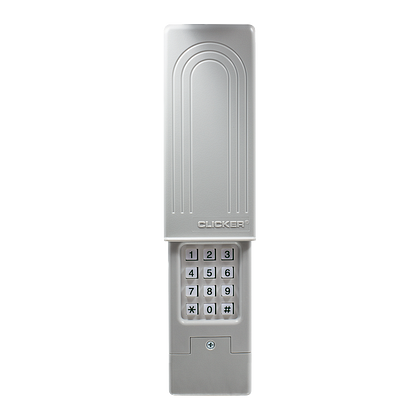
Credit: www.chamberlain.com
When To Contact Support
Knowing when to contact support for your Chamberlain wireless keypad can save time and frustration. Some problems need expert help. Others can be fixed at home. This section explains when to reach out to the support team. It covers hardware issues, warranty details, and repair choices.
Identifying Hardware Failures
Hardware failures often cause keypad problems. Signs include unresponsive buttons or no power. If the keypad does not light up, it might be broken. Loose or damaged wiring can also cause issues. Physical damage from drops or water can stop it from working. Troubleshooting software or settings won’t fix these problems. In such cases, contact support to check the hardware.
Warranty And Service Options
Chamberlain keypads come with a limited warranty. This covers defects and hardware failures. The warranty period usually lasts one year. Check your purchase date and receipt for proof. Support can guide you through warranty claims. They may offer repairs or replacements at no cost. Knowing your warranty status helps avoid extra expenses. Support can also explain service plans for extended coverage.
Professional Repair Vs Replacement
Support can advise whether to repair or replace the keypad. Small fixes may be possible through professional repair. But major damage or old models might need replacement. Repairs usually cost less but take time. Replacement ensures a fully working new device. Support helps weigh the cost and time factors. They provide options that suit your budget and needs.

Credit: www.youtube.com
Frequently Asked Questions
How Do I Reset My Chamberlain Wireless Keypad?
Press and hold the reset button for 10 seconds until the light blinks. This clears all codes and settings. You must then reprogram your keypad.
Why Is My Chamberlain Keypad Not Responding?
Check the keypad’s batteries first. Weak or dead batteries often cause unresponsiveness. Also, ensure no dirt or damage blocks the keys.
How Can I Change The Access Code On My Keypad?
Enter the current code, then press and hold the program button. Input your new code and press the program button again to save it.
What Should I Do If The Keypad Light Is Flashing?
A flashing light means either low battery or a programming error. Replace batteries or follow the programming steps again to fix it.
Can Interference Affect My Chamberlain Wireless Keypad?
Yes, wireless signals from other devices may cause interference. Keep the keypad away from metal objects and strong wireless sources.
How Do I Know If My Keypad Is Synced With The Garage Door Opener?
Press your access code; the door should move. If not, reprogram the keypad using the garage door opener’s learn button.
Conclusion
Troubleshooting your Chamberlain wireless keypad can be simple and quick. Check the batteries first and replace them if needed. Make sure the keypad is within range of the garage door opener. Reset the keypad by following the user manual instructions.
Clear any dirt or debris that might block the signal. These steps usually fix common problems. Keep your keypad clean and dry to avoid issues. Stay patient and take one step at a time. Your garage door will work smoothly again soon.