
Is your dishwasher acting up because the buttons won’t work? It’s frustrating when you press a button and nothing happens.
You rely on your dishwasher to save time and effort, so when it stops responding, it feels like a big problem. But don’t worry—this issue is more common than you think, and there are simple ways to fix it. Keep reading to discover why your dishwasher buttons might not be working and what you can do to get your appliance back in action quickly.

Credit: www.reddit.com
Common Causes Of Unresponsive Buttons
Dishwasher buttons not working can frustrate any user. Understanding common causes helps fix the problem faster. Buttons become unresponsive due to several issues. Some are simple and others need professional help. Check these common causes before calling a technician.
Power Supply Issues
Power problems often cause dishwasher buttons to stop working. A loose plug or tripped circuit breaker can cut power. Sometimes, power surges damage the dishwasher’s electronics. Ensure the dishwasher is properly plugged in. Reset breakers if needed. Consistent power is key for button response.
Control Panel Problems
The control panel can wear out over time. Dirt, grease, or food particles block button contact. Internal circuits may fail or connectors become loose. Physical damage to the panel stops button signals. Cleaning the panel gently can help. If damaged, replacing the control panel may be necessary.
Child Lock Activation
Many dishwashers have a child lock feature. It disables buttons to prevent accidental use. Sometimes, the lock activates by mistake. Check your manual for how to turn off the child lock. This simple step can restore button function quickly.
Water Damage Effects
Water leaks inside the dishwasher can harm the buttons. Moisture causes corrosion on the control board. It also short circuits electronic parts. Over time, water damage leads to unresponsive buttons. Inspect for leaks and dry the area thoroughly. Fixing leaks helps prevent future button issues.
Credit: www.samsung.com
Easy Troubleshooting Steps
Dishwasher buttons not working can be frustrating. Many issues are easy to fix at home. Try these simple steps to get your dishwasher working again.
Resetting The Dishwasher
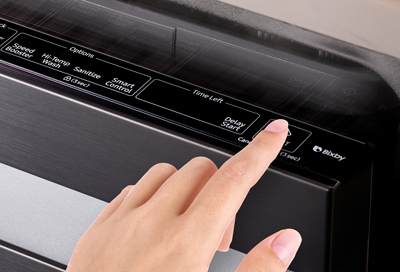
Resetting can clear small glitches. Press and hold the start button for 3 seconds. Wait for the dishwasher to beep or lights to flash. This action restarts the system. After reset, test the buttons again.
Checking The Power Source
Make sure the dishwasher is plugged in properly. Check the outlet by plugging in another device. Look for blown fuses or tripped circuit breakers. Restore power if needed. Without power, buttons won’t respond.
Inspecting The Control Panel
Look for dirt or moisture on the panel. Clean gently with a soft cloth. Avoid using too much water. Moisture can cause buttons to stop working. Check for visible damage or loose parts. Damaged panels may need professional help.
Disabling Child Lock
Child lock can block button use. Check your dishwasher manual for instructions. Usually, hold the child lock button for a few seconds. A light may turn off to show it is disabled. Try the buttons again after unlocking.
Cleaning And Maintenance Tips
Keeping your dishwasher buttons working means regular cleaning and care. Dirt and grime can stop buttons from responding. Simple maintenance helps your dishwasher last longer and work better.
Removing Dirt And Debris
Start by turning off the dishwasher power. Use a soft cloth to wipe the button area. Remove any crumbs or sticky residue gently. A cotton swab dipped in mild soap can reach small spaces. Avoid using too much water to protect the electronics.
Cleaning Button Contacts
Button contacts can get dusty or corroded. Carefully open the control panel if possible. Use a dry brush or compressed air to clean contacts. If corrosion is visible, a little rubbing alcohol on a cotton swab helps. Let everything dry completely before closing the panel.
Regular Maintenance Schedule
Check and clean the buttons once a month. Wipe the control panel weekly to stop dirt buildup. Inspect for any damage or wear during cleaning. Regular care prevents button failure and costly repairs. Keep your dishwasher buttons responsive with simple habits.

Credit: kitchpulse.com
When To Call A Professional
Knowing when to call a professional is key for dishwasher button issues. Some problems need expert help to avoid damage or safety risks. Quick action can save time and money.
Signs Of Electrical Issues
Buttons not working might show electrical problems. Flickering lights or no power are warning signs. A burning smell or sparks mean stop using the dishwasher. Only a trained technician should handle electrical repairs.
Control Board Replacement
The control board controls the buttons and settings. If it is damaged, buttons may stop working. Replacing the control board requires special tools and skills. A professional can test and replace this part safely and correctly.
Warranty And Service Options
Check your dishwasher’s warranty before repairs. Some fixes may be covered at no cost. Authorized service centers have access to original parts. Calling a certified technician keeps your warranty intact.
Preventing Future Button Problems
Preventing future button problems on your dishwasher saves time and money. Simple habits help keep the buttons working well. Small steps taken now avoid bigger issues later.
Proper Use Of Buttons
Press buttons gently. Avoid using sharp objects to press them. Use your finger to push buttons softly. Do not hold buttons down for too long. Follow the dishwasher manual for the right button use.
Avoiding Excess Moisture
Keep the control panel dry. Wipe off water spills quickly. Avoid spraying water directly on buttons. Moisture can cause buttons to stop working. Use a dry cloth to clean the panel regularly.
Routine Checks And Care
Check buttons often for dirt or sticky residue. Clean buttons with a soft, damp cloth. Do not use harsh chemicals or abrasive cleaners. Test buttons regularly to ensure they work. Early care helps prevent future problems.
Frequently Asked Questions
Why Are My Dishwasher Buttons Not Responding?
Buttons may fail due to dirt, moisture, or a faulty control panel. Cleaning or repair might be needed.
How Can I Fix Unresponsive Dishwasher Buttons?
Try resetting the dishwasher by unplugging it for a few minutes, then plug it back in.
Can Dishwasher Buttons Stop Working From Power Issues?
Yes, power surges or faulty wiring can cause buttons to stop working properly.
Does Moisture Affect Dishwasher Button Functionality?
Yes, moisture inside the control panel can cause buttons to become unresponsive or sticky.
When Should I Call A Technician For Dishwasher Button Problems?
Call a professional if cleaning and resetting don’t fix the buttons or if electrical issues are suspected.
Conclusion
Dishwasher buttons not working can be frustrating. Start by checking the power supply and door latch. Clean the control panel gently to remove dirt or moisture. Sometimes, a simple reset fixes the problem quickly. If issues continue, consult the user manual or a technician.
Taking these steps saves time and money. Keep your dishwasher working smoothly with regular care. Small problems can turn big if ignored. Stay patient and follow easy fixes first. Your dishwasher will be back to normal soon.