
Is your Sonic Fusion 2.0 Waterpik not working and leaving you frustrated? You rely on it to keep your teeth clean and your smile bright, so when it stops working, it feels like a real hassle.
But don’t worry—you’re not alone, and there are simple fixes you can try right now. Keep reading to discover easy steps that can bring your Waterpik back to life quickly. Your oral care routine doesn’t have to suffer!
Common Issues With Sonic Fusion 2.0
The Sonic Fusion 2.0 is a popular water flosser and toothbrush combo. Many users enjoy its convenience and efficiency. Yet, some face problems that stop the device from working well. Understanding these common issues helps users fix them quickly. This section covers frequent problems to watch for and simple solutions.
Power Problems
The device may not turn on or stop suddenly. This issue often comes from a loose power connection. Check the power cord and outlet for damage or dirt. Sometimes, the power button can get stuck or fail. Press gently and try again. If power problems persist, the internal circuit might need repair.
Water Flow Interruptions
Water flow can weaken or stop during use. Blockages in the water reservoir or nozzle are common causes. Clean the nozzle and tank regularly to prevent clogging. Air bubbles in the water tube can also cause flow issues. Tap the unit gently to release trapped air. Using clean, fresh water helps maintain smooth flow.
Battery Concerns
The battery may drain quickly or not charge properly. Over time, batteries lose capacity and need replacement. Avoid charging the device for too long or too short. Use the original charger to protect battery health. If the battery swells or leaks, stop using the device and seek professional help.
Basic Troubleshooting Steps
Basic troubleshooting steps help fix common issues with the Sonic Fusion 2.0 Waterpik. These steps are simple and quick. They often solve problems without the need for repair or replacement. Follow these tips carefully to get your Waterpik working again.
Check Power Source And Charging
Make sure the Waterpik is properly charged. Plug it into a working outlet using the original charger. Look for any damage to the power cord or charger. Check if the charging light turns on. If not, try a different outlet. Avoid using extension cords or adapters. A fully charged device works best.
Clean The Water Reservoir
Empty the water reservoir after each use. Rinse it with warm water to remove dirt or buildup. Use a soft cloth to clean the inside gently. Avoid harsh chemicals or abrasive materials. Regular cleaning prevents clogs and improves water flow. Let the reservoir dry before refilling it.
Inspect The Nozzle And Tips
Remove the nozzle and tips from the handle. Look for any blockages or damage. Rinse them under warm running water. Use a small brush to clear hard-to-reach areas. Replace worn or broken tips to maintain performance. Proper nozzle care ensures efficient water pressure.
Advanced Fixes
Advanced fixes help solve deeper problems with the Sonic Fusion 2.0 Waterpik. These steps go beyond basic troubleshooting and can restore your device’s function. They require some care and attention but are often worth the effort.
Try these advanced fixes if your Waterpik still does not work after simple checks. Each method targets specific issues inside the device. Follow the instructions carefully for the best results.
Resetting The Device
Resetting can clear internal errors that block operation. Locate the reset button or unplug the device for a few minutes. Press the reset button if available, or hold the power button for 10 seconds. This process refreshes the system and can restore normal function.
Replacing The Battery
A worn battery causes power problems in cordless models. Open the battery compartment using a small screwdriver. Remove the old battery safely. Insert a new battery that matches the model’s specifications. Secure the compartment and test the device. This fix restores power and improves performance.
Repairing Internal Components
Internal parts may wear out or break over time. Check for loose wires or damaged seals inside the device. Use a small tool to tighten connections or replace broken parts. Handle components gently to avoid further damage. Repairing internal parts requires patience but can save your Waterpik from replacement.

Credit: www.waterpik.com
Maintenance Tips For Longevity
Keeping your Sonic Fusion 2.0 Waterpik working well takes simple care. Regular maintenance helps avoid common problems and extends the device’s life. Small daily habits make a big difference in performance and durability.
Regular Cleaning Routine
Clean the water reservoir after each use. Rinse it with warm water to remove leftover toothpaste and debris. Wipe the unit’s exterior with a soft cloth. Avoid using harsh chemicals that may damage parts. Remove and clean the tips regularly to prevent buildup. Soak tips in vinegar or mouthwash to kill bacteria. Dry all parts completely before reassembling the device.
Proper Storage Practices
Store your Waterpik in a dry place. Avoid keeping it in damp or humid areas. Keep the device upright to prevent water leaks. Make sure the reservoir is empty before storing. Cover the unit to protect it from dust. Avoid storing near heat sources or direct sunlight. Proper storage helps stop mold and damage over time.
Using Recommended Accessories
Use only official Waterpik tips and parts. Other accessories may not fit correctly or cause damage. Replace tips every three to six months for best hygiene. Use the right power cord and charger supplied with the unit. Using recommended accessories ensures smooth operation and prevents malfunctions. Always check compatibility before buying replacement parts.
When To Contact Customer Support
Knowing when to contact customer support for your Sonic Fusion 2.0 Waterpik saves time. Some problems need expert help beyond simple fixes. If your device stops working or shows errors, support can guide you. They offer solutions that protect your purchase and keep your device safe.
Warranty Coverage
The Sonic Fusion 2.0 Waterpik usually comes with a warranty. This warranty covers defects and some malfunctions. Check your warranty period before calling support. If the problem matches warranty terms, repairs or replacements may be free. Keep your proof of purchase handy for faster service.
Authorized Repair Centers
Customer support can direct you to authorized repair centers. These centers use original parts and follow brand standards. Repairs done here keep your warranty valid. Avoid unauthorized repair shops to prevent further damage. Support can also provide instructions on how to send your device for repair.
Replacement Options
If the Waterpik cannot be fixed, support might offer replacements. This depends on the warranty and the issue’s severity. Some cases allow for a new unit at low or no cost. Customer support will explain your options clearly. They help you understand the process and next steps.
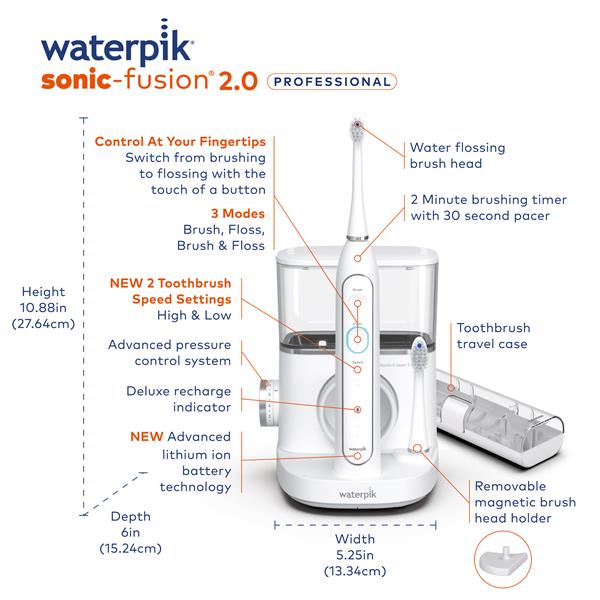
Credit: www.waterpik.com

Credit: store.waterpik.com
Frequently Asked Questions
Why Is My Sonic Fusion 2.0 Waterpik Not Turning On?
Check if the unit is properly plugged in and the power switch is on. Also, inspect the power cord for damage.
How Do I Fix Low Water Pressure In Sonic Fusion 2.0?
Clean the water reservoir and remove any blockages in the nozzle or water tube to improve pressure.
Can A Clogged Nozzle Cause Sonic Fusion 2.0 To Stop Working?
Yes, a clogged nozzle can block water flow and stop the device. Regular cleaning helps prevent this.
What Should I Do If The Water Flossing Stops Suddenly?
Turn off the device, check the water level, and remove any air bubbles in the water tube.
Is Battery Replacement Needed For Sonic Fusion 2.0 Waterpik?
This model uses a power cord, not batteries. Ensure the cord and outlet work properly for power issues.
Conclusion
Sonic Fusion 2. 0 Waterpik issues can frustrate daily routines. Small fixes often solve common problems quickly. Checking power, water pressure, and nozzle helps a lot. Clean parts regularly to keep it working well. If troubles persist, contacting customer support is wise.
Taking care of your Waterpik ensures longer use. Stay patient and try simple steps first. Your dental care should stay easy and effective. Keep these tips in mind for smooth operation.