
Are you noticing a change in the taste of your water or wondering if your Samsung fridge is still keeping your water fresh and clean? Replacing your Samsung water filter regularly is key to ensuring pure, great-tasting water every time you fill your glass.
But how do you know when it’s time to replace the filter? And which replacement filter is the right one for your model? You’ll discover everything you need to keep your water filter working perfectly, so you can enjoy crisp, clean water without any hassle.
Keep reading to find out how simple it is to maintain your Samsung water filter and why it matters for your health and home.
Why Replace Samsung Water Filters
Replacing Samsung water filters is important for clean and safe drinking water. Over time, filters collect dirt and impurities. This reduces water quality and can affect your health. Regular replacement keeps water fresh and tastes better. It also protects your appliance from damage caused by clogged filters.
Benefits Of Fresh Water
Fresh water tastes pure and is healthier to drink. It removes harmful chemicals, chlorine, and bad odors. Clean water helps keep your family safe from germs. It also improves the taste of coffee and food made with filtered water. Using fresh filters supports better appliance performance and saves energy.
Signs You Need A Replacement
Water flows slower than before. The taste or smell of water changes. You see particles or cloudiness in the water. The filter indicator light on your Samsung appliance turns on. These signs mean the filter is clogged or no longer effective. Change the filter to ensure water stays clean and fresh.
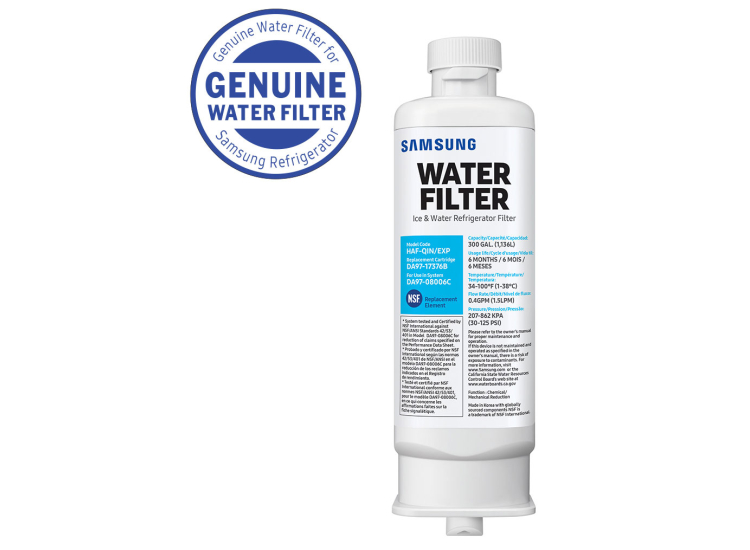
Credit: www.abt.com
Types Of Samsung Water Filters
Samsung offers different types of water filters for its refrigerators. Each filter type serves a specific purpose. Choosing the right filter keeps your water clean and fresh. Understanding these types helps you maintain your appliance well.
Standard Filters
Standard filters remove common impurities like chlorine and sediment. They improve water taste and odor. These filters are easy to replace and affordable. Most Samsung refrigerators use standard filters as basic protection.
Advanced Filters
Advanced filters offer deeper purification. They can reduce lead, mercury, and other harmful substances. These filters use more layers or special materials. They provide safer drinking water for families concerned about quality.
Compatible Models
Not all Samsung water filters fit every model. Check your refrigerator’s manual for compatible filter types. Using the correct filter ensures proper fit and function. Always match your filter to your model number to avoid issues.
How To Identify Your Filter Model
Knowing the correct Samsung water filter model is important for replacement. Using the right filter keeps your water clean and safe. This guide helps you find your filter model quickly. Follow easy steps to identify your filter without confusion.
Checking The Refrigerator Manual
The refrigerator manual often lists the filter model number. Look in the maintenance or care section. Manuals usually show pictures and codes of compatible filters. Keep the manual handy for quick reference. If lost, check the Samsung website for a digital copy.
Inspecting The Filter Itself
Remove the water filter from your fridge carefully. Look for a label or stamp on the filter body. The model number is usually printed in clear, bold letters. Note down the number exactly as it appears. This helps you buy the correct replacement filter.
Step-by-step Replacement Process
Replacing your Samsung water filter keeps your water clean and fresh. Follow these simple steps for a smooth replacement process. Each step is easy and quick to do. This guide helps you replace the filter without any hassle.
Preparing For Replacement
First, find the correct Samsung water filter for your model. Turn off the water supply to avoid leaks. Keep a towel nearby to catch any drips. Clear the area around the filter for easy access. Wash your hands before starting to keep things clean.
Removing The Old Filter
Open the refrigerator door to locate the water filter. Twist the old filter counterclockwise to unlock it. Gently pull the filter out of its slot. Dispose of the old filter according to local rules. Check inside the filter slot for dirt or debris and clean if needed.
Installing The New Filter
Remove the protective cap from the new filter. Align the filter with the slot carefully. Insert the filter and twist it clockwise until it locks. Make sure the filter is secure to avoid leaks. Open the water supply and check for any drips.
Resetting The Filter Indicator
Press and hold the filter reset button on your refrigerator. Hold it for about three seconds or until the light changes. This resets the filter indicator light. The light will now show when the next replacement is due. This step keeps you informed about filter status.
Maintenance Tips For Longevity
Proper maintenance of Samsung water filter replacements ensures clean water and extends filter life. Small daily efforts help keep your water fresh and safe. Follow these simple tips to get the best from your filter and avoid issues.
Regular Replacement Schedule
Change the water filter every six months or as recommended by Samsung. Old filters lose effectiveness and can let contaminants through. Mark your calendar to remember the replacement date. A fresh filter means better taste and cleaner water.
Cleaning The Filter Area
Clean the filter compartment regularly to prevent dirt buildup. Use a soft cloth and mild soap to wipe the area. Avoid harsh chemicals that can damage the filter housing. Keeping this area clean helps the filter work properly and lasts longer.
Avoiding Common Mistakes
Do not install the filter upside down or force it in place. Check the seal to avoid leaks. Avoid using water with high iron or sediment levels without pre-filters. Skipping maintenance or ignoring signs of wear reduces filter life and water quality.
Troubleshooting Common Issues
Troubleshooting common issues with Samsung water filter replacements can save time and avoid frustration. Many users face simple problems that can be fixed quickly. This section helps you identify and solve frequent concerns.
Water Flow Problems
Slow or no water flow often means the filter is clogged. Replace the filter if it has been used for a long time. Check if the filter is installed correctly. Make sure the water supply is open and working well. Clean any debris around the filter area.
Taste And Odor Concerns
Bad taste or smell can mean the filter is old or damaged. Change the filter every six months for fresh water. Flush the new filter with water before use. Avoid storing water too long in the fridge, as it can affect taste. Clean the water dispenser regularly.
Filter Indicator Not Resetting
The filter indicator may not reset after replacement. Press and hold the reset button for 3 seconds. Check the user manual for exact reset steps. If it still does not reset, try unplugging the fridge for a few minutes. Contact support if the problem continues.
Where To Buy Samsung Water Filters
Finding the right place to buy Samsung water filters is important. Genuine filters keep your water clean and your fridge working well. Several options exist for buying these filters. Knowing where to shop helps ensure you get the right product for your needs.
Official Retailers
Samsung’s official stores sell authentic water filters. These include Samsung’s website and authorized appliance dealers. Buying here guarantees quality and compatibility. Official retailers offer customer support and warranty service. This is the safest choice for genuine filters.
Online Marketplaces
Popular online stores like Amazon and eBay list Samsung water filters. They offer convenience and often better prices. Check seller ratings before purchasing. Choose listings that specify genuine Samsung products. Read customer reviews to avoid issues.
Avoiding Counterfeit Filters
Fake filters can harm your fridge and water quality. Look for proper packaging and labels. Genuine filters have Samsung branding and serial numbers. Avoid sellers with very low prices or no reviews. Using real filters protects your health and appliance.

Credit: www.amazon.com
Credit: www.target.com
Frequently Asked Questions
How Often Should I Replace My Samsung Water Filter?
Samsung recommends changing the water filter every 6 months for clean water.
What Happens If I Don’t Replace The Filter On Time?
Old filters can reduce water flow and affect water taste and quality.
How Do I Know Which Samsung Filter To Buy?
Check your refrigerator model number to find the correct filter type.
Can I Install A Samsung Water Filter Myself?
Yes, installation is simple and usually takes only a few minutes.
Does Samsung Water Filter Remove Chlorine And Odors?
Yes, it effectively reduces chlorine, odors, and other impurities for fresh water.
Conclusion
Replacing your Samsung water filter keeps water fresh and clean. It helps your fridge work well and last longer. Regular changes stop bad tastes and smells in water. Choose the right filter for your Samsung model. Easy to do, it saves you time and money.
Clean water means better health for you and your family. Don’t wait until the water looks or tastes strange. Stay on top of filter changes for best results. Simple steps make a big difference in water quality. Keep your Samsung fridge running smoothly with new filters.