
Schlage keypad locks offer convenience and security. But sometimes, they can have issues.
If you own a Schlage keypad lock, you know how important it is for your home’s security. Yet, even the best locks can have problems. Maybe the keypad isn’t responding. Or the lock isn’t opening, even with the correct code.
These issues can be frustrating, especially if you don’t know where to start. Understanding common problems and their solutions can save you time and stress. This guide will help you troubleshoot your Schlage keypad lock, so you can get back to feeling safe and secure. Let’s dive into some common issues and how to fix them.
Battery Problems
Battery problems are common with Schlage keypad locks. These issues can disrupt the lock’s functionality. Identifying and solving battery problems ensures your lock works efficiently.
Low Battery Indications
Knowing the signs of a low battery is crucial. Here are the indications:
- Dim Keypad Lights: The keypad lights may appear dimmer than usual.
- Beeping Sounds: The lock might emit beeping sounds more frequently.
- Slow Response: The lock takes longer to respond after entering the code.
Replacing The Battery
Replacing the battery is straightforward. Here are the steps:
- Locate the Battery Cover: Usually on the interior side of the lock.
- Remove the Cover: Use a screwdriver if necessary.
- Take Out Old Batteries: Carefully remove the existing batteries.
- Insert New Batteries: Ensure the correct polarity.
- Reattach the Cover: Secure it back in place.
Use high-quality batteries for optimal performance. Regular checks help avoid unexpected lockouts.
Keypad Malfunctions
Experiencing issues with your Schlage keypad lock can be frustrating. Keypad malfunctions can occur for various reasons, including technical glitches and power issues. This section will guide you through common problems and their solutions.
Unresponsive Keypad
An unresponsive keypad is a common problem with Schlage locks. Here are a few steps to troubleshoot:
- Check the batteries: Replace old batteries with new ones. Ensure they are correctly installed.
- Inspect the wiring: Open the lock and check for loose or disconnected wires.
- Reset the lock: Hold the Schlage button until it flashes green, then enter your programming code.
If these steps do not work, consider contacting Schlage customer support for further assistance.
Keypad Not Lighting Up
A keypad that does not light up can be due to several reasons. Here are the steps to diagnose and fix this issue:
- Battery Check: Ensure the batteries have sufficient charge.
- Light Settings: Verify if the lock’s lighting settings are configured correctly.
- Software Update: Check for any available software updates for your lock model.
If the keypad still does not light up, it might be a hardware issue. In this case, you may need to consult with a professional or contact Schlage support.
Lock Not Engaging
Experiencing issues with your Schlage Keypad Lock can be frustrating, especially if the lock is not engaging. This problem can stem from several causes, making it crucial to troubleshoot effectively. This guide will help you identify and resolve common issues with your Schlage Keypad Lock.
Check Alignment
One common reason for the lock not engaging is misalignment. Ensure the lock and strike plate align properly. Misalignment can cause the deadbolt to miss the strike hole, preventing it from engaging.
To check the alignment:
- Close the door and observe the position of the deadbolt.
- Ensure the deadbolt lines up with the strike plate.
- If misaligned, adjust the strike plate or the lock position.
Correct alignment ensures the deadbolt can engage smoothly.
Inspect Deadbolt
The deadbolt itself can cause engagement issues. Over time, debris or damage can hinder its movement. Regular inspection and maintenance can prevent these problems.
To inspect the deadbolt:
- Remove the lock cover to access the deadbolt.
- Check for any obstructions or debris.
- Clean the deadbolt with a cloth if necessary.
- Ensure the deadbolt moves freely without resistance.
If the deadbolt is damaged, consider replacing it with a new one. A functional deadbolt is essential for your lock to engage properly.
By following these troubleshooting steps, you can resolve many issues with your Schlage Keypad Lock. Ensure proper alignment and a clean, functional deadbolt to maintain lock performance.
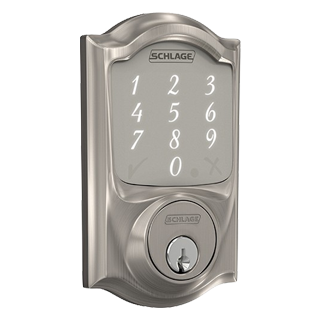
Credit: www.schlage.com
Programming Issues
Programming issues with Schlage keypad locks can be frustrating. These problems are common but manageable. This section will guide you through common programming issues. We will cover resetting user codes and resolving master code problems.
Resetting User Codes
Resetting user codes is simple with the Schlage keypad lock. Follow these steps:
- Enter the current 6-digit programming code.
- Press the Schlage button.
- Press 1 to add a new user code.
- Enter the new 4-digit user code.
- Re-enter the new 4-digit user code to confirm.
Ensure you remember the new user codes. If you forget the programming code, perform a factory reset.
Master Code Problems
The master code is essential for programming your Schlage lock. Problems with the master code can arise.
Common Issues:
- Forgetting the master code
- Entering incorrect master code
- Lock not accepting the master code
To solve these issues:
- Enter the current 6-digit master code.
- Press the Schlage button.
- Press 3 to change the master code.
- Enter the new 6-digit master code.
- Re-enter the new 6-digit master code to confirm.
If the lock does not accept the master code, ensure you follow the steps correctly. Double-check each code entered.
Connectivity Problems
Connectivity problems can be frustrating with your Schlage Keypad Lock. These issues can prevent you from using smart features. This section will guide you through common connectivity problems and their solutions.
Wi-fi Connection Issues
Your Schlage Keypad Lock might face Wi-Fi connection issues. Here are some common problems and their solutions:
- Weak Signal: Ensure your lock is within range of your Wi-Fi router. Move the router closer if needed.
- Incorrect Credentials: Double-check your Wi-Fi network name (SSID) and password.
- Network Interference: Reduce interference by keeping the lock away from other electronic devices.
- Router Settings: Make sure your router is set to 2.4 GHz, as most smart locks do not support 5 GHz.
Check the table below for quick troubleshooting tips:
| Issue | Solution |
|---|---|
| Weak Signal | Move router closer to the lock. |
| Incorrect Credentials | Re-enter the Wi-Fi name and password. |
| Network Interference | Reduce nearby electronic devices. |
| Router Settings | Set router to 2.4 GHz. |
Smart Home Integration
Integrating your Schlage Keypad Lock with smart home systems can enhance its functionality. Sometimes, connectivity issues arise. Follow these steps to resolve them:
- Compatibility: Ensure your smart home system is compatible with your Schlage lock.
- App Updates: Keep your smart home app and lock firmware updated.
- Re-pairing: If connection issues persist, try re-pairing your lock with the smart home hub.
- Factory Reset: As a last resort, perform a factory reset on the lock and start the integration process again.
Refer to the table below for a quick guide:
| Step | Action |
|---|---|
| 1 | Check compatibility. |
| 2 | Update app and firmware. |
| 3 | Re-pair the lock. |
| 4 | Perform factory reset. |
Addressing connectivity problems ensures your Schlage Keypad Lock works seamlessly. Use these tips to troubleshoot and resolve any issues.

Credit: manuals.plus
Mechanical Failures
Mechanical failures in Schlage Keypad Locks can be frustrating. Yet, most issues have simple fixes. This section will guide you through common mechanical problems. Follow these steps to ensure your lock functions smoothly.
Stuck Lock Mechanism
A stuck lock mechanism can be a common problem. It often happens due to dirt or debris inside the lock. Here are steps to troubleshoot:
- Remove the keypad cover using a screwdriver.
- Inspect the lock mechanism for any visible obstructions.
- Use compressed air to blow out dirt or debris.
- Apply a small amount of lubricant to the moving parts.
If the lock remains stuck, the problem may be internal. In this case, you might need professional help.
Loose Components
Loose components can affect the functionality of your Schlage Keypad Lock. This is usually due to wear and tear. Here’s how to check and fix loose parts:
- Check the screws on the keypad and lock mechanism.
- Tighten any loose screws using a screwdriver.
- Inspect the keypad for any signs of damage.
- Ensure the lock is securely attached to the door.
If you find damaged parts, consider replacing them. Loose components can lead to bigger issues if not addressed promptly.
Maintenance Tips
Ensuring your Schlage keypad lock operates smoothly requires regular maintenance. Following simple maintenance tips can prolong the lifespan of your lock and ensure it functions without issues. Let’s explore some essential maintenance tips to keep your Schlage keypad lock in top condition.
Regular Cleaning
Regular cleaning is vital to maintain your Schlage keypad lock. Dust and dirt can accumulate, affecting its performance. Use a soft, damp cloth to clean the lock’s exterior.
- Wipe the keypad gently to remove fingerprints and smudges.
- Avoid using harsh chemicals; they can damage the lock’s surface.
- Ensure the lock is dry before using it again.
Preventive Measures
Taking preventive measures can help avoid common issues with your Schlage keypad lock. These steps can save you time and effort in the long run.
| Measure | Description |
|---|---|
| Check Battery | Replace the battery periodically to ensure uninterrupted operation. |
| Inspect Components | Regularly inspect the lock for any loose or damaged parts. |
| Lubricate | Use graphite-based lubricant to keep the lock mechanism smooth. |
By following these maintenance tips, you can ensure your Schlage keypad lock remains functional and reliable. Regular cleaning and preventive measures are simple yet effective ways to keep your lock in optimal condition.
When To Seek Professional Help
Sometimes, troubleshooting a Schlage keypad lock can be tricky. While many issues can be resolved with basic steps, certain situations may require professional assistance. Knowing when to seek help ensures your lock operates smoothly and securely.
Identifying Severe Issues
Some problems with Schlage keypad locks indicate severe issues. These signs suggest the need for expert intervention:
- Unresponsive Keypad: If the keypad does not respond, it might need expert help.
- Stuck Lock: A lock that refuses to open or close is a major concern.
- Battery Issues: Frequent battery drain or malfunctioning battery connections.
- Programming Failures: Inability to add or delete user codes.
Finding A Qualified Technician
Finding the right technician is crucial for resolving severe issues with your Schlage keypad lock. Follow these steps to ensure you get a qualified professional:
- Check Credentials: Verify the technician’s certifications and training.
- Read Reviews: Look for customer reviews and ratings.
- Ask for Recommendations: Seek suggestions from friends or family.
- Compare Quotes: Get quotes from multiple technicians to find the best deal.
Choosing a skilled technician helps ensure your lock is fixed properly and promptly.

Credit: m.youtube.com
Frequently Asked Questions
Why Is My Schlage Keypad Lock Not Working?
Check the batteries. Low power can cause issues. Replace them and try again.
How Do I Reset My Schlage Keypad Lock?
Press the “Schlage” button. Enter the programming code. Follow instructions to reset.
Why Won’t My Schlage Lock Accept The Code?
Ensure you are entering the correct code. Check for any recent changes or resets.
How Can I Change The Code On My Schlage Lock?
Enter the programming code. Press “Schlage” button. Follow the steps to change the code.
What Should I Do If My Schlage Lock Is Jammed?
Check for obstructions. Lubricate the lock. If it persists, contact Schlage support.
Conclusion
Troubleshooting your Schlage keypad lock can be simple. Follow the steps outlined. Ensure batteries are fresh and connections secure. Check for proper keypad function. Reset if necessary. These tips should help solve common issues. If problems persist, contact customer support.
A well-maintained lock ensures safety. Happy troubleshooting!