
You can solve most flow issues with Sloan Automatic Faucet Troubleshooting by replacing the batteries or clearing the sensor lens. If water refuses to flow or won’t stop, the most common cause is a depleted power source or a blocked infrared window. This guide focuses on simple user-level checks that avoid complex plumbing or electrical work. If these steps fail, the internal valve or sensor module likely requires a professional replacement to meet Sloan’s official installation and service standards.
Sloan Automatic Faucet Troubleshooting

Automatic faucets rely on a constant, clear signal between an infrared emitter and a receiver to detect your hands. When this signal is interrupted, the faucet defaults to a safe state, which usually means staying off. The most frequent reason for failure is a low-power state. Batteries don’t always fail instantly; they often provide just enough voltage to power the sensor light but not enough to trigger the solenoid valve that releases the water.
Another common issue involves physical obstruction. The sensor window is made of a specialized plastic that can become scratched, clouded by mineral deposits, or covered in a film of soap. If the sensor cannot “see” the reflection of the infrared light off your hands, it assumes the sink is empty. You should clean the sensor with a soft, damp cloth and mild soap. Avoid using harsh chemicals or abrasive sponges, as these can permanently damage the sensitive lens, making it impossible for the device to detect movement.
Finally, the solenoid valve itself can become stuck due to debris in the water lines. If the water supply has recently been shut off for maintenance, small particles of sediment can travel through the pipes and lodge inside the valve seat. This prevents the valve from closing completely, leading to a faucet that drips or runs continuously. This varies by model — check the label on your specific unit to see if it features an integrated filter screen that you can access without specialized tools. If the blockage is deep within the valve assembly, it isn’t a repair for a typical user.
Safety: Inside a mains-powered machine, the parts behind the outer cover can hold a dangerous electrical charge even after it has been unplugged — that’s why they sit behind a cover. Opening the housing, or testing or replacing anything behind it, is a job for a qualified technician, never a home repair.
Check the power supply
This fix is for users who have a faucet that shows no indicator light or a blinking LED. Before you assume the hardware is broken, check the battery pack. Most Sloan units use four AA alkaline batteries. Don’t mix old and new batteries, as this can cause uneven power delivery and shorten the lifespan of the entire set.
If you have a hardwired faucet, check the building’s circuit breaker or the transformer box located under the sink. If the breaker is tripped, reset it once. If it trips again, don’t force it to stay on; this indicates a short circuit that requires a professional electrician. For battery-operated units, ensure the battery housing is clicked firmly into place. A loose connection is a mistake people often make, and it costs them the time of a service call when the unit was simply unplugged. If the light blinks after you insert fresh batteries, the system is performing a self-test. If the light remains off after replacing the batteries and verifying the connections, the internal control module may be faulty. This is a limit to DIY repair; at this stage, contact a licensed plumber or facility maintenance lead to inspect the internal circuitry.
Clean the sensor lens
This fix is for faucets that trigger intermittently or stay on longer than they should. A dirty sensor lens is the most common reason for “ghosting,” where the faucet turns on when no one is there. Use a clean, lint-free cloth dampened with plain water. Wipe the sensor window gently in a circular motion. If the lens has a white, chalky film, it’s likely hard water scale. Use a mixture of white vinegar and water on a soft cloth, then wipe it dry with a clean paper towel.
This isn’t for users who want to use heavy-duty cleaners or metal scrapers. If you scratch the lens, you’ll permanently degrade the sensor’s range, and the faucet will require a full sensor head replacement. You’ll know this worked when the LED indicator flashes steadily when you wave your hand within the range specified in your manual. If the faucet still struggles to detect your hands after a thorough cleaning, the infrared emitter has likely reached the end of its functional life. This is a trade-off: you can spend time cleaning it repeatedly, or you can accept that the sensor module needs a professional swap.
Inspect the water supply
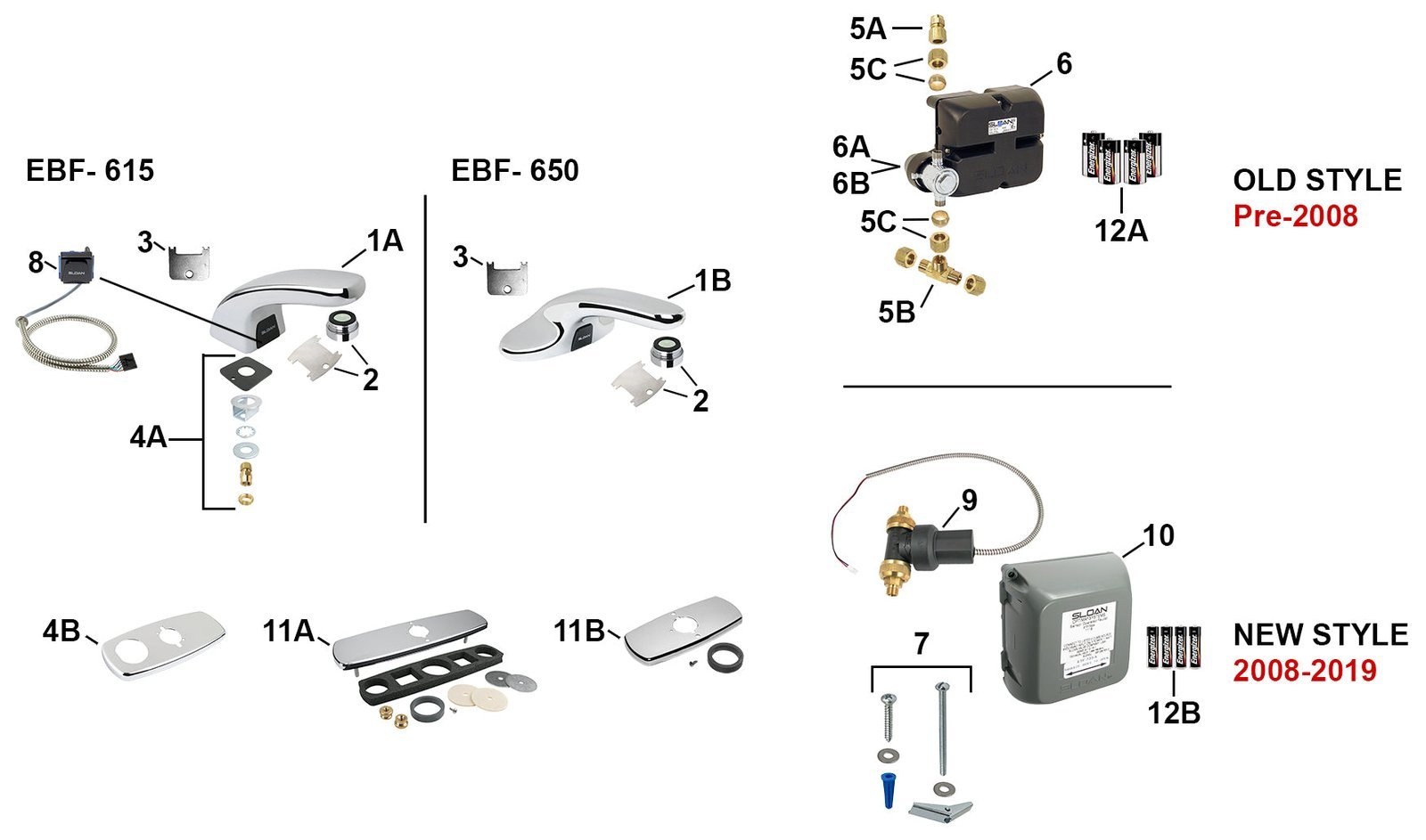
This fix is for faucets that have a weak flow or don’t stop running. First, locate the supply stops under the sink. Turn them clockwise until they’re fully closed. If the faucet continues to run, the solenoid valve is stuck in the open position. If you can hear a faint “click” when you wave your hand in front of the sensor, the electronics are signaling the valve, but the valve isn’t moving. This is a clear indicator of a mechanical failure.
This fix is for users who feel comfortable turning off water valves. If the valves are corroded or don’t turn easily, don’t force them, as this can cause a pipe leak. If you can’t turn the valves, stop immediately and call a professional. If you successfully turn off the water, you can verify if the issue is with the supply lines by disconnecting the flex hoses and checking for a clogged filter screen. Some models have a small mesh screen where the water enters the valve. If this screen is packed with debris, the water pressure will drop to a trickle. Rinse the screen under a separate faucet and reinstall it carefully. If the valve remains stuck after cleaning the screen, you have reached the limit of what you can do. Don’t attempt to take apart the solenoid valve itself, as the internal springs and seals are under pressure and can be easily damaged.
What not to do
- Don’t use abrasive scouring pads like steel wool on the sensor lens, as these create micro-scratches that trap future dirt and scatter the infrared beam.
- Don’t pour drain cleaner or harsh chemicals into the sink while the faucet is malfunctioning, as splashes can ruin the finish and the electronic housing.
- Don’t attempt to bypass the solenoid valve by connecting wires directly, as this creates a significant risk of electrical fire or flooding.
- Don’t ignore a constant “click-click” sound from the faucet, as this means the solenoid is trying to actuate but failing, which will drain your batteries in hours.
- Don’t use rechargeable batteries unless the manual explicitly lists them as compatible, as they often have a different voltage output that can confuse the control board.
How to stop it happening again
Regular maintenance prevents the most common failures before they start.
| If you’re doing this | Do this instead | Why |
|---|---|---|
| Using paper towels to clean | Use a soft microfiber cloth | Prevents tiny scratches on the sensor lens |
| Ignoring slow water flow | Clean the inlet filter screen | Stops sediment from clogging the valve |
| Using harsh bathroom cleaners | Use a damp water-only cloth | Protects the plastic sensor from chemical damage |
Frequently asked questions
Can I fix a Sloan faucet if it just drips?
No, a dripping faucet usually means the internal solenoid valve seat is worn or obstructed. The valve assembly is a precision component that typically requires a full replacement by a trained technician. If the drip is constant, turn off the water supply to prevent waste.
Why is my faucet flashing red?
A red flashing light on a Sloan faucet indicates that the batteries are low and need immediate replacement. Most models provide this signal well before the power dies completely. Replace all batteries with high-quality alkaline cells to ensure the sensor has the full voltage required for reliable detection.
How long should the batteries last?
Batteries in a standard Sloan faucet typically last for two to three years in a home environment with average use. In a busy office or public restroom, you may need to replace them every six to twelve months. If batteries die in under three months, the solenoid valve may be stuck.
Is it safe to clean the sensor with vinegar?
Yes, you can safely use a mixture of white vinegar and water to remove hard water deposits from the sensor lens. Apply the mixture to a soft cloth first to ensure no liquid enters the electronic housing. Never use undiluted vinegar, as it can damage the lens and finish.
What happens if I use the wrong batteries?
Using the wrong type of batteries can lead to erratic behavior, such as the faucet failing to detect your hands. Electronic sensors are calibrated to work within a specific voltage range. Always stick to the battery type recommended by the manufacturer in the manual to avoid damaging the power housing.
Final Thoughts
If the faucet still isn’t working properly after these checks, don’t hesitate to reach out to a certified plumber. They’ll have the right tools to inspect the internal components safely. It’s worth getting an expert’s help early, as it’ll save you from potential water damage or further frustration down the road.