
Is your Kenmore 500 Series washer acting up? Don’t let a malfunctioning washing machine disrupt your laundry routine.
You’ve come to the right place. This guide will help you quickly identify and fix common problems with your Kenmore 500 Series washer. We’ll walk you through simple steps to get your machine running smoothly again, saving you time and the expense of a service call.
Read on to find the solution you’ve been looking for.
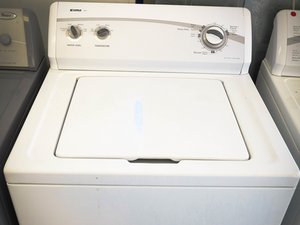
Credit: www.ifixit.com
Common Kenmore 500 Series Washer Issues
Your Kenmore 500 Series washer is a workhorse. Sometimes, it needs a little help. We explore common problems. You can fix many yourself. This guide helps you troubleshoot. It saves you time and money.
Won’t Start
The washer does not start. Check the power cord. Is it plugged in firmly? The outlet might be bad. Try another appliance. The lid switch can fail. Make sure the lid is closed. It needs to click shut.
Not Draining
Water stays in the drum. A clogged drain hose is common. Check for kinks in the hose. Remove any blockages. The pump might be faulty. Listen for a humming sound. The drain filter needs cleaning. Find it at the machine’s base.
Not Spinning
Clothes are still wet. The load may be too large. Redistribute the clothes evenly. The drive belt could be broken. It connects the motor and drum. The motor itself might be bad. The lid switch affects spinning too. Ensure the lid closes properly.
Leaking Water
Water pools around the washer. Inspect the water inlet hoses. Are they tightly connected? Check the drain hose connection. Look for cracks in the tub. The door seal might be damaged. Small tears cause leaks. The pump seal can also fail.
Making Strange Noises
The washer makes loud sounds. Objects can get stuck. Check inside the drum. Look for coins or buttons. The suspension rods might be worn. They support the tub. The motor or pump can be noisy. Loose parts can rattle.
Error Codes Displayed
The display shows an error code. Consult your owner’s manual. Each code has a meaning. It points to a specific problem. For example, F2 means a lid switch issue. F9 indicates a drain problem. Clear the code after fixing. Sometimes a power cycle helps.
Troubleshooting ‘won’t Start’ Problems
Your Kenmore 500 Series washer won’t start. This is frustrating. Many reasons can cause this. We will help you fix it. Follow these simple steps.
Check Power Supply
First, check the power cord. Is it plugged in securely? Is the outlet working? Test it with another device. You might have a tripped circuit breaker. Find your home’s breaker box. Look for a tripped breaker. Flip it off then on again. This restores power. Your washer needs electricity to run.
Inspect Lid Switch
The lid switch is important. It tells the washer the lid is closed. A faulty switch stops the machine. Open the washer lid. Locate the lid switch. It is usually near the hinge. Look for any visible damage. Is it stuck or broken? Clean any debris around it. Sometimes a simple adjustment helps. Make sure it clicks when closed. This switch is a safety feature. It prevents spinning with the lid open.
Examine Start Button
The start button starts the cycle. It might be stuck or damaged. Press the start button firmly. Does it feel loose or sticky? Sometimes dirt can obstruct it. Try pressing it a few times. If it feels broken, it needs repair. A broken button will not engage. This prevents the washer from starting.
Reset The Washer
A reset can solve many issues. Unplug the washer from the wall. Wait for about five minutes. Plug the washer back in. Try starting a cycle again. This clears temporary glitches. It can reboot the machine’s system. This simple step often works wonders. It is a quick troubleshooting method.
Diagnosing And Fixing ‘not Draining’
Your Kenmore 500 series washer won’t drain. Find and fix common drain problems. Check the drain hose and pump for blockages.
Your Kenmore washer stops mid-cycle. Water stays in the drum. This is frustrating. Do not worry. Many issues cause this. We can fix it. Let’s find the problem.Clear The Drain Hose
A kinked hose stops water flow. Check the hose behind the washer. Straighten any bends. Ensure it is not crushed. A blocked hose causes backups. Remove the hose. Look inside for debris. Flush it with water. Reconnect it securely.Inspect The Pump Filter
The pump filter catches lint. It can get clogged. Locate the filter. It is usually at the front. Open the access panel. You might need a towel. Water will spill out. Carefully unscrew the filter. Clean out any gunk. Rinse the filter well. Put it back firmly.Check The Drain Pump
The pump moves water out. A failed pump means no draining. Listen for the pump running. You should hear a hum. If it is silent, it may be dead. Check the pump for obstructions. Sometimes a small object blocks it. You may need to replace the pump. This is a more involved fix.Verify Lid Switch Function
The lid switch tells the washer it is closed. A faulty switch stops cycles. It can prevent draining. Test the switch. Does it click when the lid closes? Some switches are visible. Others are hidden. Consult your manual. A broken switch needs replacement.Resolving ‘not Spinning’ Or Slow Spinning
Your Kenmore 500 Series washer should spin clothes dry. A load of wet clothes is heavy. It should not leave clothes soaking wet. This problem is common. Many issues cause this. We can fix it. Let’s look at solutions.
Balance The Load
Uneven loads stop the spin. Clothes clump on one side. This throws the machine off balance. Stop the washer. Open the lid. Redistribute wet clothes evenly. Make sure the weight is equal. Restart the spin cycle. This often solves the problem.
Check The Lid Switch
The lid switch is a safety feature. It stops the washer when open. A faulty switch prevents spinning. The machine might think the lid is open. Locate the switch. It is usually near the lid hinge. Inspect it for damage. Clean any debris. Test it with a multimeter. Replace it if it is broken.
Inspect The Drive Belt
The drive belt connects the motor. It turns the drum during spin. A worn or broken belt will not spin. Look for the belt. It is often on the back. Check its condition. Is it cracked or loose? Is it missing completely? Replace a damaged belt. Ensure it is tight and secure.
Examine The Motor Coupler
The motor coupler links the motor. It connects to the transmission. This part can break. It is often made of plastic. A broken coupler stops all motion. You may hear a humming noise. The drum will not turn. Access the motor coupler. It is usually at the bottom. Replace it if it is cracked or broken.
Stopping Kenmore 500 Series Washer Leaks
Kenmore 500 Series washer leaks can be frustrating. Water puddles are never a good sign. Fortunately, many leaks are simple fixes. You can often stop them yourself. This guide helps you troubleshoot. Let’s get your washer dry again.
Identify Leak Source
First, find the water. Where is it coming from? Look under the washer. Check the front and back. Note the exact location of the wetness. This points you in the right direction. Dry the area completely. Run the washer briefly. Watch for dripping water. This makes the source clear.
Check Hoses And Connections
Inspect the water hoses. Are they cracked or worn? Feel along their length. Check the connections at both ends. Ensure they are tight. Loose hoses cause leaks. Old rubber can also fail. Replace any damaged hoses. Tighten fittings securely. This is a common problem.
Inspect The Tub Seal
The tub seal is important. It stops water from escaping. Look around the base of the tub. You might see water seeping out. A worn tub seal needs replacement. This repair is more involved. You may need professional help. Check your owner’s manual. It shows the seal’s location.
Examine The Water Inlet Valve
The water inlet valve controls flow. It lets water into the tub. Water can leak from this valve. Look for drips near the valve. It connects to the hoses. The valve itself might be faulty. If it is leaking, replace it. This part is usually at the back. Access may require panel removal.
Quieting Unusual Washer Noises
Loud washer noises? Troubleshoot your Kenmore 500 Series washer. Identify and fix common sounds. Get your machine running quietly again.
Decoding Kenmore 500 Series Error Codes
Troubleshooting your Kenmore 500 Series washer is easier now. Understand what those error codes mean. Quickly fix common washer problems.
Preventative Maintenance Tips
Preventative maintenance keeps your Kenmore 500 Series washer running smoothly. Simple steps prevent bigger problems. Your washer will last longer. You will save money on repairs.
Regular Cleaning
Clean the washer drum often. Use a soft cloth. Wipe down the door seal. This removes lint and debris. Clean the detergent dispenser too. A clean machine works better. It smells fresher, too.
Proper Loading Techniques
Do not overload your washer. Overloading strains the motor. It can damage the drum. Distribute clothes evenly. This helps the washer spin. Balance is key for washing.
Inspect Hoses Periodically
Check the water inlet hoses. Look for cracks or leaks. Feel for any stiffness. Replace worn-out hoses. This prevents water damage. Burst hoses are a big mess.
Leveling The Washer
Ensure your washer is level. An unlevel washer vibrates. It makes loud noises. It can also move around. Adjust the leveling feet. A stable washer runs best.
When To Call A Professional
Persistent issues with your Kenmore 500 Series washer? Simple fixes sometimes aren’t enough. Complex problems often need expert hands. Call a professional for complicated repairs.

Credit: www.youtube.com

Credit: www.reddit.com
Frequently Asked Questions
Why Is My Kenmore 500 Washer Not Starting?
Check if the washer is plugged in. Ensure the lid is completely closed. The machine won’t run if the lid switch fails.
What If My Kenmore 500 Washer Won’t Drain?
Verify the drain hose is not kinked or blocked. The pump filter might need cleaning. Remove any lint or debris inside it.
Why Is My Kenmore 500 Washer Making Loud Noises?
Loose items in the drum can cause noise. Check for coins or buttons. Ensure the washer is level on the floor.
How To Fix A Kenmore 500 Washer That Shakes?
Uneven loads create excessive shaking. Redistribute the clothes inside the drum. Check that the machine is balanced.
My Kenmore 500 Washer Smells Bad. What Now?
Clean the drum with a washer cleaner. Leave the lid open after use. This helps prevent mold and mildew growth.
Why Is My Kenmore 500 Washer Leaking Water?
Inspect the water inlet hoses for damage. Check the door seal for tears. Make sure the drain hose is secure.
How To Reset A Kenmore 500 Series Washer?
Unplug the washer for one minute. Then, plug it back in. This often clears minor error codes.