
Is your Daikin One thermostat acting up again? Don’t let a glitchy system leave you uncomfortable.
You’ve already tackled some common issues, but if you’re still facing problems, you’re in the right place. This guide is designed to help you get your smart thermostat back in perfect working order, saving you time, money, and a whole lot of frustration.
Let’s dive into the next steps for Daikin One thermostat troubleshooting.
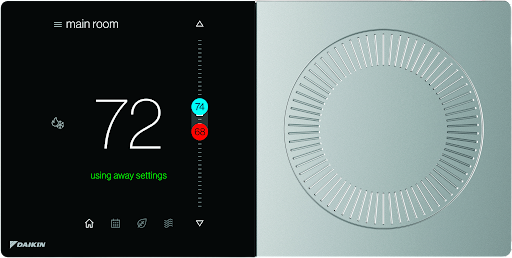
Credit: daikincomfort.com
Common Daikin One Issues
Even the best smart thermostats face challenges. The Daikin One is powerful. Sometimes, it needs a little help. This section covers common problems. We help you fix them fast.
Connectivity Problems
Your thermostat might not connect. Check your home Wi-Fi. Is it working properly? Restart your router. Try reconnecting the thermostat. Ensure the network is 2.4 GHz.
Display Errors
The screen may show errors. These are often temporary glitches. Try a soft reset. Press and hold the main button. Wait for the screen to reset. Check for firmware updates. Updates often fix display issues.
Temperature Inaccuracies
Is the temperature wrong? The thermostat needs calibration. Check for drafts near it. Sunlight can also affect readings. Ensure it is not near heat sources. Recalibrate the sensor in settings. This ensures accurate readings.
System Not Responding
Your HVAC system might not respond. Confirm power to the thermostat. Check the circuit breaker. Is the system online in the app? Restart the Daikin One. This can re-establish communication.
Wi-fi Connection Drops
Your Wi-Fi signal may be weak. The thermostat needs a stable connection. Move your router closer. Consider a Wi-Fi extender. Check router settings for interference. A strong signal prevents drops.
Power And Connectivity Checks
First, check your thermostat’s power. Ensure it has a strong electrical connection. A stable power source is key for proper function.
The Daikin One thermostat needs power. It needs a good internet connection. These checks help fix many issues.Verify Power Source
Your thermostat needs electricity. Check the power adapter. Ensure it is plugged in securely. Look for any loose connections. A stable power source is key.Check Breaker Box
Find your home’s breaker box. Locate the breaker for your HVAC system. Is the breaker tripped? Flip it off, then on again. This can restore power.Inspect Wiring
Carefully examine thermostat wires. Make sure they are secure. Loose wires cause power problems. Check for any damage. Damaged wires need professional attention.Restart The Thermostat
Sometimes a simple restart helps. Remove the thermostat from its base. Wait for a few seconds. Reattach it firmly. This often resolves glitches.Reset Network Settings
Connectivity issues can arise. Go to the thermostat’s settings menu. Find the network options. Select “Reset Network Settings.” This clears old Wi-Fi data. You will need to reconnect.Display And Interface Fixes
The Daikin One thermostat display is your control center. Sometimes, it acts up. Troubleshooting display issues is simple. You can fix most problems yourself. This section covers common screen and interface fixes.
Screen Is Blank
Your screen shows nothing. First, check power. Is the breaker on? The thermostat needs power. Try resetting the thermostat. Pull it from the wall mount. Wait ten seconds. Push it back on. Does the screen light up now? If not, check wiring connections. Loose wires cause blank screens. Contact a professional if needed.
Unresponsive Touchscreen
The screen does not respond. Clean the screen gently. Use a soft, dry cloth. Dirt can interfere. Restart the thermostat. Follow the reset steps above. Did that solve it? Sometimes, a software glitch occurs. Ensure the thermostat is updated. Check your Daikin app. Outdated software can cause issues. A faulty touchscreen needs repair. Call for service.
Error Codes Explained
See an error code? Look it up. Your manual has a list. Daikin’s website also helps. Codes tell you the problem. For example, E1 means a sensor issue. E2 might indicate a communication error. Understanding codes guides your fix. Many codes point to simple fixes. Others require expert help. Note the exact code. This helps technicians.
Brightness Adjustments
The screen is too dim. Or it is too bright. You can adjust brightness. Go to the thermostat settings. Find the ‘Display’ option. Look for ‘Brightness’ control. Slide the bar to your liking. Make it easy to see. Protect your eyes too. Proper brightness improves usability. Enjoy a clear display.
Temperature Accuracy Solutions
Getting temperature accuracy with your Daikin One Thermostat is key. Troubleshooting helps ensure your home is always comfortable. Proper settings prevent issues.
Is your Daikin One Thermostat showing wrong temperatures? This can make your home uncomfortable. It also wastes energy. Get your thermostat reading correctly. Follow these simple steps. They will fix temperature accuracy issues. Your comfort is important.Recalibrate Sensors
Your thermostat has sensors. They measure room temperature. Sometimes, these sensors need adjustment. Recalibrating them fixes readings. Look for a recalibration option. It is usually in the settings menu. Follow the on-screen prompts. This process is quick. It restores accuracy.Check Thermostat Location
The thermostat’s spot matters. Sunlight can heat it up. A draft can cool it down. This skews temperature readings. Move the thermostat away from windows. Avoid direct sunlight. Keep it clear of vents. A central location is best. This ensures fair temperature readings.Avoid Drafts And Heat Sources
Drafts cause cold spots. Heat sources create warm spots. Both affect thermostat accuracy. Keep doors and windows closed. Avoid placing heat-generating items nearby. Lamps or electronics can warm the area. Remove these obstructions. Proper placement is key.Ensure Proper Airflow
Airflow is vital for readings. Blocked vents disrupt air circulation. The thermostat needs consistent airflow. Check that vents are not covered. Furniture should not block them. Ensure your HVAC system is clean. Good airflow means accurate temps.System And Connectivity Troubleshooting
System and connectivity issues can cause frustration. Your Daikin One thermostat needs a stable connection. It needs to talk to your HVAC. This section helps you fix these problems. We will cover common issues. Let’s get your system working again.
Thermostat Not Controlling Hvac
Your HVAC system is not turning on. The thermostat shows no response. Check the power to your thermostat. Ensure the battery is good. Verify wiring connections are secure. Look at the circuit breaker for your HVAC. Is it tripped? Reset it. Confirm your thermostat is set correctly. Is the mode set to heat or cool? Is the temperature set point active?.
Hvac System Cycling Issues
Your system turns on and off too much. This is called short cycling. It wastes energy. It can harm your equipment. Check for blocked air filters. A dirty filter restricts airflow. Clean or replace your air filter. Make sure vents are open. Are they blocked by furniture? Is the thermostat in a good location? Direct sunlight can affect readings. Drafts can also cause problems. Seal any air leaks near the thermostat. Adjust the thermostat’s swing setting. This controls temperature fluctuations. Consult your HVAC manual for details.
Re-establishing Wi-fi
Your thermostat lost its Wi-Fi connection. This stops remote control. It also stops software updates. First, check your home Wi-Fi router. Is it powered on? Try restarting your router. Unplug it for 30 seconds. Plug it back in. Wait for it to fully boot. On your thermostat, find network settings. Select your Wi-Fi network again. Enter your Wi-Fi password carefully. Make sure the password is correct. Try moving the thermostat closer to the router. Obstacles can weaken the signal. Consider a Wi-Fi extender if needed.
App Sync Problems
The Daikin One app is not syncing. Your phone cannot control the thermostat. Ensure your phone has an internet connection. Check your Wi-Fi or cellular data. Close and reopen the Daikin One app. Force close the app. Then launch it again. Restart your smartphone. This often resolves temporary glitches. Check for app updates. Go to your phone’s app store. Install any available updates. Make sure your thermostat is online. It needs a Wi-Fi connection. Log out of the app. Log back in. This can refresh the connection.

Credit: daikincomfort.com
Advanced Troubleshooting Steps
Sometimes, simple fixes are not enough. Your Daikin One Thermostat might need more advanced attention. These steps go deeper. They address complex issues. Try these solutions for stubborn problems. They can bring your system back online.
Firmware Updates
Outdated firmware causes many problems. Check for updates regularly. Your thermostat needs the latest software. Connect to your Wi-Fi network. The thermostat will check for updates. Install any available updates. This often solves performance issues. It improves overall functionality.
Factory Reset
A factory reset erases all settings. It returns the thermostat to its default. This is a last resort option. You will lose custom schedules. You will lose all personalized settings. Navigate to the settings menu. Find the reset option. Confirm the reset action. You will need to set it up again. This can clear deep software glitches.
Check Hvac System Health
Your thermostat controls your HVAC. The HVAC system itself can fail. Check your air filter. A dirty filter restricts airflow. Ensure vents are not blocked. Listen for unusual noises. Your furnace or AC might have issues. Check your circuit breaker. A tripped breaker stops power. A healthy HVAC system is vital. It works with the thermostat.
When To Call A Professional
Some problems are beyond DIY. You tried all advanced steps. Your thermostat still acts up. Your HVAC system shows errors. Do not risk further damage. Contact a qualified HVAC technician. They have specialized tools. They have expert knowledge. They can diagnose complex faults. They ensure safe operation. Get expert help for peace of mind.

Credit: www.youtube.com
Frequently Asked Questions
Why Is My Daikin One Thermostat Offline?
Your thermostat might be offline due to a Wi-Fi issue. Check your home’s internet connection. Try restarting your router and modem.
What Does The Daikin One Error Code Mean?
Error codes point to specific problems. Consult your Daikin One manual for meanings. It will guide you on fixing the issue.
How Do I Reset My Daikin One Thermostat?
A reset can fix many glitches. Locate the reset button on the device. Press and hold it for ten seconds.
Is My Daikin One Thermostat Compatible?
Compatibility depends on your HVAC system. Daikin One works with most central systems. Check your system’s wiring for compatibility.
Daikin One Thermostat Screen Is Blank. What Now?
A blank screen needs power check. Ensure the thermostat has power. Verify breaker connections and wiring.
Why Is My Daikin One Not Heating?
Heating problems can stem from settings. Double-check your schedule and mode. Your HVAC system might need a check.
How To Connect Daikin One To Wi-fi?
Connecting is usually simple. Open the Daikin One app on your phone. Follow the on-screen prompts to connect.
Conclusion
Your Daikin One thermostat problems are solvable. Many issues have simple fixes. Check power and connections first. Resetting often helps. Consult your manual for details. Still stuck? Your HVAC professional can assist. Keep your home comfortable. Your smart thermostat works again.