
Common Rv2300s Issues
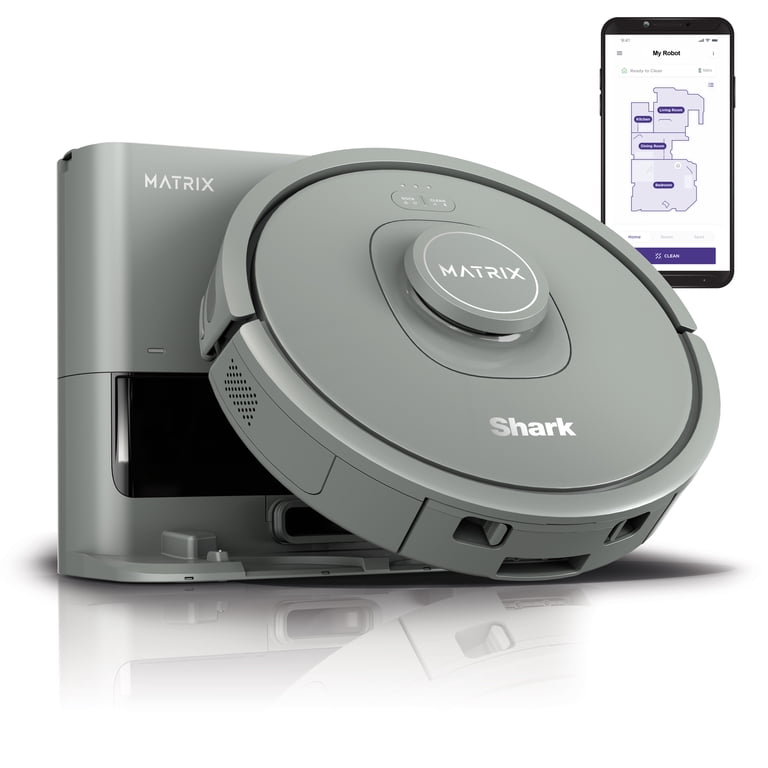
Your Shark Matrix Robot Vacuum RV2300S is a great helper. Sometimes, it needs a little attention. You might face common problems. We will help you fix them. Let’s look at these issues.
Robot Not Charging
Is your robot not charging? Check the power outlet. Ensure the charging base is plugged in. Clean the charging contacts. Wipe the robot’s contacts too. Make sure they are free of debris. Position the robot correctly. It should align with the base. A solid light means charging. No light may mean a problem. Try a different outlet. Contact support if needed.
Robot Not Starting
Your robot won’t turn on? Check its battery level. It might be too low. Place it on the charging base. Wait a few minutes. Press the power button again. Ensure the lid is closed properly. Sometimes a restart helps. Remove it from the base. Wait 10 seconds. Put it back. Try starting it once more.
Robot Not Cleaning Effectively
Is cleaning not up to par? Empty the dustbin. A full bin reduces suction. Clean the main brush. Remove tangled hair and debris. Check the side brushes. Ensure they spin freely. Inspect the filter. A clogged filter blocks airflow. Wash or replace the filter. Clear the path for the robot. Remove obstacles from its route. Ensure sensors are clean. This helps navigation.
Robot Getting Stuck Frequently
Does your robot get stuck often? Clear clutter from floors. Remove cords and small objects. These can trap the robot. Check for uneven surfaces. The robot may struggle there. Ensure the charging base is stable. It should not wobble. Clean the cliff sensors. Dirty sensors can cause errors. They might think there is a drop. Adjust the base location. Find a clear, flat spot.
Robot Making Unusual Noises
Hear strange sounds? Check the main brush. Debris might be caught. Remove anything wrapped around it. Inspect the wheels. Make sure they rotate smoothly. Small objects can jam them. Clean the brush compartment. Ensure all parts are secure. Loose parts can vibrate. Listen closely to pinpoint the source. Address any obstructions found.
Credit: www.walmart.com
Navigation Problems
Your Shark Matrix Robot Vacuum RV2300S navigates your home. Sometimes, it gets lost. This can be frustrating. Navigation problems disrupt cleaning. Let’s fix these issues.
Mapping Errors
The map might be wrong. Your robot may not see rooms correctly. This causes cleaning gaps. Clear the robot’s sensors. Wipe them gently. Ensure good lighting. Obstacles can confuse the map. Remove clutter. Try re-mapping the house. Go to the app. Start a new map. This often solves mapping problems.
Room Detection Issues
The robot might miss rooms. It may not identify room boundaries. Check the app’s room definitions. Are rooms split incorrectly? Are they merged? Adjust room dividers in the app. Ensure clear pathways. Doors should be open. The robot needs access. Sometimes, a restart helps. Power cycle the robot. This can reset its room memory.
Returning To Dock Problems
The robot struggles to find its base. It may wander aimlessly. The dock might be blocked. Ensure clear space around it. Check the dock’s power. Is the indicator light on? Clean the robot’s charging contacts. Clean the dock’s contacts too. Position the dock carefully. Avoid direct sunlight. Sunlight can interfere. Try moving the dock slightly. A new spot may help.
Inconsistent Cleaning Patterns
The robot cleans randomly. It misses spots. It repeats areas. This suggests a navigation glitch. Check the cleaning mode. Is it set correctly? Ensure it’s not in spot clean mode. Clear the robot’s memory. Reset its navigation system. A software update might be needed. Check the Shark app for updates. Install any available updates. This can improve its cleaning logic.
Connectivity And App Issues
Connectivity problems can stop your Shark Matrix robot vacuum. App issues are common. We will fix them. Let’s get your vacuum working again.
Wi-fi Connection Fails
Your vacuum needs Wi-Fi. Check your router. Is it on? Is the signal strong? Try restarting the router. Move the vacuum closer. Forget the network. Reconnect it. Use the right password. Make sure it is correct. 5GHz networks may not work. Use a 2.4GHz network. This helps connectivity.
App Not Responding
The app can freeze. Close the app. Open it again. Restart your phone. Check your phone’s internet. Is it connected? Update the Shark app. New versions fix bugs. Uninstall the app. Install it again. This often solves problems.
Voice Command Malfunctions
Voice commands are convenient. Are they working? Check the microphone. Is it clear? Is there dust? Speak clearly. Use simple commands. Ensure Alexa or Google is linked. Reconnect the voice service. Try again. This helps voice control.
Firmware Update Errors
The vacuum needs updates. Firmware updates are important. Do not interrupt updates. Keep the vacuum charged. Ensure Wi-Fi is stable. Try the update again. Restart the vacuum. Restart your router. This can fix errors. Contact support if needed.

Credit: cy.manuals.plus
Maintenance And Cleaning Tips
Regular maintenance keeps your Shark Matrix RV2300S running smoothly. Clean parts ensure better performance. Simple cleaning steps prevent many problems. Follow these tips for optimal results.
Brush Roll Maintenance
Hair tangles the brush roll. Remove the brush roll. Use scissors to cut hair. Pull hair away gently. Clean the brush roll ends. Ensure it spins freely. Reinstall the brush roll.
Filter Cleaning And Replacement
A dirty filter reduces suction. Remove the filter housing. Take out the filter. Tap the filter gently. This removes loose dust. Rinse the filter with water. Let it air dry completely. Do not use the vacuum wet. Replace the filter every few months. A fresh filter boosts power.
Sensor Cleaning
Sensors guide your robot. Dirty sensors cause navigation issues. Wipe all sensors with a soft cloth. Use a dry cloth. Pay attention to cliff sensors. Also clean the bumper sensors. Clean sensors help it move better.
Dust Bin Emptying
An full dust bin stops cleaning. Empty the dust bin often. Open the robot’s lid. Remove the dust bin. Open the bin’s door. Empty contents into the trash. Close the bin door securely. Reinsert the dust bin. This keeps the robot working.
Advanced Troubleshooting
Your Shark Matrix Robot Vacuum RV2300S is a smart device. Sometimes, it needs a little extra help. Advanced troubleshooting tackles tougher issues. These steps go beyond simple fixes. They help restore your vacuum’s full function. Let’s dive into these advanced solutions.
Resetting The Robot
A simple reset often works wonders. It clears temporary glitches. Find the power button. Press and hold it down. Wait for the robot to turn off. Release the button. Then, power it back on. This restarts its system. Test its performance after the reset.
Factory Reset Procedure
A factory reset is a more drastic step. It returns the robot to its original settings. This erases custom maps. It also removes Wi-Fi connections. Locate the reset button. It is usually a small pinhole. Use a paperclip to press it. Hold it for about 10 seconds. The robot will power down. Then, it will restart. You will need to set it up again. Follow the initial setup guide.
Checking For Obstructions
Obstructions cause many problems. They can stop the robot moving. They can also affect suction. First, turn off the robot. Inspect the wheels. Remove any tangled hair or debris. Check the brushes. Clean them thoroughly. Ensure the dustbin is empty. Look inside the suction port. Remove any blockages there. A clear path is essential.
Battery Health Diagnostics
Battery issues impact performance. Your robot might run out quickly. It may not charge properly. Check the charging contacts. Ensure they are clean. Wipe them with a dry cloth. Place the robot on its dock. Verify it is charging. Look for charging indicator lights. If problems persist, contact support. They can diagnose battery health. Replacement might be necessary.
When To Seek Support
Your Shark Matrix Robot Vacuum is smart. It solves many problems. Sometimes, it needs help. You can fix common issues. Some problems need expert help. This section guides you. Find solutions quickly.
Understanding Error Codes
Your vacuum shows error codes. These codes point to problems. Check your manual for codes. The manual lists meanings. It suggests fixes too. For example, code E1 means a brush jam. Remove debris from the brush. Code E2 means a cliff sensor issue. Clean the sensors gently. Codes help diagnose issues fast. Consult your manual first.
Contacting Shark Support
Basic fixes may not work. Shark support offers more help. They have trained technicians. They can guide you remotely. You can call them. You can visit their website. They have a support section. Look for contact options there. Explain your problem clearly. Provide your vacuum’s model number. They will help you find solutions.
Warranty Information
Your vacuum has a warranty. It covers manufacturing defects. Check your purchase receipt. It shows warranty duration. Keep your receipt safe. If a defect occurs, contact Shark. They will assess the issue. They may repair or replace it. Understand your warranty terms. This protects your investment.

Credit: www.amazon.com
Frequently Asked Questions
Why Is My Shark Rv2300s Not Cleaning Effectively?
Check if the brushes are clean and free of debris. Ensure the dustbin is empty. Obstructions can reduce cleaning power.
What To Do If Shark Rv2300s Won’t Charge?
Confirm the charging base is plugged in securely. Make sure robot’s charging contacts are clean. Try a different outlet for power.
How To Fix Shark Rv2300s Connection Issues?
Restart your home Wi-Fi network. Ensure the robot is close to the router. Re-pair the robot with the app.
Why Is My Shark Rv2300s Making Strange Noises?
Inspect the brushes and side brushes for tangles. Check for any objects stuck in the vacuum. Small issues can cause loud sounds.
What If The Shark Rv2300s Gets Stuck Often?
Clear the area of small objects. Ensure the robot’s sensors are clean. Map out no-go zones in the app.
How To Reset The Shark Rv2300s Robot?
Locate the reset button on the robot. Press and hold it for a few seconds. This will restore factory settings.
Why Is My Shark Rv2300s Not Returning To Base?
Ensure the charging base has clear space. Check for any blockages around the base. Manually guide the robot near the base.
Conclusion
Your Shark Matrix RV2300S can work well. Simple fixes often solve problems. Check connections and power. Restarting the vacuum helps. Refer to your manual for more. Keep your floors clean easily. Enjoy a spotless home.