
Experiencing a frozen or unresponsive control panel on your Samsung refrigerator can be a frustrating ordeal. This vital component is the brain of your appliance, managing everything from temperature settings and ice production to special modes and diagnostics. When it glitches, it can leave you guessing about your fridge’s internal conditions and unable to make necessary adjustments.
While a completely dead panel might indicate a serious hardware issue, many common control panel problems can be resolved with a simple reset or through basic troubleshooting steps.
This comprehensive guide will walk you through the process of troubleshooting and resetting your Samsung refrigerator’s control panel. We’ll cover common causes for malfunctions, step-by-step reset procedures for various models, and additional tips to get your appliance back to optimal performance.
Understanding these steps can save you the time and expense of a service call, empowering you to tackle minor issues with confidence.
Key Takeaways
- Control Panel Malfunctions: A frozen or unresponsive Samsung refrigerator control panel can be caused by power surges, software glitches, physical damage, or internal component failures.
- Resetting is Key: The most common and effective solution for minor control panel issues is a power reset, which reboots the system and clears temporary errors.
- Power Cycle Procedure: Disconnecting power to the refrigerator for several minutes is the standard method for a power cycle reset.
- Model Variations: Reset procedures can differ slightly depending on your Samsung refrigerator model; consult your owner’s manual if unsure.
- Beyond Reset: If a reset doesn’t work, consider checking the user interface board, door seals, and ensuring the appliance is level.
- When to Call a Pro: Persistent issues or error codes that don’t clear after troubleshooting necessitate professional repair.
Understanding Samsung Refrigerator Control Panel Issues
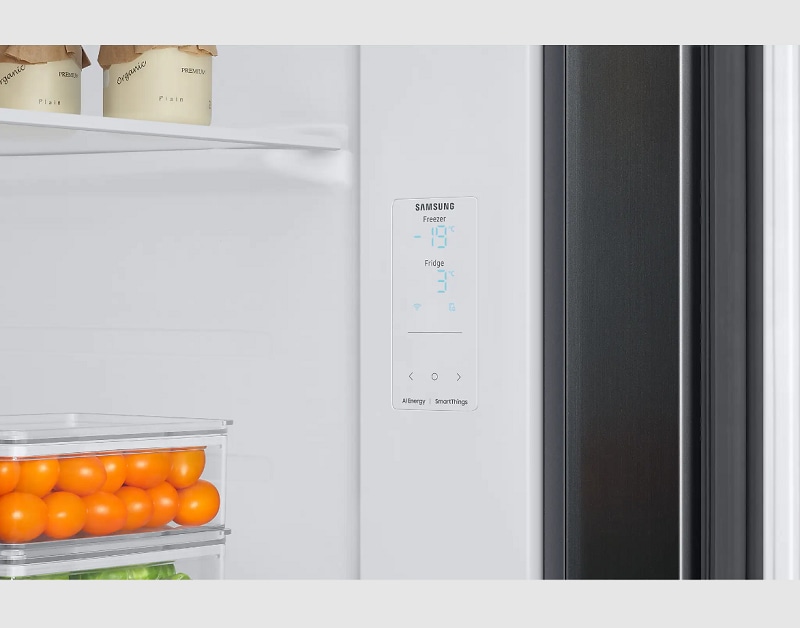
Samsung refrigerators, like any sophisticated electronic device, can encounter temporary glitches or persistent problems with their control panels. These panels, often sleek touchscreens or arrays of buttons, are responsible for communicating user input to the refrigerator’s internal systems and displaying vital information like temperature and operational status. When this communication breaks down, it can manifest in several ways:
- Unresponsive Touchscreen: The most common issue is a touchscreen that no longer registers touches or responds intermittently. This can be due to a software freeze, a dirty screen, or a problem with the underlying digitizer.
- Frozen Display: The screen might remain stuck on a particular setting or error message, preventing any further interaction. This often points to a software loop or a critical system error.
- Buttons Not Working: For models with physical buttons, some or all might cease to function, rendering specific features inaccessible.
- Erratic Behavior: The panel might display random characters, flash incorrect information, or activate features on its own. This is often a sign of electrical interference or a failing component.
- Dim or Blank Screen: While sometimes an energy-saving feature, a persistently dim or completely blank screen can indicate a power supply issue to the panel or a complete failure of the display.
Common Causes Of Control Panel Malfunctions
Several factors can contribute to these control panel problems. Understanding the root cause is crucial for effective troubleshooting.
- Power Surges and Fluctuations: Just like home computers, refrigerator electronics are susceptible to damage from sudden power surges or brownouts. A significant electrical event can disrupt the control panel’s delicate circuitry, leading to temporary or permanent malfunctions. This is why surge protectors are a good investment for major appliances.
- Software Glitches and Bugs: The control panel runs on embedded software. Like any software, it can encounter bugs, freeze, or get stuck in a loop, especially after a power interruption or if a new setting is entered incorrectly. These are often temporary and can be resolved by a system reboot.
- Moisture and Spills: The control panel area is susceptible to moisture from condensation or accidental spills. Liquid ingress can short-circuit components, leading to erratic behavior or complete failure. Ensuring door seals are intact and wiping up spills promptly can prevent this.
- Physical Damage: Accidental impacts, especially during cleaning or moving the appliance, can damage the control panel’s surface or internal connections. Cracked screens or loose wiring can result.
- Age and Wear: Over time, electronic components can degrade. The touchscreen’s sensitivity might decrease, or internal connections can loosen, leading to intermittent issues.
- Overheating: While refrigerators are designed to operate in various conditions, extreme ambient temperatures or blocked ventilation can cause internal components, including the control panel’s electronics, to overheat, leading to performance issues.

Credit: www.youtube.com
The Power Cycle Reset: Your First Line Of Defense
The power cycle reset, often referred to as a hard reset or unplugging the refrigerator, is the most common and effective troubleshooting step for a wide range of Samsung refrigerator control panel issues. This process essentially cuts power to the entire appliance, allowing all internal systems, including the control panel’s software, to completely shut down and then reboot upon power restoration. This can clear temporary glitches, software errors, and resolve minor communication issues between the control panel and the main refrigerator components.
How To Perform A Power Cycle Reset
The procedure is straightforward, but it requires safe access to the refrigerator’s power source.
- Locate the Power Source:
- Direct Plug: Most refrigerators are plugged directly into a wall outlet. You’ll need to access this outlet.
- Circuit Breaker: In some installations, the refrigerator is hardwired or connected to a dedicated circuit breaker in your home’s electrical panel. If you can’t easily access the plug, you’ll need to locate and switch off the corresponding circuit breaker. Always ensure you know which breaker controls the refrigerator before flipping it.
- Disconnect Power:
- Unplug: Carefully pull the refrigerator’s power cord directly from the wall outlet. Do not pull on the cord itself, but rather grasp the plug head.
- Circuit Breaker: Flip the circuit breaker controlling the refrigerator to the “OFF” position.
- Wait for Discharge: This is a critical step. Leave the refrigerator completely disconnected from power for a minimum of 5 to 10 minutes. Some technicians recommend even longer, up to 30 minutes, to ensure all internal capacitors fully discharge. This waiting period allows the control board’s memory to clear and any residual electrical charge to dissipate.
- Reconnect Power:
- Plug In: Firmly plug the refrigerator’s power cord back into the wall outlet.
- Circuit Breaker: Flip the circuit breaker back to the “ON” position.
- Observe: Allow the refrigerator a few minutes to power up fully. The control panel should illuminate, and you should be able to interact with it. Test its functionality by trying to adjust the temperature or access different modes.
Pro Tip: If your refrigerator has an ice maker, it’s a good idea to turn it off before performing the power cycle and then turn it back on afterward. This can prevent potential issues with the ice maker during the reboot process.
Why Does A Power Cycle Work?
Think of your refrigerator’s control panel like a small computer. When it encounters a minor error, freezes, or gets stuck in a processing loop, a simple restart can resolve the issue. The power cycle achieves this by:
- Clearing Temporary Memory (RAM): Like a computer, the control board has temporary memory that stores active processes and settings. Disconnecting power clears this memory, removing any corrupted data or stuck processes.
- Rebooting the Operating System: The control panel runs embedded software. A power cycle forces this software to shut down completely and then restart from its initial boot sequence, much like rebooting your PC.
- Resetting Communication Links: It allows all the sensors and components within the refrigerator to re-establish communication with the main control board.

Credit: www.youtube.com
Model-specific Reset Procedures
While the general power cycle is effective for most Samsung refrigerators, some models might have specific reset buttons or slightly different procedures. Always refer to your owner’s manual for the most accurate instructions for your specific model. However, here are some common variations you might encounter:
Resetting Through The Control Panel (if Accessible)
Some Samsung models, particularly higher-end ones with advanced displays, might have a software-based reset option directly within the menu system. This is usually found under “Settings,” “System,” or “Maintenance. “
- Accessing Settings: Navigate through the touchscreen menus to find the settings or options area.
- Locating Reset: Look for an option like “Reset,” “Factory Reset,” “System Reset,” or “Reboot.”
- Confirmation: You will likely be prompted to confirm the reset, as it may revert some personalized settings.
- Reboot: The panel will then reboot itself.
Note: A factory reset might revert all settings to their original defaults, including temperature settings, ice maker options, and any special modes you may have activated.
Using A Dedicated Reset Button
Certain Samsung refrigerator models might incorporate a small, recessed reset button. This button is often found on the control panel itself, sometimes requiring a paperclip or pin to press.
- Locate the Button: Carefully inspect the control panel for a tiny hole or a small button. It might be labeled “Reset” or have a circular arrow icon.
- Press and Hold: Use a pointed object (like a straightened paperclip) to press and hold the button for approximately 10-15 seconds.
- Observe: The display might flicker or reset automatically.
Warning: Be cautious when using a reset button. Ensure you are pressing the correct button. Accidentally pressing other buttons could lead to unintended changes.
Resetting The Ice Maker
Sometimes, control panel issues can be linked to the ice maker. If your control panel is behaving erratically, and you suspect the ice maker might be involved, resetting it specifically can sometimes help.
- Locate Ice Maker Switch: This is often a physical switch or a button on the ice maker assembly itself, usually located inside the freezer compartment.
- Turn Off and On: Flip the switch to the “Off” position, wait about 30 seconds, and then flip it back to the “On” position.
- Control Panel Reset: After resetting the ice maker, perform a power cycle reset on the main control panel as described earlier.
Example: Samsung Rf28hmedbsr Reset
For a popular model like the Samsung RF28HMEDBSR, the primary method for resetting the control panel is the standard power cycle.
- Unplug the refrigerator from the wall outlet.
- Wait for at least 5 minutes (longer is often better).
- Plug the refrigerator back in.
- The display should power on, and you can test the controls.
If this doesn’t resolve the issue, checking the user manual for any model-specific reset buttons or software options is recommended.
Credit: www.samsung.com
Troubleshooting Beyond A Simple Reset
If a power cycle reset doesn’t bring your Samsung refrigerator’s control panel back to life, it’s time to investigate further. Several other factors could be at play, ranging from simple environmental issues to more complex component failures.
Inspecting The User Interface (ui) Board
The user interface (UI) board is the electronic component directly behind the control panel’s display and buttons. It processes your inputs and sends commands to the main refrigerator control board.
- Accessing the UI Board: This usually involves removing the top trim or control panel cover. This process varies significantly by model. Consult your owner’s manual or a service manual for your specific model before attempting this. You may need to remove screws, pry off clips, or detach wiring harnesses.
- Visual Inspection: Once accessed, look for obvious signs of damage on the UI board:
- Burn Marks: Any discoloration or scorching indicates a component failure.
- Swollen Capacitors: Look for small, cylindrical components (capacitors) that appear bulged or leaking.
- Corrosion: Check for any signs of rust or greenish/white residue, especially around connections, which could indicate moisture damage.
- Loose Connections: Ensure all ribbon cables and wire harnesses connecting the UI board to the display and the main control board are securely seated. Gently push them in to ensure a firm connection.
Important Note: Working with internal electronic components carries a risk of further damage if not done carefully. If you are not comfortable with disassembling parts of your appliance, it’s best to leave this step to a qualified technician.
Checking Door Seals And Alignment
A compromised door seal can lead to temperature fluctuations inside the refrigerator and freezer compartments. This can sometimes cause the control panel to behave erratically as the system tries to compensate for temperature deviations.
- Inspect Seals: Run your fingers along the rubber door seals. Check for cracks, tears, or areas where the seal is no longer making full contact with the refrigerator frame.
- The Dollar Bill Test: Close the refrigerator door on a dollar bill. If you can easily pull the bill out, the seal is weak in that spot. Repeat this around the entire perimeter of both doors.
- Clean Seals: Dirt and grime can prevent seals from closing properly. Clean them with mild soap and water.
- Door Alignment: Ensure the doors are closing correctly and not sagging. Sometimes, adjusting the door hinges can fix alignment issues.
If you find a faulty seal or poor alignment, replacing the seal or adjusting the hinges might resolve the control panel’s erratic behavior.
Ensuring Proper Ventilation And Temperature
Refrigerators generate heat as part of their cooling process. Proper ventilation is crucial to prevent components from overheating.
- Back Ventilation: Ensure there is adequate space behind the refrigerator (usually 1-2 inches) for air to circulate around the condenser coils and compressor. Do not push the refrigerator too tightly against the wall.
- Bottom/Side Vents: Check that any vents on the bottom or sides of the refrigerator are not blocked by objects or debris.
- Clearance: Make sure the refrigerator isn’t crammed into a tight space with insufficient airflow.
- Ambient Temperature: Extremely high ambient room temperatures can make it harder for the refrigerator to cool efficiently and can potentially affect electronics. Ensure the room temperature is within the recommended operating range for your model (typically between 55°F and 110°F or 13°C and 43°C).
Verifying Power Supply Stability
While a power surge can cause issues, inconsistent power delivery from the outlet itself can also be problematic.
- Dedicated Outlet: Samsung recommends plugging refrigerators into a dedicated, grounded electrical outlet. Avoid using extension cords or multi-plug adapters, as these can lead to unstable power delivery and are often not rated for the appliance’s power draw.
- Test the Outlet: If you suspect the outlet, you can test it with another small appliance or a voltage meter (if you have one and know how to use it safely).
- Circuit Breaker Health: Ensure the circuit breaker is functioning correctly and hasn’t been tripped or is showing signs of wear.
When To Call A Professional Technician
Despite your best efforts with troubleshooting and resets, some problems are beyond the scope of DIY repair. If you’ve exhausted the steps above and your Samsung refrigerator’s control panel remains unresponsive or continues to malfunction, it’s time to seek professional help.
Signs It’s Time To Call A Pro
- Persistent Error Codes: If the control panel displays an error code (e.g., 33E, 46E, 57E) that doesn’t clear after a power cycle reset, it indicates a specific internal fault that requires diagnosis. You can often find a list of error codes and their meanings in your owner’s manual or on Samsung’s support website.
- Visible Damage: If you noticed burn marks, swollen capacitors, or significant corrosion on the UI board during your inspection, the component likely needs replacement.
- No Power to the Panel: If the control panel remains completely blank and unresponsive even after a power cycle, and you’ve confirmed the outlet is working, there might be an issue with the main control board or the power supply to the panel.
- Intermittent Issues Persist: If the control panel works for a while after a reset but then starts malfunctioning again, it suggests an underlying intermittent electrical fault or a component nearing failure.
- Lack of Confidence: If you’re uncomfortable performing any of the troubleshooting steps, especially those involving disassembly, it’s always safer to call a professional. Attempting repairs without adequate knowledge can void your warranty or cause further damage.
What To Expect When Calling For Service
When you contact Samsung support or a qualified appliance repair technician, they will typically follow a structured diagnostic process:
- Information Gathering: They’ll ask about the specific symptoms, error codes (if any), and the troubleshooting steps you’ve already taken.
- Initial Diagnostics: They may guide you through a few more basic checks over the phone.
- On-Site Visit: If the issue can’t be resolved remotely, a technician will schedule a visit. They will bring common replacement parts and diagnostic tools.
- Component Testing: The technician will test the UI board, main control board, sensors, and wiring harnesses to pinpoint the faulty component.
- Repair or Replacement: Based on the diagnosis, they will either repair the existing component (if possible) or replace the faulty part.
- Testing: After the repair, they will thoroughly test all functions of the refrigerator, including the control panel, to ensure everything is working correctly.
Remember to have your refrigerator’s model and serial number handy when you call for service. This information is typically found on a sticker inside the refrigerator compartment.
Preventative Maintenance For Your Control Panel
While some issues are unavoidable, adopting a routine maintenance schedule can help prevent control panel problems and extend the life of your Samsung refrigerator.
Regular Cleaning
- Control Panel Surface: Clean the control panel regularly with a soft, damp cloth. Avoid abrasive cleaners, harsh chemicals, or excessive moisture, as these can damage the screen or buttons. For touchscreens, a microfiber cloth is ideal.
- Door Seals: Keep the door seals clean and free of debris. Wipe them down weekly with a damp cloth and mild detergent. This ensures a tight seal and prevents temperature issues.
- Ventilation Areas: Periodically check and clean the areas around the condenser coils (usually at the back or bottom) and any ventilation grilles. Dust buildup can impede airflow and cause the system to work harder, potentially affecting component longevity.
Monitoring Performance
- Listen for Unusual Noises: Pay attention to any new or unusual sounds coming from the refrigerator.
- Check Temperatures: Regularly verify that the refrigerator and freezer compartments are maintaining the set temperatures. Use a refrigerator thermometer for accuracy.
- Observe Ice Production: If you have an ice maker, ensure it’s producing ice consistently and without issues.
Electrical Safety
- Use a Surge Protector: Consider plugging your refrigerator into a high-quality surge protector designed for large appliances. This can help safeguard the sensitive electronics from damaging power spikes. Research reputable brands known for appliance protection.
- Avoid Extension Cords: As mentioned earlier, always plug your refrigerator directly into a grounded wall outlet.
Software Updates (if Applicable)
Some modern smart refrigerators may receive occasional software updates. Check your Samsung app or the refrigerator’s settings menu to see if any updates are available and recommended. These updates can sometimes fix bugs and improve performance.
Frequently Asked Questions
Why Is My Samsung Refrigerator Control Panel Completely Blank?
A blank control panel can be due to a complete power failure to the unit, a tripped circuit breaker, a blown internal fuse, a faulty main control board, or a disconnected wire leading to the panel. Start by checking your home’s circuit breaker and ensuring the refrigerator is plugged in securely.
If those are fine, perform a power cycle reset. If the panel remains blank after a reset, it likely indicates a more serious electrical issue requiring professional diagnosis.
Can I Use A Household Cleaner On My Samsung Refrigerator’s Touch Control Panel?
It’s best to avoid harsh household cleaners. Use a soft, damp cloth, preferably microfiber, to clean the touch panel. For stubborn smudges, you can use a mild solution of water and dish soap, applied to the cloth (not directly to the screen), and then wipe dry with a clean cloth.
Avoid abrasive pads, ammonia-based cleaners, or window cleaners, as they can damage the screen’s coating.
How Often Should I Perform A Power Cycle Reset On My Samsung Refrigerator?
A power cycle reset is a troubleshooting step, not a routine maintenance task. You should only perform it when you encounter issues like an unresponsive control panel, erratic temperature settings, or other minor glitches. Performing it too frequently is unnecessary and could potentially cause minor wear on electronic components over extended periods, though generally it’s safe.
What Does An Error Code Like ’33e’ Or ’46e’ Mean On My Samsung Refrigerator Control Panel?
These codes indicate specific diagnostic information about a fault detected by the refrigerator’s internal systems. For example, ’33E’ often relates to an issue with the ice maker or its sensor, while ’46E’ can point to a problem with the defrost system.
The exact meaning can vary slightly by model. You should consult your refrigerator’s owner’s manual for a comprehensive list of error codes and their corresponding troubleshooting steps. If the error persists after a power cycle, professional service is usually required.
Is It Safe To Open The Refrigerator Control Panel Myself To Check For Issues?
Opening the control panel involves removing plastic bezels and potentially disconnecting delicate wire harnesses. While it can be done, it carries a risk of damaging the panel, the wiring, or voiding your warranty if not performed correctly. If you are not experienced with appliance repair or electronics, it is strongly recommended to consult your owner’s manual for guidance or call a qualified Samsung appliance repair technician.
They have the proper tools and