
Is your Minka Aire remote control not working right when you need it most? It’s frustrating when the buttons don’t respond, leaving you stuck trying to figure out what’s wrong.
You rely on that remote to keep your fan and lights just the way you like them. But don’t worry—this guide will help you quickly find the cause and fix the problem. Keep reading, and you’ll be back in control in no time.
Common Remote Issues
The Minka Aire remote control may stop working due to common issues. These problems often prevent the remote from sending commands to the fan or light. Knowing these common issues helps to fix the remote quickly. Below are the main causes of remote control failure.
Battery Problems
Dead or weak batteries are the most common cause of remote issues. Replace old batteries with fresh ones of the same type. Check the battery contacts for dirt or corrosion. Clean the contacts gently to ensure a good connection. Always keep spare batteries nearby to avoid downtime.
Signal Interference
Other electronic devices can block or confuse the remote signal. Wireless routers, cordless phones, and microwaves create interference. Move the fan or remote away from these devices. Test the remote in a different room to see if the signal improves. Interference can reduce the remote’s range and effectiveness.
Remote Sensor Blockage
The fan’s sensor must see the remote’s signal clearly. Dirt, dust, or objects can block the sensor on the fan. Clean the sensor gently with a soft cloth. Remove any items between the remote and the fan. Ensure the remote points directly at the sensor for best results.
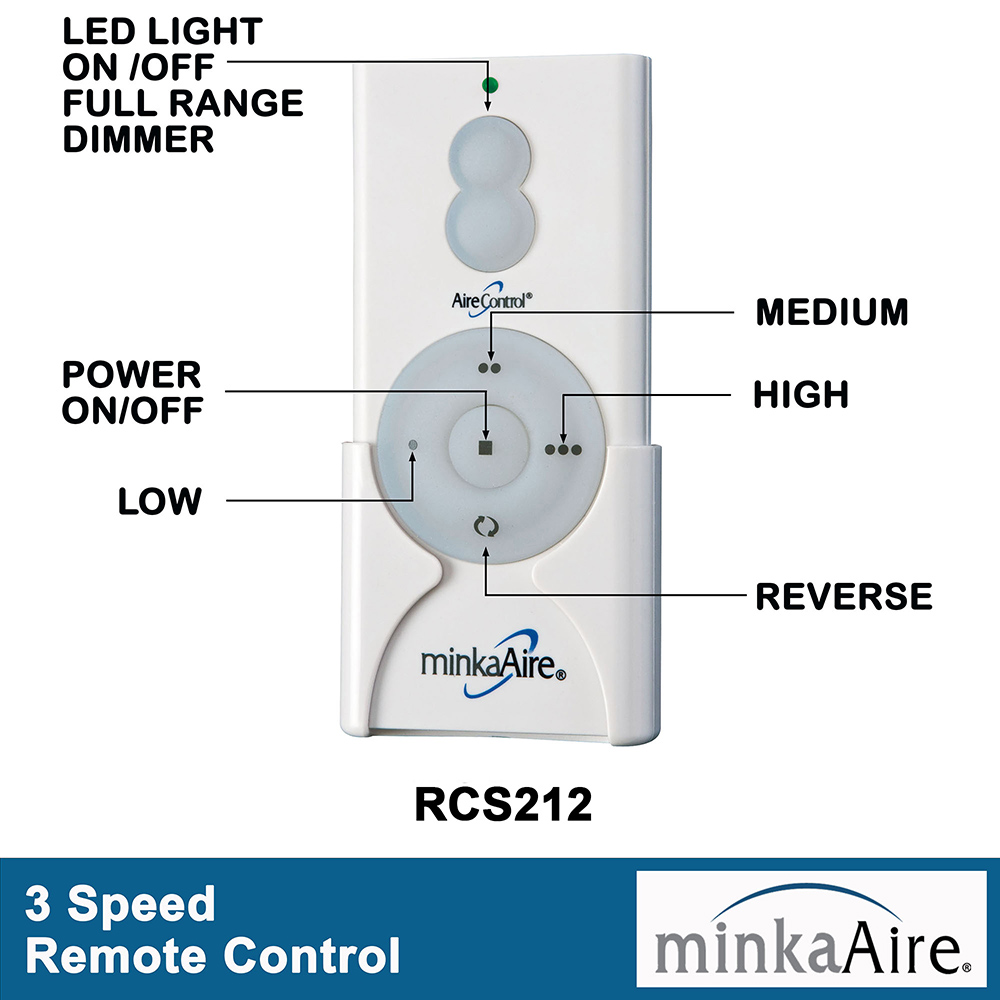
Credit: www.minkagroup.net
Basic Troubleshooting Steps
When the Minka Aire remote control stops working, start with basic troubleshooting steps. These simple checks often solve common issues. Follow each step carefully to restore your remote’s function.
Checking And Replacing Batteries
First, open the battery compartment on the remote. Take out the old batteries. Look for signs of corrosion or leakage. Replace them with fresh, new batteries. Make sure to insert the batteries the right way. Test the remote after replacing the batteries.
Resetting The Remote
Sometimes, the remote needs a reset to fix glitches. Remove the batteries from the remote. Press and hold any button for 10 seconds. Release the button and reinsert the batteries. Try using the remote again to check if it works.
Cleaning The Remote And Receiver
Dirt and dust can block signals between the remote and fan. Wipe the remote’s surface with a soft cloth. Clean the infrared sensor on the remote’s front. Also, clean the fan’s receiver area gently. Avoid using liquids or harsh chemicals. This can improve the connection and remote response.
Advanced Fixes
Advanced fixes can help solve problems when basic steps fail. These methods dig deeper into remote control issues. They focus on the connection between the remote and the fan. Also, they check parts that often cause problems. These fixes may require more time and care. They improve chances of getting your Minka Aire remote working again.
Re-pairing The Remote With The Fan
Sometimes the remote loses connection with the fan. Re-pairing resets this connection. Start by turning off the fan’s power at the circuit breaker. Wait about 30 seconds. Turn power back on. Press and hold the fan’s receiver button. Press any button on the remote. Release both buttons after a few seconds. This process re-establishes the link between remote and fan. Test the remote to see if it controls the fan.
Inspecting The Remote Sensor On The Fan
The sensor on the fan receives signals from the remote. Dust or dirt can block the sensor. Clean the sensor gently using a soft cloth. Check for any physical damage or loose parts. Make sure nothing covers the sensor. Shine a flashlight on the sensor to see if it looks clear. A clean and clear sensor helps the remote work properly.
Using A Universal Remote
A universal remote can replace your original remote. It works with many fan models. Buy one that supports Minka Aire fans. Follow the instructions to program the remote. Enter the code for your fan model. Test the universal remote on all fan functions. This can solve problems caused by a broken original remote.
Preventive Tips
Preventing issues with your Minka Aire remote control saves time and stress. Simple habits keep the remote working well. Small steps help avoid common problems before they start. Follow these tips to keep your fan and remote in top shape.
Proper Remote Storage
Store the remote in a dry, cool place. Avoid direct sunlight or hot spots. Keep it away from water or liquids. Use a small box or holder to protect it from dust. Prevent drops by placing it on stable surfaces. Proper storage extends remote battery life and function.
Regular Maintenance Of Fan And Remote
Clean the fan blades and remote regularly. Use a soft cloth to remove dust. Check the remote battery often and replace it if weak. Wipe the remote buttons gently to avoid dirt build-up. Regular care prevents malfunctions and keeps controls smooth.
Avoiding Signal Blockage
Keep the remote pointed directly at the fan sensor. Remove objects that block the signal path. Avoid thick curtains or furniture between remote and fan. Signal blockage causes slow or no response. Clear line of sight improves remote control performance.
When To Contact Support
Knowing when to contact support for your Minka Aire remote control saves time and stress. Some problems need expert help beyond simple fixes. If basic troubleshooting does not work, reaching out to support is best. Professional guidance ensures your fan works safely and correctly.
Warranty And Repair Options
Check your fan’s warranty before contacting support. Most Minka Aire fans come with a limited warranty. This warranty covers parts and repair for a certain time. If your remote stops working during warranty, repairs may be free.
Contact the seller or Minka Aire customer service to verify warranty details. They guide you through repair or replacement steps. Keep your purchase receipt handy. It helps speed up the process.
Finding Professional Help
Some issues need a trained technician to fix. Contact Minka Aire support for authorized service centers near you. Certified technicians know your fan model well. They use original parts for repairs.
Avoid fixing electrical problems yourself. Wrong repairs may cause damage or injury. Professional help ensures safe and lasting solutions. If unsure, always ask support for advice.

Credit: www.youtube.com
Credit: www.minkagroup.net
Frequently Asked Questions
Why Is My Minka Aire Remote Control Not Working?
The remote may have dead batteries, be out of range, or need a reset.
How Do I Reset The Minka Aire Remote Control?
Remove batteries, press all buttons, then reinsert batteries to reset the remote.
Can Signal Interference Cause Remote Control Issues?
Yes, other devices or obstacles can block the signal between remote and fan.
How To Replace Batteries In Minka Aire Remote Control?
Slide open the battery cover and insert new batteries matching the correct size.
What If The Remote Still Doesn’t Work After Troubleshooting?
Contact Minka Aire support or consider replacing the remote for further help.
Conclusion
Troubles with your Minka Aire remote control can feel frustrating. Start by checking the batteries and cleaning the sensor. Make sure nothing blocks the remote’s signal to the fan. Resetting the remote and fan might help fix simple glitches. If problems continue, consider contacting customer support or a technician.
Small steps often solve the issue quickly. Don’t give up on your fan’s remote just yet. Keep these tips handy for easy troubleshooting next time.