
Is your Samsung dishwasher not turning on when you need it most? That sudden silence can be frustrating, especially when you’re counting on it to handle your dirty dishes.
You might be wondering if it’s a simple fix or something more serious. Don’t worry—you’re not alone, and this problem can often be solved without a costly repair. Keep reading, and you’ll discover easy steps to get your dishwasher back up and running quickly.
Your kitchen routine will thank you!
Common Reasons For No Power
When a Samsung dishwasher does not turn on, the cause usually lies in simple issues. These problems stop power from reaching the machine. Understanding common reasons helps fix the problem quickly. Here are the main causes why your dishwasher might have no power.
Power Supply Issues
The dishwasher needs a steady power supply to work. Check if the plug is fully inserted into the outlet. Sometimes, the outlet itself may not have power. A tripped circuit breaker or blown fuse can cut electricity. Loose or damaged wires inside the machine also cause power failure.
Door Latch Problems
The dishwasher will not start if the door latch is broken or not closed properly. This latch acts as a safety lock. It ensures the door is shut tight before the cycle begins. A faulty latch prevents the machine from receiving the start signal.
Control Panel Malfunctions
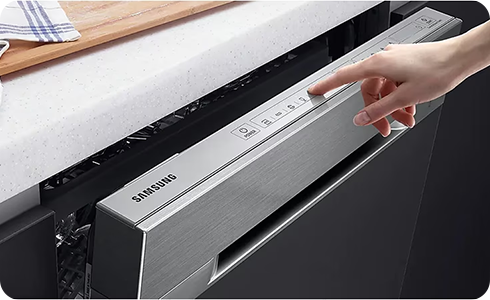
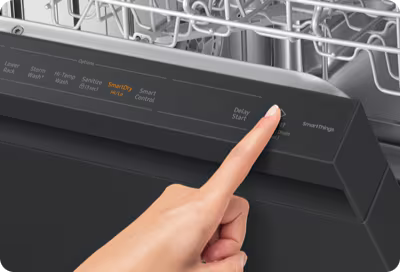
The control panel controls power and settings for the dishwasher. Faults here can stop the dishwasher from turning on. Buttons may be stuck or unresponsive. Internal electrical issues in the control board also block power delivery.
Quick Checks Before Repair
Samsung dishwashers sometimes fail to turn on. Before calling for repairs, try a few simple checks. These steps can save time and money. They help find easy fixes you can do yourself.
Inspecting The Power Cord
Check the power cord for any damage. Make sure it is plugged firmly into the outlet. A loose or damaged cord can stop the dishwasher from powering up. Replace the cord if you see frays or cuts.
Resetting The Dishwasher
Resetting the dishwasher can clear minor errors. Turn off the dishwasher using the control panel. Unplug it from the power source. Wait for about five minutes, then plug it back in. Turn it on and see if it works.
Examining The Circuit Breaker
Look at the circuit breaker in your home’s electrical panel. The dishwasher may have tripped the breaker. Flip the switch off and then back on to reset it. This restores power to the dishwasher if the breaker caused the issue.
Fixing Door Latch And Switch
The door latch and switch play a key role in your Samsung dishwasher’s operation. They keep the door closed tightly during cycles. If the dishwasher does not start, these parts might be the problem. Fixing or replacing them can often solve the issue quickly. Understanding how to test and replace these parts helps you save time and money.
Testing The Door Latch
Begin by unplugging the dishwasher for safety. Open the door and locate the door latch. Press the latch to check if it moves freely. A stuck latch can stop the dishwasher from starting. Use a multimeter to test for electrical continuity. Set the multimeter to the lowest ohms setting. Touch the probes to the latch terminals. A reading close to zero means the latch is good. No reading or infinite resistance means the latch is faulty and needs replacing.
Replacing A Faulty Door Switch
First, unplug the dishwasher to avoid electric shock. Remove the screws around the door panel to access the switch. Carefully disconnect the wires from the switch terminals. Use a screwdriver to remove the faulty switch. Install the new switch by connecting the wires correctly. Secure the switch with screws and reattach the door panel. Plug in the dishwasher and test if it turns on. A new switch often restores proper function to the dishwasher.

Credit: www.youtube.com
Troubleshooting Control Panel Issues
Troubleshooting control panel issues on your Samsung dishwasher can solve many power problems. The control panel is the main interface. It sends commands to the dishwasher. If it does not work properly, the dishwasher may not turn on.
Start with simple steps to check the control panel. These easy fixes often restore functionality. Understanding these steps can save time and avoid costly repairs.
Performing A Control Panel Reset
A control panel reset can clear minor glitches. First, turn off the dishwasher. Unplug it or switch off the circuit breaker. Wait for about five minutes. This lets the system fully power down.
Plug the dishwasher back in or turn the breaker on. Press the power button to turn it on. This reset can fix frozen or unresponsive buttons. Try starting the dishwasher after the reset.
Checking For Error Codes
The dishwasher may show error codes on the display. These codes help identify specific problems. Look at the control panel screen for any flashing numbers or letters.
Write down the code. Check the user manual or Samsung’s website for meanings. Error codes can point to electrical or mechanical issues. Knowing the code helps decide the next steps.
When To Call A Technician
Knowing when to call a technician for your Samsung dishwasher saves time and stress. Some problems need expert skills to fix. This helps avoid risks and further damage.
Read on to learn signs of complex issues and how to schedule professional help.
Identifying Complex Electrical Problems
Electrical faults can be hidden and dangerous. If your dishwasher shows no signs of power, this may be more than a simple fix.
Burning smells, sparks, or a tripped circuit breaker are clear warnings. Flickering lights or buzzing sounds also signal electrical trouble.
These issues need a trained technician. They have tools to diagnose and fix safely.
Scheduling Professional Repair
Choose a licensed technician with experience in Samsung dishwashers. Book repair appointments early to prevent long waits.
Explain the problem clearly. Mention any unusual sounds, smells, or error codes.
Professional repair ensures the dishwasher works reliably and safely again. Attempting fixes without knowledge may cause more harm.
Credit: www.samsung.com
Preventive Tips To Avoid Power Issues
Power problems can stop your Samsung dishwasher from working. Preventing these issues saves time and money. Simple steps keep your dishwasher running smoothly. Follow easy tips to avoid power troubles and enjoy clean dishes every day.
Regular Maintenance Steps
Check the power cord for damage regularly. Replace frayed or broken cords immediately. Clean the dishwasher filter often to avoid blockages. Dirt can cause electrical parts to fail. Inspect the door latch and seal for proper closure. A loose door can stop the dishwasher from starting. Remove debris from the control panel gently with a dry cloth. Avoid using water on electrical parts.
Safe Usage Practices
Plug the dishwasher directly into a wall outlet. Avoid using extension cords or power strips. Turn off the dishwasher after each cycle. Unplug the unit during storms or power outages. Do not overload the dishwasher with dishes. Too many dishes can strain the motor and wiring. Use the correct dishwasher detergent to prevent residue build-up. Residue can cause electrical shorts. Follow the user manual instructions carefully for safe operation.
Credit: www.samsung.com
Frequently Asked Questions
Why Is My Samsung Dishwasher Not Turning On?
Power issues, door latch problems, or faulty control boards often cause this problem.
How To Reset A Samsung Dishwasher That Won’t Start?
Unplug the dishwasher for 5 minutes, then plug it back in to reset.
Can A Blown Fuse Stop My Samsung Dishwasher From Working?
Yes, a blown fuse can cut power and prevent the dishwasher from turning on.
What Should I Check If My Samsung Dishwasher Door Won’t Lock?
Ensure the door latch is clean, aligned, and not broken for proper locking.
When To Call A Technician For Samsung Dishwasher Power Issues?
Call a technician if simple resets and checks don’t fix the power problem.
Conclusion
A Samsung dishwasher not turning on can feel frustrating. Simple checks often solve the problem. Check the power source and door latch first. Clean filters and inspect the control panel next. Small issues like a tripped circuit breaker may cause the fault.
If problems continue, contacting a professional helps. Regular maintenance keeps your dishwasher running smoothly. Don’t ignore warning signs or strange noises. Taking quick action saves time and money. Your dishwasher can work well again with careful attention. Keep these tips in mind for future troubles.