
Have you just changed the battery in your Ford key fob, only to find it’s not working? It’s frustrating when something that should be simple turns into a hassle.
You rely on your key fob every day to unlock your car, start the engine, and keep your vehicle secure. So, when it stops working, you need answers—and fast. You’ll discover why your Ford key fob might fail after a battery change and what you can do to fix it quickly.
Keep reading to get your key fob back in action without extra stress.
Common Reasons For Key Fob Failure
Ford key fobs can stop working after a battery change for several reasons. Understanding these common causes helps fix the problem quickly. Many issues happen during or after replacing the battery. Some are easy to fix, while others might need professional help.
Battery Installation Issues
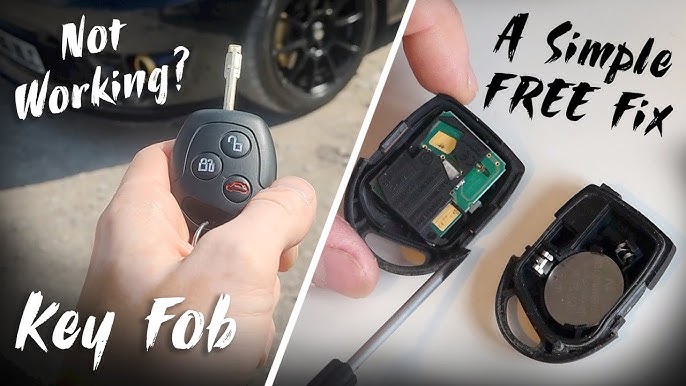
Placing the battery incorrectly is a common mistake. The battery must fit the right way, matching the positive and negative sides. Dirt or corrosion inside the key fob can block power flow. Sometimes the battery is dead or low-quality, causing failure. Always use a fresh, correct battery and clean the contacts before installing.
Key Fob Programming Problems
After changing the battery, the key fob may lose its programming. The car needs to recognize the fob to work properly. Some models require reprogramming after battery replacement. If the fob is not synced with the car, it won’t respond. Professional tools or dealer assistance might be necessary to reprogram it.
Signal Interference
Signal interference can stop the key fob from working. Other electronic devices nearby might block the signal. Metal objects or thick walls can reduce the range. Strong radio signals or Wi-Fi networks may cause problems. Try standing closer to the car or away from electronic devices.
Physical Damage
Physical damage can prevent the key fob from working correctly. Dropping the fob can harm internal parts or the circuit board. Water or moisture can short-circuit the key fob. Cracked buttons or loose parts stop the key from sending signals. Inspect the fob carefully for any visible damage.

Credit: www.reddit.com
Checking The Battery Installation
After changing the battery in your Ford key fob, it might still not work. Checking the battery installation is a simple step. It helps find small mistakes that stop the key fob from working.
Many times, the problem is in how the battery fits inside the fob. Small errors can block power flow. Let’s explore what to check carefully.
Correct Battery Orientation
Placing the battery the right way is very important. The positive side must match the plus sign in the battery slot. The negative side goes to the minus sign. If reversed, the key fob will not get power. Check the tiny symbols inside the battery case. Align the battery accordingly.
Battery Contact Points
The battery must touch the metal contacts inside the key fob. Dirt or corrosion on these points can stop power. Clean the contacts gently with a dry cloth. Make sure the battery sits tightly on the contacts. Loose fit can cause connection issues.
Using The Right Battery Type
Not all batteries are the same. Use the battery type your Ford key fob needs. Usually, it is a CR2032 or similar coin cell battery. Check your car manual or the old battery label. Using the wrong type can cause the key fob to fail.
Reprogramming The Ford Key Fob
Reprogramming the Ford key fob is often necessary after changing its battery. Without reprogramming, the car may not recognize the key fob. This can stop the remote functions from working properly. Reprogramming links the key fob to your vehicle’s system again. The process can be done manually or with a diagnostic tool. Some situations require a visit to a dealer for professional help.
Manual Reprogramming Steps
Start by sitting inside your Ford with all doors closed. Insert the key into the ignition and turn it to the “On” position without starting the engine. Press the lock button on the key fob. Turn the key to the “Off” position and then back to “On” three times. End by turning the key to “Off” and removing it. The car should lock and unlock the doors to confirm programming success.
Using A Diagnostic Tool
Diagnostic tools can reprogram the key fob quickly. Connect the tool to your vehicle’s OBD-II port. Follow the tool’s instructions to access the key fob programming mode. This method is faster and more reliable than manual steps. It works well if you have multiple key fobs to program. Some tools require purchase, while others may be available at repair shops.
When To Visit A Dealer
Dealers have advanced equipment for key fob reprogramming. Visit a dealer if manual or tool methods fail. Also, seek dealer help if your key fob is damaged or lost. They can replace the key fob and program it to your car. Dealers ensure the key works smoothly with your vehicle’s security system. This service often comes with a fee but guarantees proper function.

Credit: www.reddit.com
Troubleshooting Signal Issues
After changing your Ford key fob battery, signal problems may occur. These issues stop the key fob from working properly. Troubleshooting signal issues helps find and fix the problem fast. This section covers common steps to check and solve signal problems.
Avoiding Interference Sources
Electronic devices can block your key fob signal. Keep away from Wi-Fi routers, microwaves, and cordless phones. Metal objects like fences or large tools also cause interference. Try using the key fob in a different spot. This simple step can improve the signal strength.
Testing The Key Fob Range
Stand close to your car and press a button. Slowly move farther away while pressing again. Notice the distance where the key fob stops working. A very short range means the signal is weak. This test helps decide if the key fob needs repair or replacement.
Inspecting The Vehicle Receiver
The car’s receiver picks up the key fob signal. Dirt, damage, or loose connections can block the signal. Check the receiver area near the windshield or dashboard. Clean any dust and ensure all wires are tight. Fixing receiver issues often restores key fob function.
Handling Physical Damage
Physical damage can stop your Ford key fob from working after a battery change. Dropping the fob or pressing buttons too hard may cause problems. Dirt or moisture inside the fob can also affect its function. Handling these issues quickly helps restore your key fob’s performance.
Repairing Button Issues
Buttons on the key fob can wear out or get stuck. Sometimes dirt or debris blocks the button’s movement. Clean the area around the buttons gently. Use a soft cloth or a small brush. If a button is broken, repair kits are available. These kits let you fix or replace faulty buttons easily.
Replacing The Key Fob Shell
The outer shell protects the key fob’s internal parts. Cracks or damage to the shell can expose the electronics to harm. You can buy a replacement shell online or at a dealer. Transfer the internal parts carefully into the new shell. This step often fixes many physical damage problems.
When To Replace The Key Fob
Sometimes repair is not enough. Internal damage may be too severe to fix. If the key fob does not work after repairs, replacement is necessary. Buying a new key fob ensures reliable operation. Contact your dealer for a compatible replacement key fob.
Credit: www.youtube.com
Preventive Tips For Key Fob Maintenance
Keeping your Ford key fob in good shape saves time and hassle. Proper care helps avoid common issues after changing the battery. Small habits can extend your key fob’s life and improve its performance. Here are easy tips to maintain your key fob and prevent problems.
Regular Battery Checks
Check the battery often, even if the fob works fine. Weak batteries cause poor signal and delayed responses. Replace the battery every year or as needed. Use the correct battery type to avoid damage. Test the fob after replacing the battery to confirm it works well.
Safe Storage Practices
Store the key fob away from metal objects and electronics. These can interfere with the signal. Keep the fob in a soft pouch or case to prevent scratches. Avoid dropping the fob or exposing it to heavy impacts. Store it in a dry place at room temperature.
Avoiding Water Damage
Water harms the fob’s internal circuits. Do not leave the key fob near sinks, pools, or outdoors in rain. If the fob gets wet, dry it immediately with a soft cloth. Remove the battery and let it air dry before using again. Using waterproof covers adds extra protection against moisture.
Frequently Asked Questions
Why Is My Ford Key Fob Not Working After Battery Change?
The key fob may need reprogramming or the battery might be inserted incorrectly.
How Do I Reset My Ford Key Fob After Battery Replacement?
Press and hold the unlock button for 15 seconds to reset the key fob.
Can A Dead Car Battery Affect The Key Fob Function?
Yes, a low or dead car battery can stop the key fob from working.
How To Check If The New Battery Is Properly Installed?
Ensure the battery is placed with the positive side facing up and fits snugly.
When Should I Replace My Ford Key Fob Battery?
Replace the battery every 1-2 years or when the key fob range decreases.
Conclusion
A Ford key fob not working after a battery change can be frustrating. Check the battery type and placement carefully. Try reprogramming the key fob to sync it with your car. Sometimes dirt or damage inside the fob causes issues.
If problems continue, visit a professional for help. Small steps often fix common key fob problems. Stay calm and follow these tips to get your key fob working again.