
Are you frustrated with unexpected charges on your Verizon bill? You’re not alone.
Many customers face Verizon billing problems that can cause confusion and stress. Whether it’s unclear fees, sudden price hikes, or errors in your statement, these issues can quickly become overwhelming. But don’t worry—this article will help you understand why these billing problems happen and, more importantly, how you can fix them.
Keep reading to take control of your Verizon bill and avoid paying more than you should.
Common Verizon Billing Issues
Verizon billing problems can confuse many customers. These issues often cause frustration and delays in payment. Understanding common billing problems helps you spot mistakes quickly. This knowledge saves time and avoids extra charges.
Unexpected Charges
Many Verizon users see charges they did not expect. These may come from roaming fees or extra data use. Sometimes, premium services add fees without clear notice. Checking your bill carefully can catch these surprises early.
Duplicate Billing
Duplicate billing happens when Verizon charges for the same service twice. This error can occur after plan changes or device upgrades. It leads to paying more money than necessary. Spotting duplicates requires reviewing each bill line closely.
Incorrect Plan Fees
Incorrect plan fees appear when charges do not match your chosen plan. Verizon may bill for services you did not select. These mistakes can happen during plan updates or promotions. Verify your plan details to avoid paying wrong fees.
Late Payment Penalties
Late payment penalties add extra costs to your bill. Missing the payment date triggers these fees. Sometimes, billing errors cause confusion about due dates. Paying on time prevents these penalties and keeps your account in good standing.
Quick Steps To Check Your Bill
Checking your Verizon bill carefully can help you find any mistakes fast. It saves time and stress. Follow these simple steps to understand your bill clearly.
Review Usage Details
Look at your call, text, and data use on the bill. Check if the numbers match your actual usage. Note any spikes or unusual activity. This helps spot errors in charges.
Compare With Your Plan
Match the bill charges with your Verizon plan features. Ensure you are billed only for what your plan covers. Watch out for charges beyond your package limits. This keeps your bill accurate.
Spot Extra Services
Look for any extra services or add-ons on your bill. Sometimes unwanted services get added by mistake. Identify these and decide if you want to keep or remove them.
Verify Payment History
Check your past payments listed on the bill. Confirm all payments are recorded correctly. Missing payments can cause confusion or extra fees. This step keeps your account up to date.
Easy Fixes For Billing Errors
Billing errors with Verizon can cause confusion and stress. Fixing these errors does not have to be hard. There are simple steps you can take to solve billing problems quickly. These easy fixes help you save time and avoid frustration.
Contact Customer Support
Call Verizon’s customer support for help with billing issues. Speak clearly and explain the problem. Keep your account details ready. The support team can check your bill and fix mistakes fast. They can also answer your questions about charges.
Use The Verizon App
Download the Verizon app to manage your account easily. The app shows your current bills and payment history. You can spot errors by reviewing charges closely. Use the app to report problems or ask for help. It is available on Android and iOS devices.
Dispute Charges Online
Disputing charges online is a quick way to solve billing problems. Visit Verizon’s website and find the billing dispute form. Fill in the details about the wrong charges. Submit the form and wait for Verizon to respond. Keep copies of all your communication for reference.
Request Bill Adjustments
You can ask Verizon to adjust your bill if you find errors. Provide clear evidence of the mistake. Request a correction or a refund if needed. Verizon usually reviews your request and updates the bill. This step helps make sure you only pay what you owe.

Credit: www.youtube.com
Preventing Future Billing Problems
Preventing future billing problems with Verizon starts with simple, careful steps. These steps help you avoid surprises and keep your account in good shape. Staying proactive saves time and stress.
Set Up Payment Alerts
Payment alerts notify you before your bill is due. They help you avoid late fees and missed payments. You can get alerts by email or text message. Set alerts for bill amounts or due dates. This keeps you informed every month.
Regular Bill Reviews
Check your bill each month for errors or unexpected charges. Look at each item carefully. Spotting mistakes early helps you fix problems quickly. Regular reviews keep your billing clear and accurate. Make it a habit to review bills on time.
Update Account Information
Keep your contact and payment details up to date. Wrong information can cause billing delays or errors. Change your address, phone number, or payment method as soon as needed. This keeps your account running smoothly and payments on time.
Choose The Right Plan
Select a Verizon plan that fits your needs and budget. Avoid plans with extra features you do not use. A suitable plan reduces unexpected charges and confusion. Review your plan regularly to ensure it still fits your usage.
When To Escalate Billing Issues
Billing problems with Verizon can become frustrating fast. Knowing when to escalate the issue saves time and stress. Some billing errors need more than a quick call or email. Acting early helps protect your money and service. Here are ways to escalate billing issues effectively.
Filing Complaints
Start by filing a complaint with Verizon’s customer service. Use their official website or call their billing department. Keep records of all your communications. If the problem stays unsolved after multiple attempts, file a formal complaint. This step shows you are serious about resolving the issue.
Contacting Regulatory Agencies
Regulatory agencies oversee telecom companies like Verizon. They can help when billing disputes become severe. Contact the Federal Communications Commission (FCC) or your state’s public utility commission. These agencies investigate complaints and may pressure Verizon to fix errors. Provide detailed information and copies of your bills.
Seeking Legal Advice
Legal help might be necessary for unresolved, large billing disputes. A lawyer can explain your rights and options. Legal advice is important if Verizon charges are unfair or incorrect. Some lawyers offer free consultations to review your case. This step should come after all other efforts fail.
.png)
Credit: telecloud.net
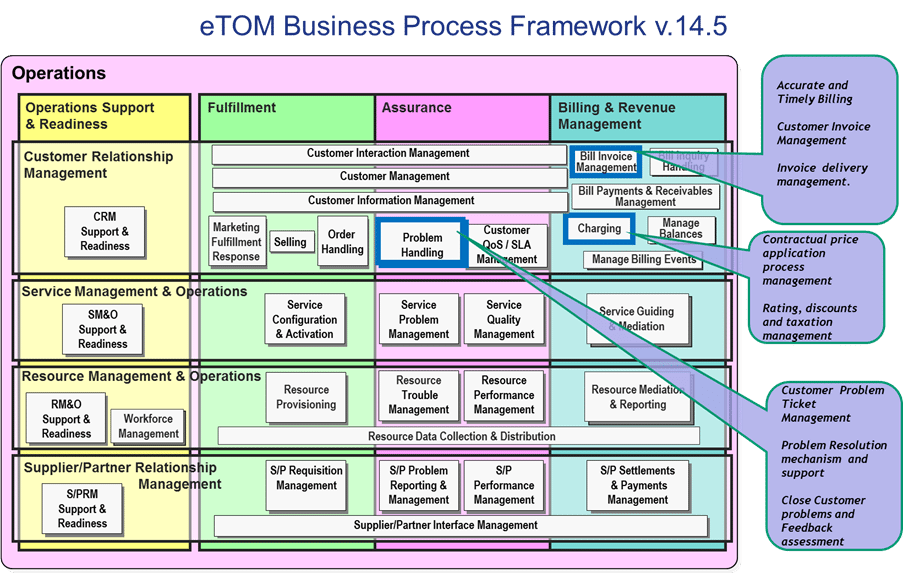
Credit: www.tmforum.org
Frequently Asked Questions
Why Is My Verizon Bill Higher Than Expected?
Billing errors or extra charges can cause a higher bill. Check your plan and usage details carefully.
How Can I Fix Verizon Billing Errors Quickly?
Contact Verizon customer service by phone or online chat to report and resolve billing errors fast.
What Should I Do If Verizon Charges Are Unknown?
Review your bill for all charges. Dispute unknown fees immediately with Verizon support.
Can Verizon Billing Problems Affect My Service?
Yes, unpaid bills may lead to service suspension. Pay bills on time to avoid disruptions.
How Do I Check My Verizon Bill Online?
Sign in to the Verizon website or app to view, download, and manage your bill easily.
Conclusion
Verizon billing problems can cause stress and confusion. Clear communication helps solve many issues fast. Always check your bill carefully each month. Contact Verizon support as soon as you spot errors. Keep records of your calls and messages. Patience and persistence often bring good results.
Staying informed protects you from unexpected charges. Don’t let billing problems affect your peace of mind. Taking small steps makes a big difference. Stay calm and handle issues one at a time.