
Is your GE dehumidifier pump not working when you need it most? It’s frustrating to find your device suddenly failing to remove moisture from your space.
You might be wondering why it stopped pumping water or how to fix it quickly. Don’t worry—you’re not alone, and there are simple steps you can take to get your dehumidifier back in action. Keep reading to discover common causes and easy solutions that will save you time and stress.
Your home deserves to stay dry, and your dehumidifier should help make that happen.
Credit: www.homedepot.com
Common Causes Of Pump Failure
Understanding why your GE dehumidifier pump is not working helps fix the issue fast. Pumps fail for several common reasons. Identifying these causes can save time and money.
Below are the main causes of pump failure. Each one affects the pump’s ability to move water properly.
Clogged Drain Hose
The drain hose carries water from the pump to the drain. Dirt, dust, or algae can block the hose. A clogged hose stops water flow, causing the pump to fail. Cleaning or replacing the hose often solves this problem.
Pump Motor Issues
The motor powers the pump. Over time, motors can wear out or overheat. A broken motor means the pump cannot push water out. Checking the motor for damage or wear is important to keep the pump working.
Electrical Problems
Electric faults can stop the pump from running. Loose wires, blown fuses, or damaged circuits cause power loss. Testing the electrical parts ensures the pump gets the right power supply.
Sensor Malfunctions
Sensors tell the pump when to start and stop. Faulty sensors send wrong signals. This leads to the pump not working or running too long. Replacing bad sensors fixes these errors and restores pump function.
Credit: www.homedepot.com
Step-by-step Troubleshooting
When your GE dehumidifier pump stops working, follow clear steps to find the problem. Troubleshooting helps save time and money. It guides you through simple checks to fix the issue quickly.
Start by looking at parts that often cause pump failure. This step-by-step guide helps you test and fix the pump with easy actions. Each step focuses on one part of the pump system.
Checking The Drain Hose
First, examine the drain hose. Make sure it is not bent or blocked. A clogged hose stops water flow and stops the pump.
Remove the hose and check for dirt or debris inside. Clean the hose if needed. Reattach it tightly to avoid leaks.
Inspecting The Pump Motor
Next, check the pump motor. Listen for strange sounds when the unit runs. Silence may mean the motor is not working.
Look for visible signs like rust or damage. If the motor is dirty, clean it carefully. Replace the motor if it shows major damage.
Testing Electrical Connections
Check all electrical connections. Loose wires can stop the pump from working. Turn off the power before inspecting wires.
Ensure all plugs are tight and free from corrosion. Use a multimeter to test voltage if you can. Fix or replace any faulty wiring.
Resetting The Unit
Try resetting the dehumidifier. Unplug it for a few minutes. This can clear minor errors and restart the pump.
Plug it back in and turn it on. Watch if the pump starts working again. Resetting often fixes small glitches easily.
Quick Fixes To Try At Home
Dehumidifier pumps sometimes stop working without warning. Small issues often cause this problem. Many of these problems can be fixed at home. Trying quick fixes can save time and money. Simple steps may get your pump running again fast.
Clearing Blockages
Blockages in the pump or hose can stop water flow. Check the hose for any kinks or bends. Remove the hose and look inside for dirt or debris. Use a small brush or pipe cleaner to clear clogs. Flush the hose with water to remove loose dirt. Make sure the drainage path is smooth and open.
Reconnecting Loose Wires
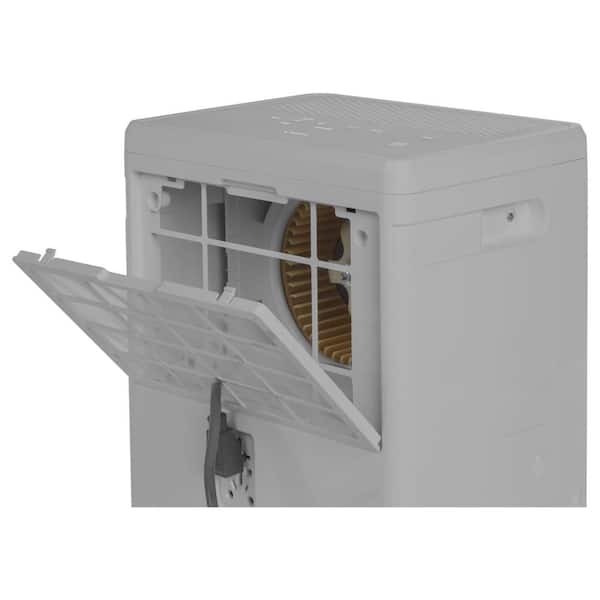
Loose wires can cut power to the pump. Unplug the dehumidifier before checking wires. Open the back panel carefully. Look for wires that are loose or disconnected. Push wires firmly into their connectors. Tight connections help the pump run correctly. Close the panel securely before testing the unit.
Replacing Faulty Parts
Some parts may wear out over time. Common faulty parts include the pump motor and switches. Identify the broken part by checking for unusual sounds or no movement. Order a replacement part that matches your model number. Follow the user manual to replace parts safely. Use basic tools like screwdrivers for installation.
Cleaning The Filter
A dirty filter can block airflow and affect pump performance. Remove the filter from the unit. Tap it gently to remove dust and debris. Wash the filter with warm water and mild soap. Let it dry completely before reinstalling. Regular filter cleaning keeps your pump working well.

Credit: www.youtube.com
Preventive Maintenance Tips
Keeping your GE dehumidifier pump in good shape helps avoid many common problems. Simple care steps can extend the pump’s life and keep it working well. Follow these preventive maintenance tips to ensure your unit runs smoothly and efficiently.
Regular Cleaning Schedule
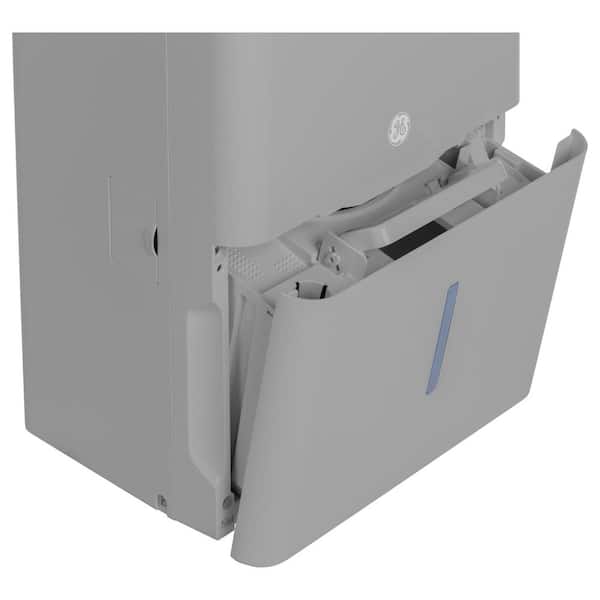
Dust and dirt can block the pump and filters. Clean the unit every two weeks. Use a soft cloth and mild soap. Avoid harsh chemicals that can damage parts. Clean the water tank and empty it fully. This stops mold and bacteria growth.
Proper Placement Of The Unit
Place the dehumidifier on a flat, stable surface. Keep it away from walls and furniture. Leave space around the unit for good air flow. Avoid direct sunlight or heat sources. This helps the pump work without extra strain.
Using Distilled Water
Fill the water tank with distilled water if needed. Tap water can cause mineral build-up inside the pump. Minerals reduce the pump’s efficiency and may cause damage. Distilled water helps keep the pump clean and working well.
Monitoring Humidity Levels
Check the humidity levels in your room regularly. Set the dehumidifier to maintain 40-50% humidity. Too low or high humidity can affect the pump’s performance. Use a separate hygrometer for accurate readings if your unit lacks one.
When To Call A Professional
Knowing when to call a professional for your GE dehumidifier pump saves time and stress. Some problems need expert help to fix correctly. Attempting repairs without skill can cause more damage. Recognizing signs that require a pro keeps your home safe and your device working well.
Signs Of Major Pump Damage
Listen for strange noises like grinding or rattling from the pump. Water leaking inside or around the unit shows serious trouble. The pump not moving water at all signals a big issue. Constant error codes on the display often mean internal damage. These signs suggest the pump needs professional repair or replacement.
Warranty And Service Options
Check if your GE dehumidifier is still under warranty before trying repairs. Warranty can cover parts and service costs. Contact GE support for authorized repair centers. Using certified technicians protects your warranty and ensures quality fixes. Service plans may offer faster help and reduce repair bills.
Cost Considerations
Professional repairs can cost more than simple fixes. Weigh repair costs against buying a new unit. Some pump problems have high labor and part expenses. A trusted technician can give a clear price estimate. Investing in quality repair often extends your dehumidifier’s life.
Frequently Asked Questions
Why Is My Ge Dehumidifier Pump Not Pumping Water?
The pump may be clogged, faulty, or the water tank sensor might be dirty or broken.
How Do I Reset The Ge Dehumidifier Pump?
Unplug the unit for a few minutes, then plug it back in to reset the pump.
Can A Dirty Filter Affect My Dehumidifier Pump?
Yes, a dirty filter can block airflow, causing the pump to stop working properly.
What Causes The Pump Hose To Stop Draining Water?
The hose might be kinked, blocked, or the pump motor could be failing.
How Often Should I Clean My Ge Dehumidifier Pump?
Clean the pump and filters every 3 months to keep the system working well.
Conclusion
A GE dehumidifier pump not working can cause water buildup. Check the pump and power supply first. Clean the filter and hose to avoid blockages. Small problems often cause big issues. Fixing these quickly saves time and money. Regular maintenance keeps your dehumidifier running well.
Stay attentive to unusual sounds or leaks. Proper care helps your home stay dry and comfortable. Don’t ignore signs of malfunction to prevent damage. Simple steps can restore your dehumidifier’s pump function fast.