
Is your Amana dryer control panel not working and leaving you frustrated? You rely on your dryer every day, and when the control panel stops responding, it can bring your laundry routine to a halt.
But don’t worry—you’re not alone, and there are clear steps you can take to fix this problem. You’ll discover simple solutions to get your dryer back in action quickly. Keep reading to find out what might be causing the issue and how you can solve it without stress or expensive repairs.
Credit: www.abt.com
Common Causes
The Amana dryer control panel may stop working for several reasons. Understanding these common causes helps in identifying the problem faster. Some issues are simple to fix, while others might need professional help.
Power supply problems often cause the control panel to fail. The control board itself can also have faults. Wiring issues can disrupt the panel’s operation. Sometimes, blown fuses stop the dryer from working properly.
Power Supply Issues
The dryer needs a steady power supply to work. A loose plug or faulty outlet can cause power loss. Check the power cord for damage or wear. Circuit breakers that have tripped may cut power to the dryer. Without power, the control panel will not respond at all.
Faulty Control Board
The control board is the brain of the dryer. It sends signals to start and stop the machine. A damaged board can cause buttons to stop working. Electronic failures or moisture can damage the control board. Sometimes, it requires replacement to restore function.
Wiring Problems
Wiring connects the control panel to the dryer’s parts. Loose or broken wires can stop signals from reaching the panel. Check for visible wire damage or disconnections. Wires can wear out over time or after rough handling. Faulty wiring often needs repair or replacement.
Blown Fuses
The dryer has fuses to protect its electrical parts. A blown fuse cuts power to the control panel. Fuses blow due to power surges or overloads. Replacing the fuse may fix the control panel issue. Always use the correct fuse type for safety.

Credit: www.amazon.com
Basic Troubleshooting Steps
The Amana dryer control panel may stop working for several reasons. Basic troubleshooting helps find simple issues fast. Start with these easy steps to check your dryer.
Check Power Connection
Make sure the dryer is plugged in properly. Sometimes the plug can come loose. Check the outlet for power by testing another device. If the outlet has no power, reset your circuit breaker or replace the fuse.
Reset The Dryer
Unplug the dryer from the power source. Wait about one minute to clear any errors. Plug it back in and turn it on. This reset can fix small glitches in the control panel.
Inspect Control Panel Buttons
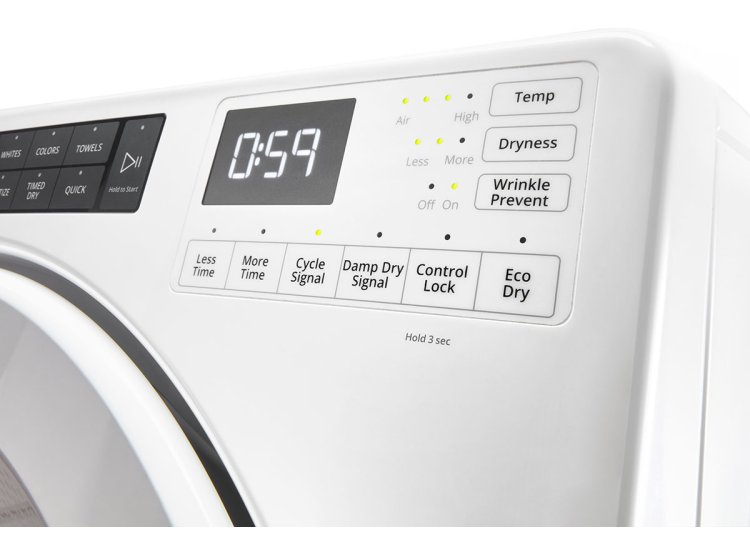
Look closely at each button on the control panel. Dirt or debris can block button presses. Clean the panel gently with a soft cloth. Press each button a few times to ensure they move freely and respond correctly.
Fixing Power Supply Problems
Power supply issues often cause the Amana dryer control panel to stop working. Checking and fixing these problems can restore the dryer’s function quickly. This section explains simple steps to test and fix power supply problems safely and effectively.
Test The Outlet
Begin by checking the electrical outlet. Plug in another device like a lamp or phone charger. If the device does not work, the outlet may have no power. Try using a different outlet to see if the dryer powers on. Testing the outlet helps find where the problem starts.
Replace Power Cord
Examine the dryer’s power cord for damage. Look for cuts, burns, or loose connections. A faulty cord can stop power from reaching the dryer. Replacing the power cord with a new one can fix the issue. Always unplug the dryer before changing the cord.
Check Circuit Breaker
Locate the home’s circuit breaker panel. Find the breaker for the dryer. If the breaker has tripped, switch it off and then on again. A tripped breaker cuts power to the dryer and its control panel. Resetting the breaker can restore power and solve the problem.
Credit: fredsappliance.com
Repairing Or Replacing The Control Board
Repairing or replacing the control board is a key step to fix your Amana dryer. The control board manages all dryer functions. When it stops working, the dryer may not start or run properly. Fixing this part can save you money and extend your dryer’s life.
Identify Control Board Type
Find the exact model number of your Amana dryer. This helps to identify the right control board. Check the user manual or the label inside the dryer door. Note down the control board’s part number. This ensures you get the correct replacement.
Remove And Inspect Board
Unplug the dryer before starting. Remove the back panel or control panel to access the board. Look for burnt marks or broken parts on the board. Clean any dust or debris gently. A careful inspection can reveal if repair is possible.
Order Replacement Parts
Use the part number to order the new control board online or from a local store. Choose genuine parts for best performance and safety. Keep the receipt and check the return policy. This ensures you can exchange the part if needed.
Install New Control Board
Turn off power to the dryer before installation. Connect wires to the new control board exactly as the old one. Secure the board in place with screws. Replace the dryer panels and plug it back in. Test the dryer to confirm it works well.
Addressing Wiring Issues
Wiring problems often cause the Amana dryer control panel to stop working. Checking wiring helps find and fix these issues fast. This step can save time and money before replacing parts.
Inspect Wiring Harness
Start by looking at the wiring harness. This bundle carries power and signals to the control panel. Check for loose or broken wires. Look for signs of burning or corrosion. Damaged harnesses can stop the panel from working.
Repair Loose Connections
Loose connections cause power loss and errors. Tighten any loose wire connectors gently. Make sure wires fit well in their terminals. Use pliers if needed, but do not pull too hard. Secure connections ensure steady power flow.
Replace Damaged Wires
Worn or broken wires must be replaced. Cut out the damaged sections carefully. Use matching wires and connectors for replacement. Insulate new wires with electrical tape or heat shrink. Proper wiring keeps the control panel functioning correctly.
Dealing With Blown Fuses
Blown fuses often cause Amana dryer control panel problems. A fuse protects the dryer from electrical damage. If it blows, the dryer may stop working or show errors. Finding and fixing a blown fuse can bring your dryer back to life quickly. Follow these steps to deal with blown fuses safely and easily.
Locate Dryer Fuse
First, unplug the dryer for safety. Open the dryer’s back panel to find the fuse. The fuse is usually near the control panel or the power cord connection. Look for a small cylindrical or glass tube with metal ends. Check your dryer manual for the exact fuse location if needed.
Test Fuse With Multimeter
Use a multimeter to check the fuse’s condition. Set the multimeter to the continuity or resistance mode. Remove the fuse from its holder carefully. Touch the multimeter probes to each end of the fuse. A good fuse shows continuity or low resistance. A blown fuse shows no continuity or infinite resistance.
Replace Fuse Safely
Buy a replacement fuse that matches the dryer’s specs. Insert the new fuse into the holder gently. Secure the dryer’s back panel. Plug in the dryer and test the control panel. The dryer should work normally if the fuse was the issue. Always handle electrical parts with care and avoid wet hands.
When To Call A Professional
Knowing when to call a professional for your Amana dryer control panel saves time and prevents damage. Some problems need expert skills and tools. Trying to fix complex issues alone may cause more harm. Safety is also a top concern when dealing with electrical parts. Below are signs that show it is best to get professional help.
Complex Electrical Problems
Control panel issues often involve electrical faults. Diagnosing wiring or circuit board problems needs special knowledge. Professionals have the right tools to test and repair these parts safely. Faulty wiring can cause shocks or fire risks. Do not attempt to fix electrical problems without experience.
Warranty Considerations
Your dryer may still have a warranty. Trying to fix it yourself might void the warranty. Professionals understand how to repair without breaking warranty rules. Calling a certified technician keeps your warranty valid. Always check warranty terms before starting repairs.
Safety Precautions
Dryer control panels use electricity that can be dangerous. Handling live wires or components may cause injury. Professionals follow safety rules to avoid accidents. They also know how to prevent damage to the dryer. Protect yourself by letting experts handle the repair work.
Preventive Maintenance Tips
Preventive maintenance keeps your Amana dryer working well. It helps avoid control panel problems. Small steps protect your appliance and save repair costs. Follow easy tips regularly for best results.
Regular Cleaning
Clean the control panel gently with a soft cloth. Avoid water or harsh cleaners. Dust and dirt can cause buttons to stick or stop working. Keep the vent and lint filter clear. This improves airflow and prevents overheating.
Avoid Overloading
Do not put too many clothes in the dryer. Overloading strains the motor and control panel. Clothes need space to dry evenly. Overloading can cause errors and reduce the dryer’s life.
Routine Inspections
Check the dryer for any damage or loose wires. Look for error messages on the control panel. Test buttons and knobs regularly to ensure they work. Early detection helps fix small issues before they grow.
Frequently Asked Questions
Why Is My Amana Dryer Control Panel Not Responding?
The control panel may be faulty, or there could be a power issue causing no response.
How Can I Reset The Amana Dryer Control Panel?
Unplug the dryer for one minute, then plug it back in to reset the control panel.
What Causes The Dryer Control Panel To Stop Working?
Electrical faults, damaged wiring, or moisture inside the panel can cause it to stop working.
Can A Blown Fuse Affect The Dryer Control Panel?
Yes, a blown fuse or tripped circuit breaker can cut power to the control panel.
When Should I Call A Technician For Control Panel Issues?
Call a technician if resetting does not work or if you see error codes on the display.
Conclusion
Fixing the Amana dryer control panel can save time and money. Check the power supply and connections first. Clean the panel to remove dust and dirt. Replace damaged buttons or fuses carefully. Small steps often solve common issues. Regular maintenance helps avoid future problems.
Remember, patience and safety come first. Don’t rush repairs to prevent more damage. Keep your dryer working smoothly with simple care. Troubleshooting feels easier with clear guidance. Your dryer will dry clothes well again soon.