
Is your Vizio subwoofer not working and leaving your sound experience flat and disappointing? You rely on your subwoofer to deliver deep, powerful bass that brings movies, music, and games to life.
When it suddenly stops working, it can feel frustrating and confusing. But don’t worry—you’re not alone, and fixing it might be easier than you think. You’ll discover simple, effective steps to diagnose and solve the problem so your Vizio subwoofer can roar back to life.
Keep reading to get your sound booming again!
Common Causes Of Subwoofer Issues
Subwoofer problems are common and can stop your Vizio sound system from working well. Knowing common causes helps fix the issue fast. Many times, the problem is easy to solve with simple checks. This section covers the main reasons why a Vizio subwoofer may not work.
Power Supply Problems
Power issues are a top cause of subwoofer failure. The subwoofer must be plugged in and switched on. A loose power cable or a faulty outlet can cut power. Sometimes, the power adapter or internal fuse may fail. Check the power source and cables first.
Connection Errors
Incorrect or loose connections stop sound from reaching the subwoofer. The audio cable must be firmly connected to both the subwoofer and the sound system. Using the wrong input or output port also causes problems. Inspect all cables and ports for damage or poor contact.
Settings And Configuration
Subwoofer settings affect how it works with your system. The volume might be too low or muted. Audio settings on the TV or receiver may not send bass signals to the subwoofer. Some systems need the subwoofer turned on in the menu. Check sound settings carefully.
Hardware Failures
Internal parts can wear out or break over time. The speaker cone might be damaged or the amplifier inside may fail. Dust or moisture can cause hardware problems too. If the subwoofer makes strange noises or no sound, hardware failure could be the cause.

Credit: www.reddit.com
Quick Checks Before Troubleshooting
Before diving into complex fixes for your Vizio subwoofer, start with some quick checks. These simple steps often solve the problem fast. They save time and avoid unnecessary frustration.
Check the basics first. Confirm the subwoofer has power. Make sure all cables are connected properly. Test the audio source to see if it plays sound. These actions reveal common issues quickly.
Verifying Power Status
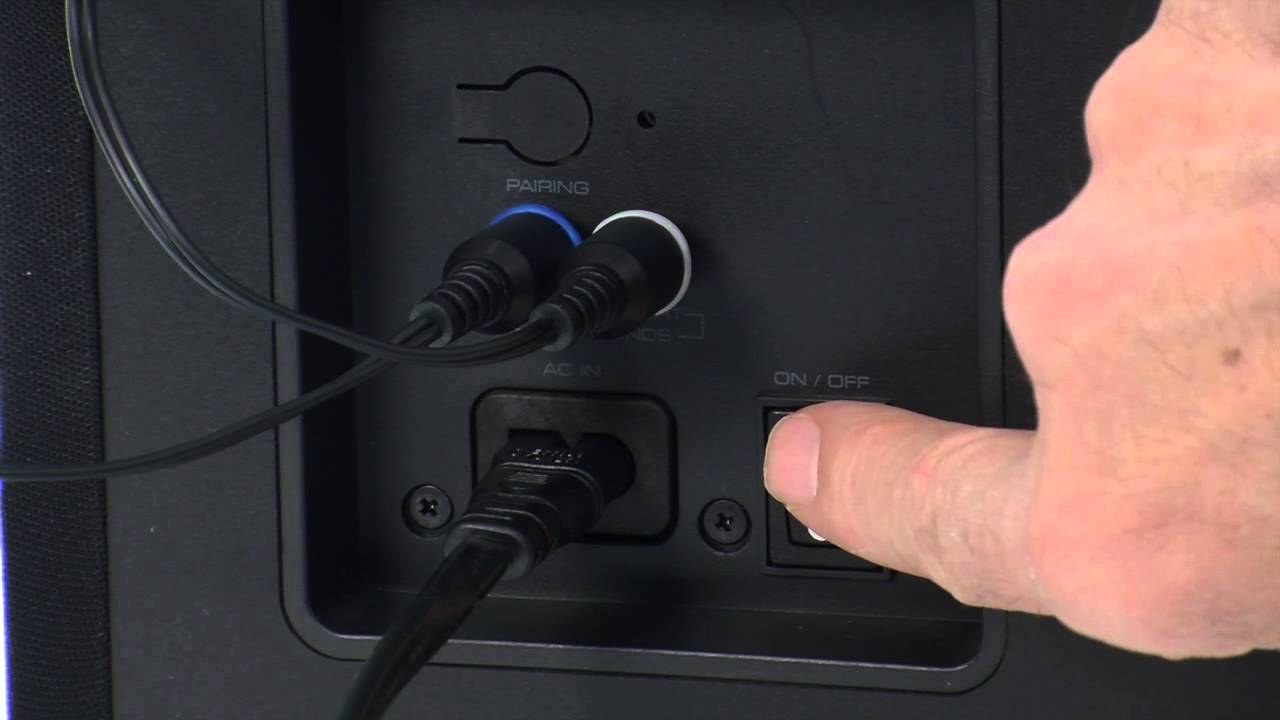
Check if the subwoofer is plugged into a working outlet. Look for a power light on the subwoofer. If there is no light, try a different outlet or power strip. Make sure the power switch is turned on. A dead power source is a frequent cause of failure.
Inspecting Cable Connections
Look closely at all cables connected to the subwoofer. Ensure each cable is fully plugged in. Loose or damaged cables can block the signal. Replace any frayed or broken wires. Secure connections improve sound quality.
Testing Audio Source
Play audio from different devices or apps. Confirm the source device’s volume is not muted or too low. Use headphones to check if the source outputs sound properly. This step confirms the problem is with the subwoofer, not the source.
Resetting The Subwoofer
Resetting the subwoofer can fix many common sound issues. It clears minor glitches and restores default settings. This simple step often helps the subwoofer work properly again. Resetting does not delete your personal settings unless you perform a factory reset.
Soft Reset Steps
Unplug the subwoofer from the power outlet. Wait for 30 seconds to 1 minute. Plug it back in and turn it on. This process clears temporary faults inside the subwoofer. Test the sound after the soft reset. If the problem continues, try the factory reset.
Factory Reset Procedure
Locate the reset button on the subwoofer. It is usually small and recessed. Use a paperclip or pin to press and hold the button. Hold it for about 10 to 15 seconds. Release the button and wait for the subwoofer to restart. The subwoofer will return to its original factory settings. This reset may fix deeper software issues.
Credit: modart.gr
Adjusting Audio Settings
Adjusting the audio settings can fix many issues with a Vizio subwoofer not working. Small changes in the settings can bring big improvements in sound quality. Knowing which settings to check helps you get the best sound from your system.
Subwoofer Volume Levels
Start by checking the subwoofer volume level on your Vizio soundbar or receiver. Low volume can make the subwoofer seem like it is not working. Increase the volume gradually to hear the bass better. Avoid setting the volume too high to prevent distortion or damage.
Bass Management Controls
Bass management controls direct low frequencies to the subwoofer. Make sure these controls are set correctly in your audio menu. Choose the option that sends bass sounds to the subwoofer. This helps the subwoofer produce deep, clear bass without interference.
Sound Mode Selection
Sound modes affect how audio is processed and output. Some modes reduce or turn off the subwoofer. Select a mode like “Movie” or “Music” for full bass effect. Experiment with different modes to find the best sound for your room and taste.
Fixing Connection Issues
Fixing connection issues is a key step to get your Vizio subwoofer working again. Problems in cables or signals often stop the subwoofer from producing sound. Check all connections carefully before moving to more complex fixes.
Using Correct Cables
Use cables made for your Vizio subwoofer. Wrong cables cause weak or no sound. RCA cables are common for wired subs. Make sure cables plug in firmly. Replace damaged cables to ensure clear sound.
Reconnecting Wireless Subwoofers
Wireless subwoofers need a strong link to the sound system. Turn off both subwoofer and soundbar. Then turn them on to reset the connection. Use the sync button if your system has one. Keep devices close during syncing for best results.
Avoiding Interference
Wireless subwoofers can face signal interference. Keep other wireless devices away from the subwoofer. Avoid placing it near routers or microwaves. Thick walls and metal objects also block signals. Clear the space around your subwoofer for better sound.

Credit: www.youtube.com
Hardware Inspection And Repairs
Hardware inspection and repairs are key to fixing a Vizio subwoofer that is not working. Problems inside the device can stop it from producing sound. Checking the parts inside helps find the cause. Simple fixes can restore your subwoofer’s performance.
Checking Speaker Drivers
Start by looking at the speaker drivers. These parts move to create sound. Check for any visible damage like tears or holes. Gently press the driver cone to see if it moves freely. Stiff or stuck cones may need repair or replacement. Clean dust or debris that might block the driver.
Testing Internal Components
Open the subwoofer carefully to test internal parts. Use a multimeter to check the wiring and connections. Look for burnt or broken wires. Inspect the circuit board for any damaged parts. Capacitors and resistors should look intact and not bulged. Replace faulty components to restore proper function.
When To Seek Professional Help
Complex repairs need expert tools and skills. If you find serious damage or cannot identify the problem, call a professional. Trying to fix advanced issues without experience may cause more harm. Professionals can safely repair or replace parts. This saves time and avoids further damage.
Preventing Future Subwoofer Problems
Preventing future subwoofer problems helps you enjoy clear, deep sound longer. Small steps can stop issues before they start. Taking care of your Vizio subwoofer keeps it working well for years. This section shares easy tips to protect your device and avoid repairs.
Regular Maintenance Tips
Clean the subwoofer regularly to remove dust and dirt. Use a soft cloth and avoid harsh chemicals. Check all cables and connections for tightness. Loose wires can cause sound problems. Test the subwoofer sound monthly to spot early issues. Keep the device in a dry, cool place. Avoid exposing it to heat or moisture. Regularly update any firmware if your subwoofer supports it. This keeps the system running smoothly.
Safe Usage Practices
Do not play music at maximum volume for long times. High volume can damage the speaker parts. Avoid sudden power cuts; turn the device off properly. Use a surge protector to guard against electrical spikes. Keep liquids away from the subwoofer to prevent damage. Place the subwoofer on a stable surface to avoid falls. Do not block the vents to allow proper airflow. Handle the device gently during moves or cleaning.
Frequently Asked Questions
Why Is My Vizio Subwoofer Not Producing Any Sound?
Check if the subwoofer is properly plugged in and turned on. Also, verify audio settings.
How Do I Reset My Vizio Subwoofer To Fix Sound Issues?
Unplug the subwoofer for 30 seconds, then plug it back in to reset the device.
Can Bluetooth Connection Problems Cause Vizio Subwoofer Failure?
Yes, weak or lost Bluetooth signals can stop sound from reaching the subwoofer.
What Settings Should I Check If Vizio Subwoofer Is Low Volume?
Ensure the subwoofer volume is turned up and the TV audio output is correct.
Is A Faulty Cable A Reason For Vizio Subwoofer Not Working?
Damaged or loose cables can stop the subwoofer from working. Inspect and replace if needed.
Conclusion
Fixing a Vizio subwoofer can be simple with the right steps. Check the power, connections, and settings first. Small issues often cause the sound to stop. Try testing with different devices to find the problem. Regular care helps keep your subwoofer working well.
Don’t ignore unusual sounds or no sound at all. A working subwoofer makes your music and movies better. Take action early to enjoy clear, deep bass again. Your sound system deserves the best performance every time.