
Is your Samsung fridge making strange noises or not cooling properly? The problem might be the evaporator fan not working.
This small but important part keeps the cold air circulating inside your fridge, so when it stops, your food can spoil faster. Don’t worry—you’re not alone, and fixing it might be easier than you think. You’ll discover why the evaporator fan fails and what steps you can take to get your fridge back to perfect cooling.
Keep reading to save your food and avoid costly repairs!
Credit: ironmountainrefrigeration.com
Common Signs Of Fan Failure
The evaporator fan in a Samsung fridge keeps air moving inside. It cools the fridge evenly. When this fan stops working, problems start. Knowing the signs helps you act fast. This can save your food and avoid bigger repairs.
Unusual Noises
Listen closely to your fridge. Strange sounds like buzzing or grinding may happen. These noises often come from a failing fan motor. The fan blades might hit other parts. Such sounds mean the fan is struggling or stuck.
Uneven Cooling
Check if some fridge spots feel warmer. The fan spreads cold air inside. Without it, air stays in one place. This causes uneven cooling. Some food may spoil faster. Your fridge might not keep the right temperature.
Frost Build-up
Look for frost or ice inside the freezer. A broken fan can stop air flow. This causes frost to form on the walls. Ice may block vents or shelves. Frost build-up signals the fan needs fixing.

Credit: www.nelaappliancerepair.com
Reasons Behind Fan Malfunction
The evaporator fan in a Samsung fridge plays a key role in keeping the fridge cool. When the fan stops working, the fridge cannot maintain the right temperature. This can lead to spoiled food and other issues. Several common problems cause the fan to malfunction. Understanding these helps you know what to check first.
Power Supply Issues
The fan needs a steady power supply to run. A loose wire or a blown fuse can cut power to the fan. Sometimes, the control board may fail to send power correctly. Checking the power source and connections is the first step.
Obstructed Fan Blades
Debris or ice can block the fan blades from spinning. Dust buildup or frozen frost can stop the blades. A blocked fan cannot circulate cold air properly. Cleaning the blades and clearing ice helps restore function.
Faulty Motor
The motor drives the fan blades. Over time, the motor can wear out or get damaged. A faulty motor will stop the fan from moving. Testing the motor and replacing it if needed often fixes the problem.
Tools Needed For Repair
Repairing a Samsung fridge evaporator fan needs some basic tools. Having the right tools makes the job easier and safer. This section lists the essential tools for the repair. Each tool plays an important role in fixing the fan properly.
Screwdrivers And Multimeter
Screwdrivers are a must. Use both Phillips and flathead types. They help remove panels and screws without damage. A multimeter checks electrical parts. It tests voltage and continuity in the fan motor. This tool finds electrical faults quickly.
Replacement Parts
Keep new parts ready. A replacement evaporator fan motor is the main part. Sometimes, you may need new screws or clips. Using original or compatible parts ensures the fridge works well. Do not reuse broken or worn pieces.
Safety Gear
Safety gear protects you during repair. Wear insulated gloves to avoid electric shock. Safety glasses shield your eyes from dust and debris. Use a mask if dust is heavy inside the fridge. Safety first, always.
Step-by-step Fan Inspection
Checking the evaporator fan in a Samsung fridge is important to fix cooling problems. The fan helps move cold air inside the fridge. A broken fan means the fridge will not cool properly. Follow these steps to inspect the fan safely and clearly.
Disconnecting Power
First, unplug the fridge from the power source. This stops any risk of electric shock. Never work on the fridge while it is plugged in. Safety is the top priority.
Accessing The Evaporator Fan
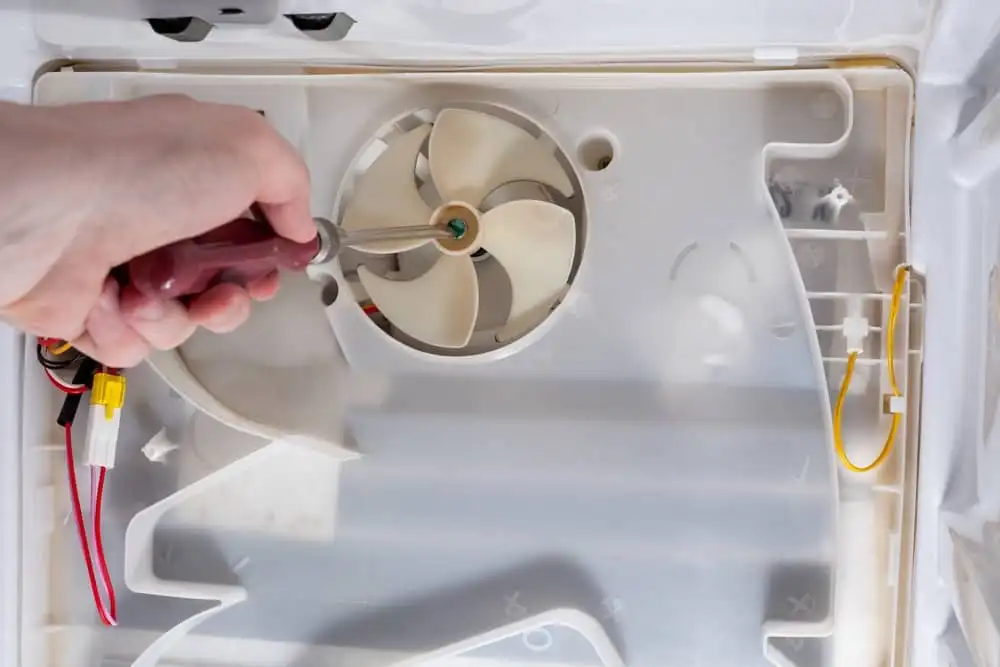
Open the freezer section to find the fan cover. Remove the screws holding the cover in place. Carefully take off the cover to see the fan. Keep the screws safe for later.
Checking Fan Blades And Motor
Look at the fan blades for any dirt or damage. Clean the blades gently with a soft cloth. Spin the blades by hand to check if they move freely. Listen for any strange noises from the motor. If blades are broken or the motor feels stuck, the fan needs repair or replacement.
Quick Fixes To Try First
Samsung fridge evaporator fan not working can cause cooling problems. Before calling a technician, try these quick fixes. They are simple steps you can do at home. These fixes often solve the problem fast. Save time and money by checking these first.
Cleaning Fan Blades
Dust and dirt can stop the fan blades from moving. Unplug the fridge before cleaning. Open the freezer and locate the fan. Use a soft brush or cloth to wipe the blades gently. Clear all dust and debris. Dirt-free blades spin easily and cool better.
Resetting The Fridge
Resetting can fix small glitches in the system. Unplug the fridge from the power outlet. Wait for about five minutes to let it reset. Plug it back in and check the fan. This simple step helps restart the fan motor.
Securing Loose Connections
Loose wires can stop the evaporator fan from working. Find the fan motor’s wiring inside the fridge. Check each connection carefully. Push any loose wires firmly back in place. Tight connections allow the fan to get power and run smoothly.
When To Replace The Fan Motor
Knowing when to replace the Samsung fridge evaporator fan motor is key to keeping your fridge working well. The fan motor helps cool the fridge by moving air over the evaporator coils. If it stops working, the fridge may get warm or freeze food unevenly. Replacing the fan motor at the right time prevents bigger problems and keeps your fridge running smoothly.
Signs Of Motor Damage
Listen for unusual noises like buzzing or grinding from the fridge. The fan may stop spinning or run very slowly. You might notice warm spots inside the fridge or freezer. Frost buildup can also show the fan is not working. If the fridge temperature keeps rising, the motor may be failing.
Choosing The Right Replacement
Use the exact model number of your Samsung fridge to find the correct fan motor. Check the motor’s size and power to match the original. Buy parts from trusted sellers to avoid poor quality. A compatible motor ensures proper fit and performance. Avoid generic parts that might cause more damage.
Installation Tips
Unplug the fridge before starting any work for safety. Remove the back panel inside the freezer to access the fan motor. Take pictures before removing parts to help with reassembly. Handle the fan blades carefully to avoid bending them. Tighten screws firmly but do not overtighten. Test the fan after installation to make sure it runs well.
Preventive Maintenance Tips
Keeping your Samsung fridge evaporator fan working well depends on regular care. Small habits can stop big problems. Focus on simple steps to keep the fan running smoothly. This saves money and extends the fridge’s life.
Regular Cleaning Schedule
Dust and dirt can block the fan’s movement. Clean the fridge coils and vents every few months. Use a soft brush or vacuum cleaner. This helps the fan cool the fridge properly. Clean fans last longer and work better.
Avoiding Overloading
Too much food blocks air flow inside the fridge. Air needs space to move and reach all parts. Keep the fridge shelves tidy. Do not pack items tightly near the vents. This prevents the fan from working too hard.
Monitoring Temperature Settings
Set the fridge temperature correctly. Too cold or too warm can strain the fan. Check the settings monthly. Keep the fridge between 37°F and 40°F (3°C to 4°C). Balanced temperature helps the fan run smoothly and saves energy.
When To Call A Professional
Knowing when to call a professional for a Samsung fridge evaporator fan issue saves time and prevents damage. Some problems look simple but need expert help. Understanding the signs helps you decide the right moment for a technician.
Complex Electrical Issues
Electrical problems can be tricky and dangerous. Faulty wiring or damaged motors need special tools and skills. A professional can safely test and fix these parts. Avoid guessing or DIY fixes on electrical parts.
Warranty Considerations
Many Samsung fridges have warranties that cover repairs. Trying to fix the fan yourself may void the warranty. Professionals know how to handle repairs without losing coverage. Check your warranty terms before starting any repair.
Safety Concerns
Working inside a fridge can expose you to sharp parts and electric shock. A wrong move can cause injury or more damage. Trained technicians follow safety rules and use proper equipment. Protect yourself by calling an expert.

Credit: www.youtube.com
Frequently Asked Questions
Why Is My Samsung Fridge Evaporator Fan Not Working?
The fan may be blocked, damaged, or have an electrical issue stopping it from running.
How To Test The Evaporator Fan Motor In Samsung Fridge?
Use a multimeter to check for continuity or listen for fan noise when the fridge runs.
Can A Faulty Evaporator Fan Cause Fridge Temperature Problems?
Yes, a bad fan stops cold air flow, making the fridge unevenly cold or warm.
How To Fix A Samsung Fridge Evaporator Fan Not Spinning?
Clean ice buildup, check wiring, or replace the fan motor if it’s broken.
Does A Frozen Evaporator Fan Affect Fridge Performance?
Yes, ice can stop the fan from spinning, leading to poor cooling and food spoilage.
Conclusion
A Samsung fridge evaporator fan not working can cause cooling problems. Checking the fan’s condition helps keep your fridge running well. Simple fixes might solve the issue quickly. Regular cleaning can stop dust from blocking the fan. Always unplug the fridge before any repairs.
If problems continue, contact a professional for help. Keeping the fan in good shape saves food and energy. Don’t ignore strange noises or warm spots inside the fridge. Small steps can prevent bigger, costly repairs later. Stay alert to how your fridge sounds and feels daily.