
Are your GE oven buttons not working when you need them the most? It’s frustrating when you try to set the timer or adjust the temperature, and nothing happens.
You rely on your oven every day, and a simple button issue can disrupt your entire cooking routine. But don’t worry—this problem is more common than you think, and there are easy ways to fix it. Keep reading to discover practical solutions that will get your oven buttons responding again quickly, so you can get back to cooking with confidence.
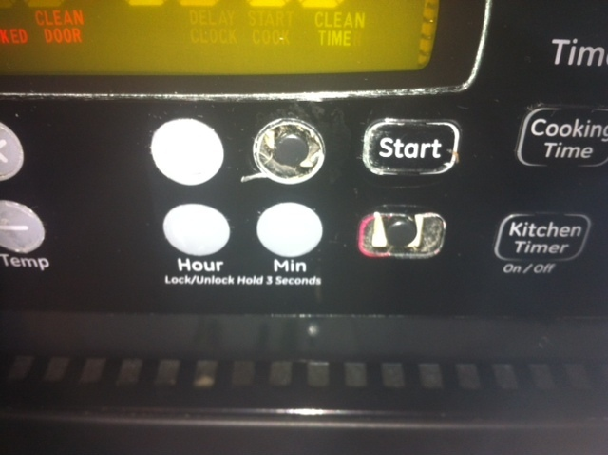
Credit: www.steveslatonappliancerepair.com
Common Causes Of Button Malfunctions
GE oven buttons may stop working due to several common reasons. Understanding these causes helps in finding the right fix quickly. Some issues are simple, while others may need professional help.
Power Supply Issues
Power problems can cause oven buttons to fail. A loose plug or tripped breaker can cut power. Voltage drops or surges might affect the control panel. Checking the power source is the first step to troubleshoot.
Control Board Problems
The control board acts as the oven’s brain. If it malfunctions, buttons may not respond. Faulty wiring or damaged circuits can cause errors. Sometimes, a reset or board replacement is necessary.
Button Pad Wear And Tear
Repeated use wears down button pads over time. The contacts beneath can become unresponsive. Dirt or grease can also block the signals. Replacing the button pad often restores function.
Moisture And Dirt Buildup
Moisture and dirt can get under the buttons. This buildup creates a barrier for electrical contact. It may cause sticking or no response. Cleaning the button area carefully can help solve the problem.
Basic Troubleshooting Steps
When GE oven buttons stop working, try some basic troubleshooting steps first. These steps often fix simple problems without needing a technician. Start with easy checks to save time and money.
Resetting The Oven
Resetting your oven can clear small glitches. Turn off the oven by unplugging it or switching off the circuit breaker. Wait about one minute before turning it back on. This simple reset can restore button functions quickly.
Checking The Power Source
Make sure the oven is getting power. Check the plug and outlet for damage or loose connections. Test the outlet by plugging in another device. If the outlet is faulty, fix it or use a different one. Power issues often cause unresponsive buttons.
Cleaning The Control Panel
Dirt and grease can block button contacts. Use a soft cloth dampened with mild soap and water. Gently wipe the control panel surface. Avoid using too much liquid to prevent damage. Clean panels improve button response and oven control.
Advanced Fixes For Button Problems
Advanced fixes for GE oven buttons not working require careful steps. These solutions go beyond basic troubleshooting. They involve checking and repairing key components. Follow clear instructions to avoid damage. Safety is important. Always unplug the oven before working on it.
Inspecting And Replacing The Control Board
The control board controls the oven’s functions. A faulty board can cause buttons to stop working. Remove the back panel of the oven to access the board. Look for signs of damage like burn marks or corrosion. Replace the board if damaged. Use an exact match for your oven model. Reinstall and test the oven after replacement.
Repairing Or Replacing The Button Pad
The button pad is the surface you press to control the oven. Dirt, spills, or wear can cause buttons to fail. Remove the control panel carefully to reach the button pad. Clean the pad gently with a soft cloth and mild cleaner. If cleaning does not help, replace the button pad. Check for a matching part online or at appliance stores.
Fixing Wiring And Connections
Loose or damaged wiring can stop buttons from working. Inspect all wires connected to the control board and button pad. Look for loose plugs, frayed wires, or corrosion. Tighten any loose connections carefully. Replace damaged wires with similar types. Reassemble the oven and test the buttons to ensure they work properly.

Credit: www.reddit.com
When To Call A Professional
Knowing when to call a professional for your GE oven buttons not working saves time and prevents damage. Some problems need expert help. Trying to fix serious issues alone can be risky. A trained technician has the right tools and knowledge to handle complex repairs safely.
Signs Of Serious Electrical Issues
Oven buttons not working might signal electrical problems. Flickering lights or sparks near the control panel are warning signs. Burning smells or smoke coming from the oven show danger. If the oven trips the circuit breaker often, do not ignore it. These signs need immediate professional attention.
Safety Precautions To Consider
Always unplug the oven before checking it. Avoid using water or wet cloths near electrical parts. Do not try to open the control panel if unsure. Keep children and pets away from the oven during any issue. Safety comes first to prevent shocks or fires.
Finding A Certified Technician
Choose a technician with proper certification and experience. Check reviews and ask for recommendations. A certified expert understands GE ovens and their controls. They provide a reliable diagnosis and fix problems correctly. Hiring the right technician ensures your oven works safely again.
Preventive Tips To Keep Buttons Working
Keeping your GE oven buttons working well saves time and stress. Small steps help avoid button problems. Simple care keeps your oven ready for cooking anytime.
Regular Cleaning Habits
Clean the buttons often to stop dirt buildup. Use a soft cloth with mild soap and water. Avoid harsh chemicals that can damage buttons. Dry the buttons completely after cleaning to prevent moisture damage.
Avoiding Excess Moisture
Do not let water drip on the control panel. Wipe spills immediately to keep moisture away. Keep the kitchen air dry by using a fan or vent. Moisture can cause buttons to stick or stop working.
Proper Oven Usage Practices
Press buttons gently to avoid damage. Do not use sharp objects on the panel. Avoid turning off the oven by unplugging frequently. Follow the user manual instructions for best results.

Credit: www.youtube.com
Frequently Asked Questions
Why Are My Ge Oven Buttons Not Responding?
Oven buttons may stop working due to a faulty control board or a power issue.
How Can I Reset My Ge Oven Control Panel?
Unplug the oven for 1 minute, then plug it back to reset the control panel.
Can Moisture Cause Ge Oven Buttons To Malfunction?
Yes, moisture or spills can cause buttons to stick or stop working properly.
When Should I Replace The Ge Oven Control Board?
Replace the control board if resetting doesn’t fix button issues or if it’s visibly damaged.
Is It Safe To Use The Oven If Buttons Don’t Work?
Avoid using the oven if buttons fail, as it may cause safety or cooking problems.
Conclusion
Troubles with GE oven buttons can be frustrating and slow cooking. Check the power supply and clean the control panel first. Sometimes, a simple reset fixes the problem quickly. If buttons still don’t work, the control board might need replacement.
Regular maintenance helps avoid these issues. Don’t ignore small problems—they can get worse over time. Taking quick action saves time and money. Keep your oven in good shape for better cooking every day.