
Are you having trouble with your Crosley record player? It’s frustrating when your favorite music doesn’t play smoothly or the sound quality drops unexpectedly.
You might be wondering why your Crosley isn’t working like it used to or what you can do to fix it. You’ll discover the most common Crosley record player problems and simple ways to solve them. Keep reading to get your music back on track and enjoy your vinyl collection without interruptions.
Common Crosley Issues
Crosley record players are popular for their vintage look and sound. Many users enjoy their music with these devices. Still, some common issues can affect their performance. Understanding these problems helps users fix them quickly.
Below are the most frequent Crosley record player issues. Each problem has simple tips to identify and solve it.
No Power Or Response
One common problem is the player not turning on. This may happen due to a loose power cord or faulty outlet. Check the plug and power source first. Sometimes, the power switch might be damaged. If the device still does not respond, internal wiring could be the issue.
Skipping Or Stuck Records
Records that skip or get stuck spoil the listening experience. Dirt or dust on the needle can cause skipping. The record itself might be scratched or dirty. Check the turntable’s level; an uneven surface causes skipping. Also, the stylus could be worn out and need replacement.
Poor Sound Quality
Low or unclear sound is another common issue. Loose speaker connections often cause poor sound. The volume or tone controls might be set incorrectly. A damaged needle or cartridge can also reduce sound quality. Clean the stylus regularly to maintain clear audio.
Turntable Not Spinning
If the turntable does not spin, the belt might be broken or loose. Check the belt for wear and proper placement. Sometimes, dust and dirt block the motor or gears. Cleaning these parts can help. In some cases, the motor may need repair or replacement.
Bluetooth Connectivity Problems
Many Crosley players have Bluetooth features. Problems connecting to devices are common. Ensure the player is in pairing mode and close to the device. Clear previous connections if pairing fails. Interference from other wireless devices may cause issues. Restart both the player and device to fix this.
Credit: turntablewave.com
Basic Troubleshooting Steps
Basic troubleshooting helps fix common Crosley record player problems. Follow these simple steps to find the issue. These checks save time and avoid unnecessary repairs.
Checking Power Sources
First, ensure the power cord is plugged in well. Check the outlet by plugging in another device. Confirm the power switch on the player is turned on. Look for any visible damage on the cord or plug.
Inspecting The Needle And Cartridge
Look at the needle carefully. It should be clean and straight. Replace the needle if it looks bent or worn out. Check the cartridge to make sure it is firmly attached. A loose cartridge can cause poor sound quality.
Cleaning The Turntable
Dust and dirt can cause problems with sound and speed. Use a soft, dry cloth to wipe the turntable surface. Avoid using water or harsh cleaners. Clean the grooves gently to protect your records.
Adjusting The Speed Settings
Check if the speed setting matches your record type. Common speeds are 33 1/3, 45, and 78 RPM. Turn the speed dial to the correct number. Incorrect speed makes music sound too fast or slow.
Fixing Skipping And Stuck Records
Skipping and stuck records are common issues with Crosley record players. These problems disrupt your music and cause frustration. Luckily, many fixes are simple and quick. Start by checking key parts of your turntable. Small adjustments can make a big difference. Here are three important steps to get your records playing smoothly again.
Leveling The Turntable
A tilted turntable causes the needle to jump. Place your Crosley on a flat, stable surface. Use a small level tool to check the alignment. Adjust the feet or the base until the turntable is perfectly flat. This helps the needle track grooves properly. A level turntable prevents skipping and improves sound quality.
Replacing The Stylus
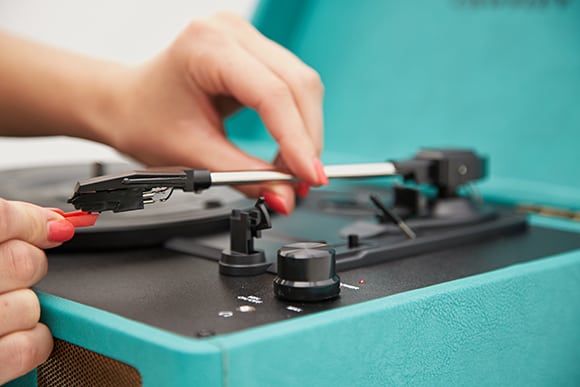
The stylus, or needle, wears out over time. A dull or damaged stylus skips or sticks on records. Check your user manual for the right replacement part. Carefully remove the old stylus and install the new one. A fresh stylus will glide smoothly on vinyl grooves. This often solves skipping issues quickly and protects your records.
Adjusting Tracking Force
Tracking force is the pressure of the needle on the record. Too much force wears the vinyl and causes skipping. Too little force makes the needle jump out of grooves. Use a tracking force gauge to measure this pressure. Set it to the recommended level in your Crosley manual. Proper tracking force ensures smooth playback and longer record life.
Credit: www.urbanoutfitters.com
Improving Sound Quality
Improving the sound quality of your Crosley record player makes listening more enjoyable. Small changes can make a big difference. Focus on simple steps to get clearer, richer sound from your records.
Cleaning Records Properly
Dirty records cause crackles and hisses. Use a soft brush or microfiber cloth to clean each record. Wipe gently in a circular motion following the grooves. Avoid harsh chemicals that can damage the vinyl. Clean records help the needle track smoothly and reduce noise.
Upgrading Speakers
The built-in speakers on Crosley players often lack depth. External speakers provide richer sound and better bass. Choose speakers that match your room size and style. Connect them using the audio output jack for improved audio clarity. Good speakers bring out details in your music.
Checking Audio Connections
Loose or damaged cables cause sound problems. Inspect all audio connections for tight fits and wear. Replace old or frayed cables with new ones. Make sure plugs are fully inserted into the correct ports. Secure connections prevent static and sound dropouts during playback.
Resolving Bluetooth Issues
Bluetooth problems with your Crosley record player can disrupt your music experience. These issues can include connection drops or devices not pairing properly. Fixing Bluetooth issues often restores smooth streaming and better sound quality.
Try simple steps to resolve common Bluetooth troubles. These steps help reset the connection, pair devices again, and update firmware. Follow the instructions below to get your Crosley player working well with Bluetooth devices.
Resetting Bluetooth Connection
Turn off the Crosley record player’s Bluetooth. Wait for about 10 seconds. Turn it back on. This refreshes the connection and clears minor glitches. You can also restart the device you want to connect. This double reset often fixes simple Bluetooth errors.
Pairing Devices Again
Remove the Crosley player from your device’s Bluetooth list. On your phone or tablet, open Bluetooth settings. Find the Crosley player and tap “Forget” or “Remove.” Then, put the Crosley player in pairing mode. Search for it again on your device and connect. Pairing fresh helps solve recognition problems.
Updating Firmware
Check if Crosley offers firmware updates for your model. Visit the official Crosley website or app. Download the latest firmware and follow update steps carefully. Firmware updates fix bugs and improve Bluetooth stability. Keeping software current ensures better device performance.
Credit: turntablewave.com
When To Seek Professional Help
Knowing when to seek professional help for your Crosley record player saves time and prevents damage. Some problems are easy to fix at home. Others need expert care to keep your player working well. Understanding the signs helps you decide the right step.
Identifying Complex Problems
Simple issues include a stuck needle or uneven sound. Complex problems may involve electrical faults or damaged parts. Strange noises, no power, or smoke mean stop using the player. These signs show the need for a professional check. Trying to fix these can cause more harm.
Finding Authorized Repair Centers
Authorized repair centers have trained technicians and original parts. They know Crosley models and common issues well. Using an authorized center keeps your warranty valid. Search for centers near you online or contact Crosley support. Always check reviews to ensure quality service.
Frequently Asked Questions
Why Is My Crosley Record Player Not Spinning?
The turntable may have a loose belt or power issue. Check and replace the belt if needed.
How To Fix Crosley Record Player Sound Problems?
Ensure the speaker connections are secure and the volume is turned up properly.
What Causes Crosley Record Player Needle Skipping?
A dirty or damaged needle or uneven surface can cause skipping. Clean or replace the needle.
Why Won’t My Crosley Record Player Connect To Bluetooth?
Bluetooth might be off or out of range. Restart the device and move closer to the player.
How To Clean A Crosley Record Player Safely?
Use a soft, dry cloth for dust. Avoid liquids on electronic parts to prevent damage.
Conclusion
Crosley record players can face common issues like skipping or poor sound. Most problems have simple fixes you can try at home. Regular cleaning and careful handling help keep your player working well. Small steps often prevent bigger troubles later.
Enjoy your music without stress by staying aware of these tips. Keep your Crosley in good shape for lasting fun. Troubleshooting becomes easier with basic knowledge. This way, you spend more time listening and less time fixing.