
Is your Hampton Bay remote control not working when you need it most? It’s frustrating when you press the buttons, but nothing happens.
You might feel stuck, wondering if you need a new remote or if your fan has a bigger problem. Before you give up or spend money on replacements, there are simple fixes you can try right now. Keep reading, and you’ll discover easy steps to get your remote—and your fan—back in action quickly.
Don’t let a small glitch disrupt your comfort any longer.
Credit: www.homedepot.com
Common Reasons For Remote Failure
The Hampton Bay remote control might stop working for several common reasons. Understanding these can help you fix the problem quickly. Most issues are simple and easy to resolve. This section explains the main causes of remote failure.
Dead Or Weak Batteries
Batteries are the most common cause of remote failure. Over time, batteries lose power and stop working. Replace old batteries with fresh ones to restore function. Always check battery placement and ensure correct polarity.
Signal Obstruction
Objects blocking the remote’s signal can stop it from working. Walls, furniture, or other items can block the infrared signal. Clear the path between the remote and the fan sensor. Keep the remote close to the fan for best results.
Remote Sensor Issues
The fan’s remote sensor may get dirty or damaged. Dust, dirt, or grime can block the sensor’s receiver. Clean the sensor gently with a soft cloth. If the sensor is broken, it may need professional repair.
Interference From Other Devices
Other electronic devices can interfere with the remote signal. Devices like Wi-Fi routers, cordless phones, or microwaves cause signal disruption. Move these devices away from the fan or remote. Reducing interference can improve remote performance.
Quick Battery Replacement Tips
Replacing the batteries in your Hampton Bay remote control can fix many common problems. Quick and proper battery replacement saves time and keeps your remote working smoothly. Follow these simple tips to choose, install, and maintain batteries effectively.
Choosing The Right Batteries
Use the battery type recommended in your remote’s manual. Most Hampton Bay remotes use AA or AAA alkaline batteries. Avoid mixing old and new batteries. Choose fresh, high-quality batteries for longer life. Avoid rechargeable batteries unless the manual says they are compatible.
Safe Battery Installation
Open the battery compartment carefully. Insert batteries with the correct polarity (+ and -). Do not force the batteries into place. Close the compartment securely to avoid loose connections. Clean the contacts inside the compartment if they look dirty or rusty.
Battery Maintenance Tricks
Remove batteries if you do not use the remote for a long time. Store batteries in a cool, dry place. Check batteries regularly for leaks or corrosion. Replace batteries at the first sign of power loss. Keep the battery compartment clean to prevent damage.
Resetting The Remote Control
Resetting the remote control can fix many common problems. It clears errors and restores normal function. This process is simple and takes only a few minutes. You do not need special tools or skills.
Follow the right steps to ensure success. A proper reset can save you time and frustration. It helps your Hampton Bay remote control work again smoothly.
Step-by-step Reset Process
First, remove the batteries from the remote. Wait for about 30 seconds. Press and hold any button to discharge leftover power.
Next, reinsert the batteries correctly. Make sure they fit snugly. Avoid mixing old and new batteries.
Press the power button to turn the device off. Hold the button down for 5 seconds. Release and wait a moment.
Try to use the remote as usual. Check if it responds to commands. Repeat the reset if needed.
When To Reset The Remote
Reset the remote if it stops working suddenly. Also reset if buttons do not respond well. Try resetting if the fan or light does not react.
Resetting helps when the remote loses connection to the device. Use it if the remote acts strange or slow. It often fixes minor glitches fast.
Try a reset before replacing batteries or buying a new remote. It is a quick way to solve many issues.
Cleaning And Maintenance
Cleaning and maintaining your Hampton Bay remote control helps it work longer. Dirt and dust can block signals and cause problems. Keeping the remote and sensors clean ensures better performance. Simple steps can prevent many common issues.
Cleaning Remote Sensors
Remote sensors detect signals from your remote control. Dirt or smudges on sensors reduce signal strength. Use a soft, dry cloth to wipe the sensors gently. Avoid using water or cleaning sprays on sensors. Clean sensors regularly for clear and strong signals.
Removing Dirt And Dust
Dirt and dust can build up inside and outside the remote. Use a small brush or compressed air to remove dust from buttons and seams. Wipe the remote surface with a slightly damp cloth. Do not let moisture enter the remote. Clean the remote every few weeks to keep it fresh.
Protecting Your Remote
Keep the remote away from heat and moisture. Store it in a safe place when not in use. Avoid dropping or hitting the remote against hard surfaces. Use a protective cover to prevent scratches and damage. Proper care extends your remote’s life and keeps it working well.
Troubleshooting The Receiver Unit
Troubleshooting the receiver unit is key to fixing your Hampton Bay remote control issues. The receiver gets signals from the remote. If the fan does not respond, the receiver may have problems. Checking this part can often restore normal function.
Checking The Receiver Sensor
Locate the receiver sensor on your fan. It is usually near the light kit or motor housing. Clean the sensor gently with a soft cloth. Dust or dirt can block signals from the remote. Make sure no objects are blocking the sensor’s view.
Test the remote while pointing directly at the sensor. If the fan still does not respond, the sensor may be faulty. Replacing the sensor might be necessary in this case.
Power Cycle The Fan
Turn off the fan and unplug it from power. Wait for about 30 seconds. Plug the fan back in and turn it on. This power cycle can reset the receiver unit. It often clears minor errors and restores remote function.
Try the remote again after the power cycle. Sometimes, a simple reset solves the problem without any tools or parts.
Identifying Wiring Problems
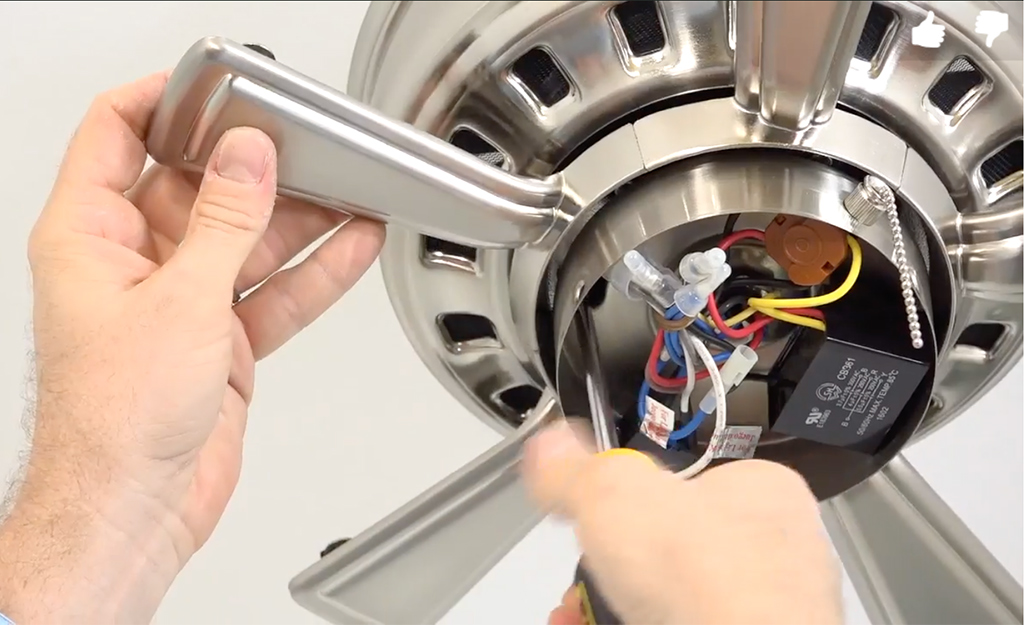
Unplug the fan before checking any wiring. Loose or damaged wires can cause the receiver to fail. Open the fan’s housing carefully. Look for wires that are disconnected or frayed.
Secure any loose wires using wire nuts or electrical tape. If you find damaged wires, replace them or call a professional. Faulty wiring can prevent the receiver from working properly.

Credit: chanakyamandal.org
Using A Smartphone As A Remote
Using a smartphone as a remote can be a smart way to control your Hampton Bay fan. It helps when the original remote stops working or goes missing. A smartphone remote uses apps that connect to your fan through Wi-Fi or Bluetooth. This method can bring convenience and extra features to your control options.
Compatible Apps
Several apps can work as a remote for Hampton Bay fans. The most common is the “Home Depot” app, as Hampton Bay is their brand. Other smart home apps like “Smart Life” or “Tuya Smart” may also connect if your fan supports Wi-Fi. Check your fan’s manual to see which apps work best.
Setup Guide
First, download the chosen app on your phone. Next, turn on your fan and enable its Wi-Fi or Bluetooth mode. Open the app and follow the steps to add a new device. Usually, you select the fan model and connect your phone to the fan’s signal. After connection, test the controls on the app to confirm it works.
Benefits And Limitations
Using a smartphone as a remote gives you easy control from anywhere in your home. You can set schedules, change speeds, and switch modes with taps. It also reduces the need for extra physical remotes. The main limit is that the fan must support smart connections. Some older models may not connect to apps. Also, your phone’s battery life affects how long you can use the remote.
When To Contact Customer Support
Knowing when to contact customer support can save time and effort. It helps to solve issues faster. Some problems need expert help. Others can be fixed at home.
Understanding the signs of hardware failure and your warranty options helps. This knowledge guides the next steps. Read on to learn more.
Signs Of Hardware Failure
The remote control does not respond at all. Pressing buttons gives no reaction from the device. The remote has visible damage like cracks or broken parts. Batteries drain very quickly even when the remote is not in use. The remote sometimes works but stops suddenly. These signs suggest a hardware problem. Repair or replacement might be necessary.
Warranty And Repair Options
Check the warranty status before contacting support. Hampton Bay products usually have a limited warranty period. If the remote is still under warranty, repairs or replacements may be free. Customer support can guide you through the warranty claim process. Outside warranty, they can offer repair services or suggest buying a new remote. Keep your purchase receipt handy for faster service.

Credit: www.youtube.com
Frequently Asked Questions
Why Is My Hampton Bay Remote Control Not Responding?
Check the batteries first. Weak or dead batteries often cause no response.
How Can I Reset My Hampton Bay Remote Control?
Remove batteries, press all buttons, and reinsert batteries to reset the remote.
What Should I Do If The Remote Still Won’t Work?
Try replacing batteries and ensure the remote is pointed at the receiver.
Can Interference Affect My Hampton Bay Remote Control Signal?
Yes. Other devices or walls may block the signal. Keep the path clear.
Where Can I Find A Replacement Remote For Hampton Bay Fans?
Look online or at home improvement stores for compatible Hampton Bay remote controls.
Conclusion
Troubles with your Hampton Bay remote can be fixed with simple steps. Check the batteries first; weak power often causes issues. Make sure the remote and fan sensor are clean and aligned. Resetting the remote or fan may solve connection problems.
If problems continue, consult the user manual or customer support. Small fixes can save you time and money. Don’t let a faulty remote stop your comfort. Keep these tips handy for quick solutions anytime. Your fan should work smoothly again soon.