
Is your Chevy Cruze Bluetooth music suddenly not working? You’re not alone, and it’s more frustrating than you might think.
Imagine hitting the road, ready to enjoy your favorite tunes, only to find the connection won’t play a single note. Don’t worry—this problem can be fixed faster than you expect. You’ll discover simple, effective steps to get your music blasting again.
Keep reading, and reclaim the soundtrack of your drive today.
Common Bluetooth Issues
Bluetooth issues in the Chevy Cruze can disrupt your music experience. Many users face common problems that stop Bluetooth from working properly. Understanding these issues helps you fix them faster. Below are some frequent Bluetooth troubles and their causes.
Connection Problems
Bluetooth may fail to connect or keep disconnecting. Weak signals or interference can cause this. Sometimes, the Cruze’s system does not recognize the device. Pairing errors or outdated software also block connections. Restarting the car or phone can help. Clear old paired devices to avoid conflicts.
Audio Playback Errors
Music might skip, pause, or not play at all. This happens due to poor signal or app glitches. Volume settings on the car or phone affect playback too. Make sure the media player is compatible with Bluetooth. Restarting apps or the phone often restores sound. Check if other devices play music correctly.
Compatibility Concerns
Some phones or apps may not work well with the Cruze’s Bluetooth. Older car models might not support latest devices fully. Software updates on the phone or car system improve compatibility. Different brands or operating systems can cause issues. Confirm your phone and car support the same Bluetooth version. Use certified cables and accessories for better performance.
Basic Troubleshooting Steps
Basic troubleshooting steps can solve most Bluetooth music problems in a Chevy Cruze. These steps are simple and take only a few minutes. They help find and fix common issues quickly. Start with these easy checks before trying anything complex.
Restarting Devices
Turn off your Chevy Cruze’s infotainment system. Also, switch off your phone or music device. Wait about 30 seconds. Turn your devices back on. Restarting clears temporary glitches that block Bluetooth music.
Reconnecting Bluetooth
Go to your car’s Bluetooth settings. Remove or forget your phone from the list. On your phone, delete the Cruze connection. Then, pair your phone and car again. This refreshes the connection and often solves sound issues.
Checking Volume Settings
Check the volume on your car’s stereo system. Also, check your phone’s volume level. Make sure both are not muted or too low. Adjust the volume on both devices. Sometimes, low volume causes the music to seem not working.
Resetting The Infotainment System
Resetting the infotainment system can fix many Bluetooth music problems in your Chevy Cruze. The system may freeze or stop responding, causing connection issues. A reset helps clear errors and refresh the system. It is a simple step before trying more complex fixes.
Soft Reset Procedure
A soft reset restarts the system without deleting any data. Press and hold the power button for about 10 seconds. The screen will turn off and then back on. This action often solves minor glitches. Try reconnecting your Bluetooth device after the reset.
Factory Reset Options
A factory reset restores the system to original settings. This deletes all saved data, including paired Bluetooth devices. Use this option only if the soft reset does not work. Find the factory reset option in the settings menu. Follow the on-screen instructions carefully to complete the reset.
Updating Software And Firmware
Updating software and firmware plays a key role in fixing Bluetooth music issues in your Chevy Cruze. These updates improve system compatibility and fix bugs. They keep your car’s infotainment and phone working smoothly together.
Outdated software may cause connection problems or dropouts. Staying current helps avoid these common issues. Updates often come with new features and better stability. Regular updates ensure your Bluetooth works as it should.
Infotainment System Updates
Your Chevy Cruze’s infotainment system needs regular updates. These updates fix bugs that block Bluetooth music playback. Check your car’s settings menu for update options. Sometimes, you may need to visit a dealer for updates.
Download the update using a USB drive or Wi-Fi. Follow the instructions carefully to avoid interruptions. After updating, restart the system and try connecting your phone again. This simple step often resolves Bluetooth problems.
Smartphone Bluetooth Updates
Your phone’s Bluetooth software also requires updates. These updates improve connection stability and audio quality. Check your phone’s settings under system updates or Bluetooth settings. Install any available updates to keep Bluetooth working well.
Restart your phone after updating Bluetooth software. Then, reconnect to your Chevy Cruze’s system. Updated phone software reduces compatibility issues and helps music play smoothly. This ensures a better listening experience on the road.
Clearing Bluetooth Cache And Data
Clearing the Bluetooth cache and data can fix many connection problems in your Chevy Cruze. Over time, stored files may cause glitches or stop Bluetooth from working properly. Removing these files allows your car’s system to start fresh and pair devices smoothly again.
This process is simple and does not delete any personal information. It only removes temporary files that might block music playback or cause interruptions. Follow the steps below to clear the Bluetooth cache and data on your car’s system.
Accessing The Bluetooth Settings On Your Chevy Cruze
Turn on your car and navigate to the infotainment screen. Find the settings menu and select Bluetooth options. This area controls all Bluetooth connections and device management.
Clearing Bluetooth Cache On The Infotainment System
Look for the option to clear Bluetooth cache or reset Bluetooth. Confirm your choice to delete stored Bluetooth files. This step removes old data that can cause connection issues.
Resetting Bluetooth Data For A Fresh Start
After clearing the cache, find the option to reset Bluetooth data. This action deletes all paired devices. You will need to re-pair your phone or music device to the car.
Re-pairing Your Device After Clearing Cache
Turn off Bluetooth on your phone and turn it back on. Search for your Chevy Cruze on the device list and select it. Follow the prompts to complete pairing and test music playback.

Credit: www.reddit.com
Checking Device Compatibility
Checking device compatibility is a key step in fixing Chevy Cruze Bluetooth music issues. Not all devices work the same with the car’s system. Some phones or apps may not connect or play music properly. Understanding compatibility can save time and frustration.
Supported Bluetooth Versions
The Chevy Cruze supports certain Bluetooth versions for music streaming. Most models work best with Bluetooth 4.0 or higher. Older versions may connect but fail to play music smoothly. Check your phone’s Bluetooth version in its settings. This simple check helps ensure your device matches the car’s system needs.
Music App Restrictions
Some music apps do not allow Bluetooth streaming in all cars. Apps like Spotify or Apple Music might have limits. These restrictions can cause music to stop or not start at all. Try different apps to see if they work better. Using compatible apps increases the chance of smooth playback in your Chevy Cruze.
Alternative Music Playback Methods
Bluetooth music issues in a Chevy Cruze can be frustrating. Finding other ways to play music keeps your drive enjoyable. Several simple options let you enjoy your favorite songs without Bluetooth.
Using Usb Connection
Connecting your phone or USB drive to the car’s USB port plays music directly. This method provides clear sound and easy control. Just plug in and select the USB source on your car’s display. It supports many audio formats and charges your device while playing.
Auxiliary Cable Option
The auxiliary (AUX) cable is a classic and reliable choice. Plug one end into your phone’s headphone jack and the other into the car’s AUX input. This method does not need Bluetooth or Wi-Fi. The sound quality depends on your device and cable condition.
Apple Carplay And Android Auto
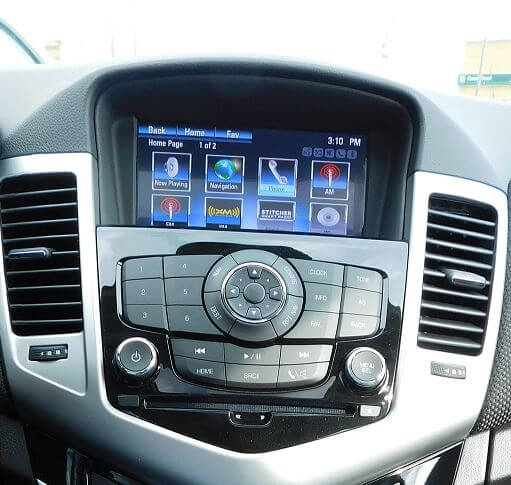
These systems link your smartphone to the car’s infotainment screen. They let you play music, use apps, and get directions safely. Connect your phone with a USB cable or wirelessly. Your phone’s music apps become easy to control on the car’s display.
Credit: www.wallacechev.com
When To Seek Professional Help
Sometimes, fixing Bluetooth music problems in a Chevy Cruze goes beyond simple steps. If basic troubleshooting does not work, it is time to seek professional help. Expert technicians can find hidden issues and fix them safely.
Professional help is important when the system has complex software or hardware problems. Avoid trying to repair electrical parts yourself. It could lead to more damage or void your warranty.
Dealer Service Options
Dealerships have trained staff who know Chevy Cruze well. They use special tools designed for your car model. Dealers can update your car’s software to fix Bluetooth bugs. They also check if any recalls affect your audio system. Service at the dealer may cost more but ensures quality repairs. Using dealer services helps keep your car warranty valid.
Third-party Repair Services
Independent shops offer another choice for fixing Bluetooth issues. Some have skilled technicians experienced with Chevy Cruze. These shops might charge less than dealers. They can repair or replace faulty Bluetooth modules. Choose a shop with good reviews and proper certifications. Ask about warranty on repairs before agreeing to service. Third-party services can be faster and more flexible with appointments.

Credit: www.youtube.com
Frequently Asked Questions
Why Is My Chevy Cruze Bluetooth Music Not Playing?
Bluetooth may not be connected properly. Try reconnecting or restarting your phone and car system.
How Do I Fix Bluetooth Audio Cutting Out In Chevy Cruze?
Check for interference, update software, and keep your phone close to the car system.
Can Low Battery Affect Bluetooth Music In Chevy Cruze?
Yes, low phone battery can cause Bluetooth to disconnect or work poorly.
How To Reset Bluetooth Settings In Chevy Cruze?
Go to the car’s audio settings, find Bluetooth options, and choose “Forget Device” or “Reset. ”
Why Does My Chevy Cruze Bluetooth Disconnect During Calls?
Bluetooth may prioritize calls, pausing music. Update system software and ensure a strong connection.
Conclusion
Fixing Chevy Cruze Bluetooth music issues often takes simple steps. Check your phone’s connection and car settings first. Restart devices to refresh the link. Updating software can solve many problems. Clean pairing history if needed and try again. Most problems clear up quickly with these tips.
Enjoy your music without long delays or frustration. Stay patient and follow these easy fixes. Your drives will feel better with smooth Bluetooth music.