
Is your paper shredder not working when you need it most? It’s frustrating, especially when you have sensitive documents to destroy quickly and safely.
You might wonder why it suddenly stopped, or how to fix it without spending a lot of time or money. Keep reading, because understanding the common reasons behind a paper shredder’s failure can save you stress and get your shredder back in action fast.
You don’t have to struggle alone—this guide is made to help you solve the problem step by step.
Common Reasons For Shredder Failure
Paper shredders are useful tools for protecting personal and business information. Sometimes, these machines stop working properly. Knowing the common reasons for shredder failure helps you fix problems quickly. This saves time and prevents frustration. Below are the main causes of shredder issues.
Power Issues
Power problems often stop shredders from working. Check if the shredder is plugged in correctly. Make sure the outlet has electricity. Sometimes, the power switch may be off. Faulty cords or plugs can also cause power failure. Always test the power source first before other checks.
Paper Jam
Paper jams are a frequent cause of shredder trouble. Overloading the shredder can cause paper to get stuck. Feeding thick or folded paper may also lead to jams. Remove jammed paper gently to avoid damage. Clear the blades and feed slot carefully for smooth operation.
Overheating
Shredders can overheat if used too long without breaks. Overheating triggers a safety shutoff to protect the motor. Allow the shredder to cool down before using it again. Follow the manufacturer’s recommended run time. Prevent overheating by shredding in short intervals.
Blade Dullness
Dull blades reduce shredder performance. Blades lose sharpness after shredding many sheets. Dull blades cause paper to tear or jam. Regularly oiling the blades helps maintain sharpness. Replace the blades if they become too dull to cut well.
Troubleshooting Power Problems
Troubleshooting power problems in a paper shredder is the first step to fix it. Power issues often stop the shredder from working. Checking the power can save time and money before calling a technician.
Start with basic checks. Power problems may come from simple causes. Fixing these can make the shredder work again quickly.
Check Power Source
Make sure the power outlet works. Plug another device into the same outlet. If it does not work, try a different outlet. Sometimes outlets lose power due to tripped breakers or blown fuses. Check your circuit breaker panel for any issues.
Inspect Power Cord And Plug
Look closely at the power cord and plug. See if the cord is damaged or frayed. Check the plug prongs for bent or broken parts. A damaged cord or plug can stop power flow. Replace the cord if you see any damage. Avoid using the shredder until the cord is fixed.
Reset The Shredder
Some shredders have a reset button. Unplug the shredder first. Wait for a few minutes to clear any electrical faults. Press the reset button if your model has one. Plug the shredder back in and try again. This step can often fix minor power problems.
Clearing Paper Jams
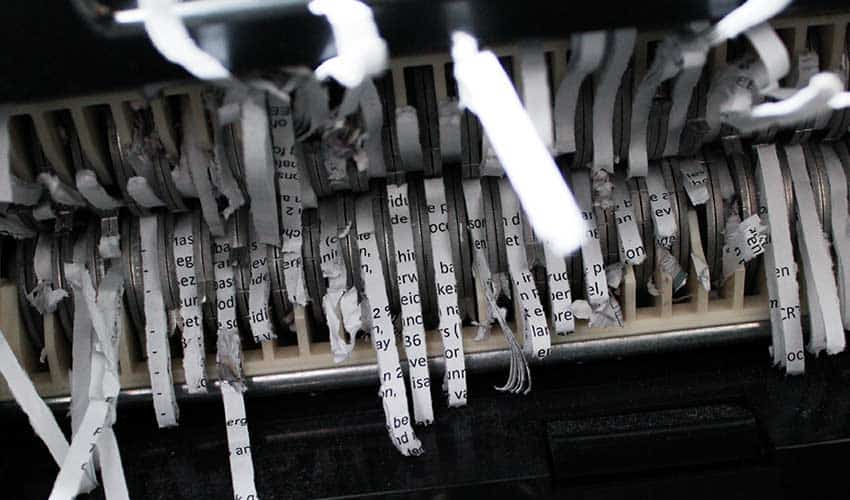
Paper jams are a common issue with shredders. They stop the machine and cause frustration. Clearing jams quickly helps keep your shredder working well. This section shows simple ways to fix jams. It also offers tips to avoid jams later.
Manual Removal Techniques
Turn off the shredder and unplug it first. Gently pull the jammed paper out. Use slow, steady force to avoid damage. Avoid yanking or tearing the paper. Use tweezers or pliers for small pieces stuck inside. Check the blades carefully for any stuck scraps. Clean the blades with a soft brush if needed.
Using Reverse Function
Most shredders have a reverse button. Press it to move paper backward. This helps loosen stuck sheets inside. Use short bursts of reverse, not long runs. Stop if the shredder gets hot. Try manual removal again after reversing. Repeat the process if needed but avoid forcing the shredder.
Preventing Future Jams
Feed paper slowly and straight into the shredder. Avoid overloading by shredding few sheets at once. Remove staples and paper clips before shredding. Use shredder oil regularly to keep blades sharp. Clean the shredder bin often to prevent paper buildup. Follow the manufacturer’s instructions for maintenance. These habits reduce paper jams significantly.
Credit: www.recycling.com
Cooling Down Overheated Shredders
Cooling down an overheated paper shredder is key to making it work again safely. Overheating can stop the shredder from running and may cause damage. Knowing how to spot overheating and cool the machine properly helps keep it in good shape.
Taking the right steps prevents long-term problems. Cooling also protects the shredder’s motor and blades. Let’s explore the signs of overheating and how to cool down the shredder without risk.
Identifying Overheat Signs
Watch for a burning smell near the shredder. The motor may feel very hot to touch. The shredder may stop working suddenly. Paper might jam more often than usual. The shredder may make unusual noises. These signs show the shredder is too hot.
Safe Cooling Practices
Turn off the shredder immediately. Unplug it from the power source. Move the shredder to a cool area with good airflow. Allow the shredder to cool for at least 30 minutes. Avoid pouring water or using cold sprays. Check the manual for specific cooling instructions. Once cool, test the shredder with a small amount of paper.
Avoiding Overuse
Shredders need breaks after heavy use. Follow the recommended run time in the manual. Shred in short sessions rather than long ones. Avoid feeding too much paper at once. Remove staples or paper clips before shredding. Regular breaks prevent motor overheating. This habit extends the shredder’s life.
Maintaining Shredder Blades
Maintaining shredder blades is key to keeping your paper shredder working well. Dull or dirty blades cause jams and reduce cutting power. Taking care of the blades helps the machine last longer and shred paper smoothly.
Lubricating The Blades
Lubricate the blades regularly to reduce friction and wear. Use shredder oil designed for this purpose. Apply oil directly on the blades or use lubrication sheets. Run the shredder for a few seconds to spread the oil evenly. Avoid using household oils, as they can damage the machine.
When To Replace Blades
Replace blades if shredding becomes slow or noisy. Blades that jam often or tear paper instead of cutting need replacement. Check the shredder manual for blade replacement instructions. Using worn blades can damage the motor and increase repair costs.
Regular Maintenance Tips
Clean the shredder blades by removing paper scraps stuck between them. Turn off and unplug the shredder before cleaning. Avoid shredding materials not recommended by the manufacturer. Schedule blade maintenance every few months for heavy use. Proper care prevents breakdowns and keeps shredding efficient.
Credit: www.reddit.com
When To Seek Professional Help
Knowing when to seek professional help for your paper shredder is important. Some issues can be fixed at home. Others require a technician’s attention. Acting at the right time can save money and prevent further damage.
Signs Of Serious Damage
Look for strange noises like grinding or buzzing. The shredder stops working suddenly or won’t start. Paper jams that happen often and are hard to clear. Burning smells or smoke coming from the machine. These signs suggest serious problems. Do not try to fix these yourself.
Repair Vs. Replacement
Consider the age and condition of your shredder. Small problems like stuck paper can be repaired easily. Large mechanical failures may cost more than a new shredder. Professionals can help decide if repair is worth it. They can also recommend the best replacement options.
Finding Reliable Service
Choose a service provider with good reviews and experience. Check if they specialize in shredders and office equipment. Ask about warranties and repair guarantees. Fast and clear communication is important. A reliable technician ensures your shredder works safely again.
Credit: www.youtube.com
Frequently Asked Questions
Why Is My Paper Shredder Not Turning On?
Check if the shredder is plugged in and the power switch is on.
How To Fix A Paper Shredder That Jams Often?
Clear stuck paper carefully and avoid overloading the shredder. Use reverse mode if available.
What Causes A Paper Shredder To Overheat And Stop Working?
Continuous use can cause overheating. Let it cool down before using again.
Can Dull Blades Cause A Shredder To Stop Working?
Yes, dull blades reduce cutting ability. Sharpen or replace the blades if needed.
How Do I Reset A Paper Shredder After A Malfunction?
Unplug it, wait a few minutes, then plug it back in to reset the system.
Conclusion
A paper shredder not working can cause real frustration. Check for jams and clear them carefully. Always follow the user manual for safe use. Regular cleaning can keep your shredder running smooth. Small problems often have simple fixes. Taking quick action saves time and stress.
Keep your shredder in good shape to protect important documents. A little care goes a long way. Don’t let a broken shredder stop your work. Stay calm and fix it step by step.