
Is your Navien tankless water heater acting up or showing an error? You don’t have to call a technician just yet.
Resetting your Navien water heater can often fix common issues quickly and easily. In this guide, you’ll learn exactly how to reset your unit step-by-step, saving you time and frustration. Keep reading to get your hot water flowing smoothly again without any hassle.
Signs You Need To Reset
Knowing when to reset your Navien tankless water heater can save you time and prevent damage. The heater may show signs that a reset is needed. These signs help you understand the problem before it gets worse.
Recognizing these signs early keeps your water heater working smoothly. It also helps avoid costly repairs or replacements.
Common Error Codes
Your Navien water heater shows error codes on the display. These codes signal specific problems. Codes like “Error 11,” “Error 12,” or “Error 29” often mean the system needs a reset. Checking the error code helps identify the issue fast.
Unusual Water Temperature
The water temperature may change suddenly or feel too hot or cold. This irregular heating means the system is not working right. A reset can fix temperature problems and bring water back to normal.
Heater Not Responding
The water heater may stop responding to commands or not turn on at all. This lack of response shows the system is stuck. Pressing the reset button can restart the heater and restore its function.

Credit: www.reddit.com
Preparation Before Reset
Before resetting your Navien tankless water heater, it is important to prepare properly. Proper preparation helps avoid damage and ensures the reset process goes smoothly. Taking a few simple steps can protect you and your heater. These steps include safety checks, gathering the right tools, and verifying the power supply.
Safety Precautions
Turn off the water heater before you start. This reduces the risk of electric shock. Make sure the area around the heater is dry. Use gloves to protect your hands. Keep children and pets away from the work area. Always follow the manufacturer’s safety guidelines.
Gathering Tools
Prepare basic tools like a screwdriver and a cloth. Have a flashlight ready for better visibility. Keep the user manual nearby for reference. Using the right tools makes the reset process easier. Avoid using damaged or wrong tools to prevent harm.
Checking Power Supply
Verify the heater is properly connected to the power source. Check the circuit breaker or fuse box for any issues. Ensure there are no tripped breakers or blown fuses. A stable power supply is necessary for the reset to work. If unsure, call a professional electrician for help.
Step-by-step Reset Process
Resetting your Navien tankless water heater can fix many common issues. This step-by-step reset process helps restore normal operation quickly. Follow the simple instructions to get your heater back to work.
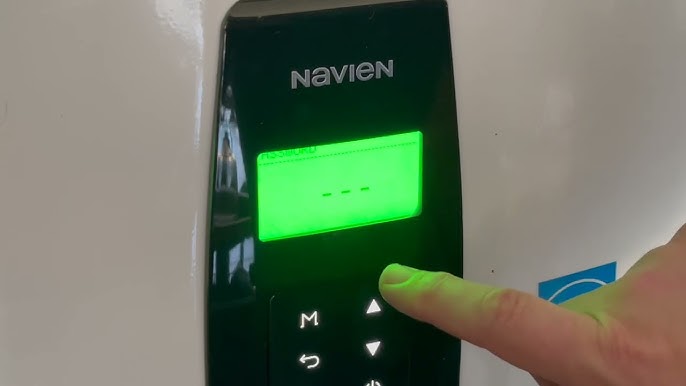
Locating The Reset Button
The reset button is usually near the control panel. Look for a small red or black button. It might be inside a protective cover. Check the user manual if you have trouble finding it.
Performing The Reset
Press and hold the reset button for about 5 seconds. Release the button once the unit powers down. Wait for a few moments before the heater restarts. This process clears minor errors and resets the system.
Verifying The Reset
Watch the display for error codes. The absence of codes means the reset worked. Run hot water to check if the heater heats properly. If problems continue, a professional service may be needed.

Credit: www.navieninc.ca
Troubleshooting After Reset
After resetting your Navien tankless water heater, some issues may still appear. Troubleshooting helps identify and fix these problems quickly. Understanding common signs keeps your heater working well.
Persistent Error Codes
Error codes may stay on even after a reset. Check the user manual for each code’s meaning. Some errors need more than a reset to clear. Watch for repeated codes that suggest a deeper problem. Record the codes to track if they return often.
Water Flow Issues
Water flow problems can happen after a reset. Low water pressure or no hot water are common signs. Inspect the water valves and filters for blockages. Make sure pipes are not frozen or leaking. Clean any clogged filters to restore flow.
When To Call A Professional
Call a professional if errors persist or water issues continue. Electrical or gas problems require expert help. Avoid fixing complex parts alone to stay safe. A technician can diagnose and repair the heater correctly. Regular service keeps your system reliable and efficient.
Maintenance Tips For Navien Heaters
Maintaining your Navien tankless water heater helps it work well and last longer. Simple steps keep the heater efficient and prevent problems. Regular care saves money and avoids sudden breakdowns.
Regular Cleaning
Clean the outside of the heater often. Wipe dust and dirt away with a soft cloth. Check vents and air intakes for blockages. Clear any debris to keep air flowing freely. Clean parts help the heater run smoothly and safely.
Flushing The System
Flush the heater’s system once a year. This removes mineral build-up inside the pipes and heat exchanger. Use a flushing kit and follow the instructions carefully. Flushing keeps water flowing well and stops damage from hard water. It also improves heating performance.
Replacing Filters
Check the filters every few months. Dirty filters reduce water flow and strain the heater. Remove and rinse filters with clean water. Replace filters if they are worn out or damaged. Clean filters help maintain good water quality and heater efficiency.
Credit: www.youtube.com
Frequently Asked Questions
How Do I Reset A Navien Tankless Water Heater?
Press and hold the reset button on the control panel for 5 seconds to reset the unit.
Why Does My Navien Water Heater Need Resetting?
Resetting clears error codes and restores normal operation after minor faults.
How Often Should I Reset My Navien Water Heater?
Only reset when error codes appear or water heater stops working properly.
Can Resetting Fix Navien Water Heater Ignition Problems?
Yes, resetting often solves ignition errors by restarting the burner system.
What If My Navien Water Heater Won’t Reset?
Check for gas supply issues or call a technician if reset fails.
Conclusion
Resetting your Navien tankless water heater is simple and quick. Follow the steps carefully to avoid mistakes. A proper reset can fix many common issues. Always turn off the power before starting. Keep the user manual nearby for guidance. Regular maintenance helps your heater work better and last longer.
Don’t ignore small problems; they can grow bigger. Taking these steps saves time and money. Enjoy warm water without hassle. Easy to do, worth the effort.