
Have you noticed the “Lo” code flashing on your Hayward heater? It can be frustrating when your pool heater stops working just as you’re ready to relax.
But don’t worry—understanding what this code means and how to fix it is easier than you think. You’ll discover simple steps to troubleshoot the Hayward Heater Lo code and get your pool warm again quickly. Keep reading to take control of your heater and enjoy your pool without interruption.
Causes Of Lo Code
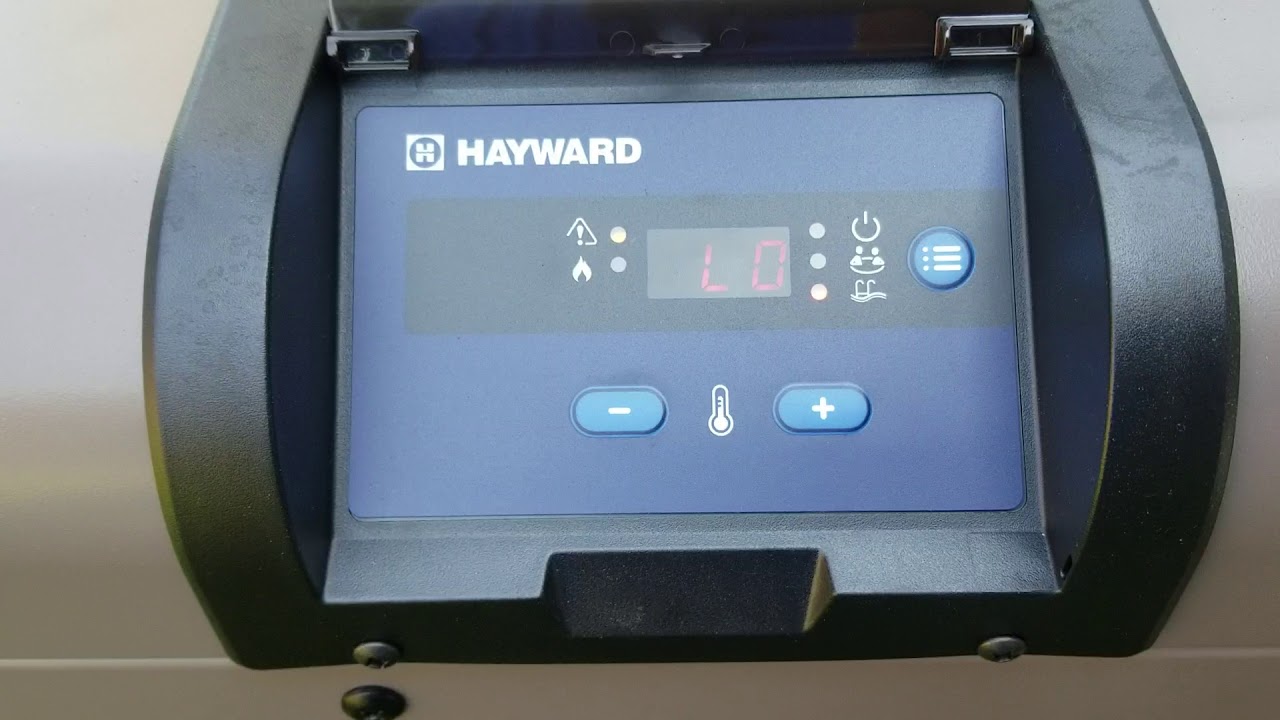
The Hayward heater showing a Lo code means low water flow. The heater cannot start heating without enough water moving through it. Several common causes lead to this low flow problem. Understanding these causes helps fix the issue quickly. Keep your pool warm and safe by checking these parts regularly.
Low Water Flow Issues
Low water flow is the main cause of the Lo code. It happens when water does not move fast enough through the heater. This can stop the heater from turning on. Low flow might come from a pump not working well or pipes with blockages. Check the pump speed and pipe condition to keep good water flow.
Dirty Or Clogged Filters
Filters clean the water before it reaches the heater. Over time, dirt and debris build up in the filter. This blocks water flow and causes the Lo code. Clean or replace filters often. This keeps water clean and flowing freely through the heater system.
Blocked Pump Or Skimmer
The pump pulls water from the pool through the skimmer. If the skimmer or pump basket is full of leaves or dirt, water flow slows down. This can trigger the Lo code on your heater. Clear out the pump and skimmer baskets regularly to avoid blockages.
Faulty Pressure Switch
The pressure switch checks water flow inside the heater. If it breaks or works wrong, it may show a false Lo code. The switch might need cleaning or replacement. Test the pressure switch to make sure it reads water flow correctly.

Credit: centraljerseypools.info
Checking Water Flow
Checking water flow is an important step when you see the Hayward Heater Lo code. Poor water flow can cause the heater to stop working. This issue can damage the heater if not fixed quickly. Always check the water flow first to find the problem.
Inspecting The Pump Operation
Start by looking at the pool pump. The pump moves water through the heater. Make sure the pump is running and making no strange noises. A broken or slow pump can reduce water flow. If the pump is off, turn it on and watch for water flow. Clean the pump basket if it is full of debris.
Verifying Valve Positions
Check all the valves around the pool and heater. Valves control where the water goes. Make sure the valves are open to let water flow to the heater. Closed or partly closed valves can block water. Adjust valves so water flows freely through the heater system.
Cleaning Filters And Skimmers
Filters and skimmers trap dirt and leaves. If these parts are clogged, water cannot flow well. Remove and clean the filter cartridges or clean the sand in sand filters. Empty the skimmer baskets of any debris. Clean filters and skimmers regularly for smooth water flow.
Resetting The Heater
Resetting your Hayward heater can solve many common issues, especially the Lo code error. This process helps clear minor faults and restarts the system fresh. It often gets your heater working again without extra tools or help.
Resetting is simple but must be done carefully. Following the right steps protects your heater and keeps it safe. Below are easy methods to reset your Hayward heater.
Power Cycling The Unit
Turn off the heater using the main power switch. Wait for about five minutes to let the system fully shut down. This pause clears temporary errors from the memory. After waiting, turn the power back on. Check if the Lo code disappears and the heater runs normally.
Using The Control Panel Reset
Find the reset button on your heater’s control panel. Press and hold it for about three seconds. Release the button once the display changes or the heater restarts. This method resets the heater’s internal settings. It helps clear error codes like Lo without unplugging the unit.
When To Call A Professional
Resetting may not fix all problems. If the Lo code stays after trying both resets, a deeper issue exists. Electrical or mechanical parts might need checking. Contact a certified technician to inspect and repair your heater safely. Avoid trying complex fixes to prevent damage or injury.
Maintaining Your Heater
Maintaining your Hayward heater is key for long-lasting performance. Regular care keeps the system running smoothly and avoids common errors. Simple tasks can prevent issues and improve heater efficiency. A well-kept heater saves energy and reduces repair costs.
Regular Filter Cleaning
Clean the heater filter often to keep water flowing freely. Dirty filters block water and make the heater work harder. Remove the filter, rinse it with water, and let it dry. Clean filters prevent the Lo code error from appearing.
Routine Pressure Switch Checks
The pressure switch controls air flow inside the heater. Check it monthly to ensure it works correctly. Look for dirt or damage and clean the switch gently. A faulty pressure switch can cause the Lo code error.
Seasonal Heater Inspections
Inspect your heater before and after each season. Check all parts for wear, leaks, or rust. Tighten loose connections and clean debris around the heater. Seasonal checks help catch problems early and keep your heater reliable.
Preventing Future Lo Codes
Preventing future Lo codes on your Hayward heater helps keep your pool warm and safe. Regular care and attention stop small issues from turning into big problems. Follow simple steps to avoid error codes and enjoy smooth heater operation.
Ensuring Proper Water Circulation
Water must flow well through the heater. Poor circulation causes the Lo code. Check the pump and filter often. Clean or replace filters to keep water moving. Make sure valves are open and pipes are not blocked. Good flow helps the heater work efficiently.
Avoiding Debris Build-up
Leaves, dirt, and other debris can clog the heater parts. Clean the skimmer basket and pump strainer regularly. Remove any debris near the heater. Clogged parts cause the heater to overheat or stop. Keeping the area clean prevents the Lo code from showing.
Upgrading Components When Needed
Old or worn parts may cause errors. Replace sensors, pumps, or valves if they show wear. Use parts made for Hayward heaters. New components ensure the system runs well. Regular upgrades reduce the chance of future problems.
Credit: www.youtube.com

Credit: www.reddit.com
Frequently Asked Questions
What Does Hayward Heater Lo Code Mean?
Hayward Heater Lo Code shows the heater’s water temperature is too low to work.
Why Does My Hayward Heater Show Lo Code?
Lo Code appears when water flow is too low or the water temperature sensor is faulty.
How Can I Fix The Hayward Heater Lo Code?
Check water flow, clean filters, and inspect the temperature sensor to fix Lo Code.
Is Lo Code Dangerous For My Pool Heater?
Lo Code is a warning to protect your heater from damage due to low water temperature.
How Often Should I Check For Hayward Heater Error Codes?
Check error codes regularly to keep your heater working well and avoid bigger problems.
Conclusion
The Hayward Heater Lo Code signals low water flow in your system. Check your pool pump and filter for blockages. Ensure water valves are fully open and clean. Fixing these issues often clears the code quickly. Regular maintenance helps avoid future problems.
Knowing this code saves time and money. Keep your heater working smoothly all season. Simple steps make pool heating safe and reliable. Stay aware, act fast, and enjoy warm pool water.