
Are you frustrated because your Stealth Cam isn’t working the way it should? You’re not alone.
Many users face issues that can ruin their experience and even cause missed moments outdoors. Whether your camera won’t turn on, the images are blurry, or the battery drains too fast, these problems can be annoying. But don’t worry—understanding the common Stealth Cam problems and how to fix them can save you time and stress.
Keep reading to discover simple solutions that will get your camera back in action quickly.
Common Stealth Cam Issues
Stealth cams are popular for wildlife monitoring and security. Many users face common issues that affect performance. Understanding these problems helps in better use and care.
Battery Drain Problems
Batteries often run out faster than expected. This can happen due to extreme weather or camera settings. Using high-resolution images and long standby times also drain batteries quickly. Regularly check battery health and replace old ones.
Image Quality Concerns
Blurry or dark images are frequent complaints. Poor lighting and dirty lenses cause low-quality photos. Incorrect settings like low resolution or wrong flash mode also reduce clarity. Keep the lens clean and adjust settings for best results.
Trigger Sensitivity Errors
The camera may miss animals or trigger too often. Sensitivity set too low or too high causes this. Moving branches, rain, or small animals can cause false triggers. Adjust sensitivity based on environment and test regularly.
Memory Card Failures
Memory cards can stop working or lose data. Using low-quality or full cards leads to errors. Cards may get corrupted if not removed safely. Use good brands and format cards in the camera before use.
Connectivity Challenges
Wireless and app connections often fail or drop. Weak signals and outdated apps cause problems. Syncing photos to phones or computers becomes difficult. Keep software updated and check signal strength for smooth connection.
Battery Troubleshooting
Battery issues are common with Stealth Cams and can stop the camera from working. Knowing how to troubleshoot battery problems saves time and frustration. Simple steps can help you find the cause and fix it fast.
Choosing The Right Batteries
Use fresh, high-quality alkaline or lithium batteries for best results. Cheap or old batteries drain quickly and cause errors. Avoid rechargeable batteries unless the camera manual says they are okay. Always check battery type recommendations in the user guide.
Proper Battery Installation
Insert batteries following the correct polarity. Plus (+) and minus (-) signs must match the camera’s battery slots. Loose or incorrectly placed batteries stop the camera from powering on. Clean battery contacts if you see dirt or corrosion for a better connection.
Extending Battery Life Tips
Turn off the camera when not in use to save power. Lower the flash intensity in low light settings. Use the camera’s sleep mode to reduce energy use between shots. Remove batteries if storing the camera for a long time. Regularly check battery levels to avoid unexpected shutdowns.
Improving Image Clarity
Clear images are key for any Stealth Cam user. Blurry or dark photos make it hard to identify animals or details. Improving image clarity helps capture better moments and makes your camera more reliable. Small changes can lead to big improvements in photo quality.
Lens Cleaning Techniques
Dirty lenses cause blurry or foggy pictures. Use a soft cloth to wipe the lens gently. Avoid rough materials that can scratch the glass. A small amount of lens cleaner or alcohol on the cloth removes stubborn dirt. Clean the lens regularly, especially after rain or dust storms.
Adjusting Camera Settings
Check your camera’s settings for the best image results. Increase brightness or contrast to make details clearer. Set the resolution to the highest available for sharp photos. Turn off night mode if your pictures look too dark or grainy. Test different settings to find what works best for your location.
Optimal Camera Placement
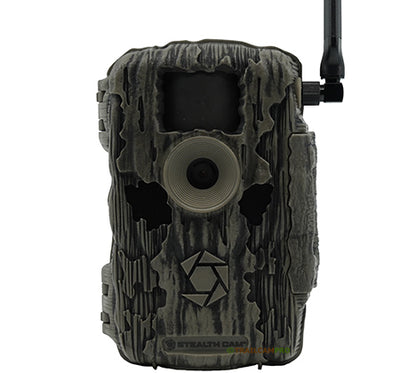
Position your Stealth Cam where it gets good natural light. Avoid placing it too close to thick bushes or branches. Higher spots can reduce shadows and improve visibility. Angle the camera slightly downward to catch more ground activity. Keep the lens free from direct sunlight glare by choosing shaded areas.
Credit: www.trailcampro.com
Fixing Trigger Issues
Trigger issues are a common problem with Stealth Cams. They cause missed shots or too many false alarms. Fixing these issues improves your camera’s performance. It helps capture clear and timely images. The key is to focus on the motion sensor and trigger settings.
Calibrating Motion Sensors
Start by calibrating your camera’s motion sensors. This ensures the sensor detects real movement accurately. Adjust sensitivity to match your environment. High sensitivity may cause false triggers from small movements. Low sensitivity might miss important activity. Test different settings to find the right balance.
Avoiding False Triggers
False triggers waste battery and storage space. Avoid placing the camera near moving branches or tall grass. These can cause frequent false alarms. Use a clear background to reduce sensor confusion. Shield the sensor from direct sunlight to prevent glare. Proper placement cuts down false triggers significantly.
Testing Trigger Speed
Trigger speed affects how fast your camera captures images. A slow trigger misses fast-moving animals. Test your camera by walking in front of it. Note the time it takes to snap a photo. Faster trigger speeds catch more action. Adjust settings to improve response time if needed.
Memory Card Solutions
Memory cards are key to Stealth Cam performance. Problems often come from card issues. Choosing the right card and keeping it healthy solves many troubles.
Good memory card care keeps your camera running smoothly. It stops lost photos and errors. Follow simple steps for best results.
Selecting Compatible Cards
Use memory cards that match your Stealth Cam model. Check the camera manual for supported types. Most cameras work well with SD or microSD cards. Choose cards with a Class 10 or higher speed rating. This ensures fast writing and reliable performance. Avoid cheap or unknown brands to reduce risks.
Formatting Memory Cards
Always format new cards before first use. Formatting sets the card for the camera’s file system. Use the camera’s built-in format option for best results. This clears old data and fixes hidden errors. Avoid formatting cards on your computer. It may create compatibility problems with the camera.
Preventing Data Corruption
Turn off the camera before removing the card. Remove cards gently to avoid damage. Avoid full cards; delete old files regularly. Use high-quality cards to reduce corruption risk. Keep cards away from extreme heat or moisture. Back up important photos often to another device. These steps protect your data and keep the camera ready.

Credit: www.stellarinfo.com
Enhancing Connectivity
Enhancing connectivity is key for a better Stealth Cam experience. Good connections ensure quick image uploads and smooth remote access. Many users face issues due to weak signals or outdated settings. Fixing these can improve performance and reduce frustration.
Simple steps can boost your camera’s wireless link. Let’s explore how to improve signal strength, set wireless options correctly, and update firmware for better results.
Improving Signal Strength
Place your Stealth Cam where it gets a strong signal. Avoid thick walls and metal objects nearby. Higher locations often catch signals better. You can also try external antennas for a stronger link. Clear line of sight to the cell tower helps greatly.
Configuring Wireless Settings
Check your camera’s wireless settings carefully. Use the correct network name and password. Choose the right frequency band if the camera supports it. Disable any power-saving modes that reduce signal power. Proper settings keep the camera connected longer.
Firmware Updates And Their Impact
Firmware updates fix bugs and improve connectivity. Regular updates can make your camera more stable. Check the manufacturer’s website for the latest version. Follow instructions to update safely without losing data. Updated firmware often solves many common problems.
Preventive Maintenance Tips
Stealth cams need regular care to work well for a long time. Small problems can stop your camera from capturing important moments. Preventive maintenance helps keep your device ready and reliable. Simple steps can avoid many common issues.
Regular Cleaning Routines
Dust and dirt can block the lens and sensors. Clean the camera lens gently with a soft cloth. Wipe down the body to remove mud and debris. Avoid harsh chemicals that can damage the surface. Clean the battery contacts to keep good power flow. Do this cleaning every few weeks or after bad weather.
Weatherproofing Strategies
Stealth cams face rain, snow, and heat. Use waterproof cases or covers to protect them. Check seals and gaskets for cracks or wear. Apply silicone spray to keep seals flexible. Place cameras under tree branches or shelters for extra cover. Secure the camera tightly to avoid shaking in wind.
Routine Performance Checks
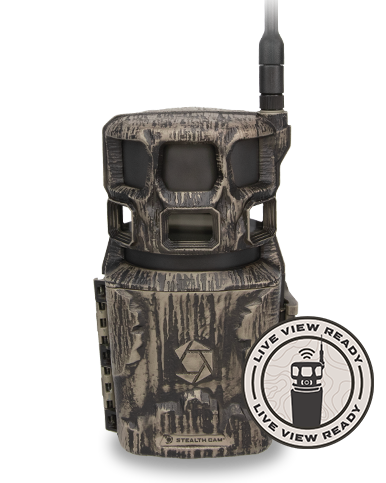
Test the camera regularly to catch problems early. Turn it on and check the display screen. Take a few test photos and review the quality. Check battery levels and replace old batteries. Update the camera’s firmware for best performance. Note any unusual sounds or errors during use.
Credit: www.stealthcam.com
Frequently Asked Questions
Why Is My Stealth Cam Not Turning On?
Check the battery power and placement. Weak or dead batteries often cause this issue.
How To Fix Blurry Images On Stealth Cam?
Clean the lens and adjust the focus. Dirt or wrong focus blurs photos.
What Causes Stealth Cam Motion Sensor To Fail?
Obstructions or wrong placement can block sensors. Clear the area and reposition the camera.
Why Does My Stealth Cam Have No Night Vision?
Night vision may fail if infrared LEDs are blocked or batteries are low.
How To Reset Stealth Cam To Factory Settings?
Press and hold the reset button for 10 seconds to restore default settings.
Conclusion
Stealth cam problems can affect your outdoor experience a lot. Knowing common issues helps you fix them faster. Check batteries, memory cards, and settings often. Keep your camera clean and dry to avoid damage. Small steps prevent big headaches later.
Stay patient and try simple solutions first. Your camera will work better with care. Enjoy capturing nature without constant trouble. Remember, every problem has a fix. Keep your gear ready and your patience strong.