
Are you facing a frustrating issue where your Element TV has sound but no picture? You’re not alone, and this problem can be surprisingly common.
Imagine settling in to watch your favorite show, only to hear the audio without any visuals. It’s confusing and annoying, but don’t worry—there are simple steps you can take to fix it. You’ll discover why this happens and how to get your picture back quickly.
Keep reading, and you’ll be back to enjoying your TV in no time.
Credit: support.elementelectronics.com
Common Causes Of No Picture
When your Element TV has sound but no picture, it can feel frustrating. Several common issues cause this problem. Understanding these helps fix the issue quickly. Below are some main reasons why your TV shows no picture.
Loose Or Damaged Cables
Cables connect your TV to devices like cable boxes or DVD players. Loose or damaged cables often cause no picture. Check HDMI, coaxial, and power cables for secure connections. Replace any cables that look worn or broken.
Incorrect Input Source
Your TV needs the right input source to show a picture. Sometimes the TV is set to the wrong input. Use the remote to cycle through inputs like HDMI1, HDMI2, or AV. Select the one matching your device connection.
Backlight Issues
The backlight lights up your TV screen. If it fails, the screen stays dark even with sound. Shine a flashlight on the screen closely. If you see faint images, the backlight likely needs repair or replacement.
Firmware Glitches
Firmware controls your TV’s software functions. Bugs or glitches can cause the picture to disappear. Restart your TV or update the firmware to fix software problems. Check the Element website for update instructions.
Credit: www.youtube.com
Initial Quick Fixes
When your Element TV shows sound but no picture, start with quick fixes. These simple steps often solve the problem fast. Check each one carefully to avoid bigger issues.
Power Cycle The Tv
Turn off your TV using the remote or button. Unplug it from the wall. Wait for 60 seconds. Plug it back in and turn it on. This resets the TV and clears minor glitches.
Check And Reconnect Cables
Loose or damaged cables cause no picture issues. Unplug all cables from the TV and devices. Check for any damage or dirt. Reconnect them firmly. Ensure HDMI or AV cables are in the right ports.
Switch Input Sources
Your TV may be on the wrong input source. Use the remote to cycle through HDMI, AV, or other inputs. Stop on the correct source where your device is connected. This helps find the active video signal.
Adjust Brightness And Picture Settings
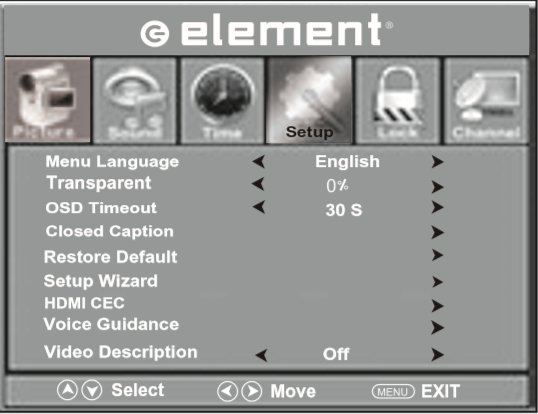
Sometimes brightness is too low or the picture is off. Open the TV’s menu and go to picture settings. Increase brightness and check contrast. Reset to default settings if needed. This can bring the picture back clearly.
Advanced Troubleshooting Steps
Advanced troubleshooting steps help fix the Element TV no picture but sound issue. These steps go beyond basic checks. They dive deeper into settings and hardware. Follow each step carefully for best results.
Reset Tv To Factory Settings
Resetting the TV returns all settings to original. This clears any wrong changes causing the problem. Navigate to the menu using your remote. Find the “Reset” or “Factory Reset” option. Confirm the reset and wait for the TV to restart. This step often resolves software glitches causing no picture.
Update Tv Firmware
Outdated firmware can cause display issues. Updating the firmware improves TV performance. Connect the TV to the internet. Go to the settings menu and select “Update Firmware” or “Software Update.” Download and install any available updates. Restart the TV after updating to apply changes.
Inspect Backlight Function
The backlight helps the screen show images. Check if the backlight works by shining a flashlight on the screen. Look closely for faint images. If you see images, the backlight might be faulty. Backlight issues need professional repair or replacement. Do not open the TV yourself.
Use External Devices To Test
Connect devices like a DVD player or gaming console. This helps find if the problem is with the TV or input source. Use a different HDMI or AV cable to connect. Switch to the correct input on the TV. If external devices show a picture, the TV screen or internal parts may be damaged.
Credit: www.wirelesshack.org
When To Seek Professional Help
Knowing when to seek professional help for your Element TV is important. Some problems need expert care to avoid more damage. Understanding the signs can save time and money. It ensures your TV works well again.
Persistent Picture Issues
Picture problems that do not improve need expert help. If the screen stays blank but sound plays, it may be a deeper issue. Troubleshooting at home may not fix it. Professionals have tools to find hidden faults quickly.
Hardware Component Failures
Broken parts inside the TV cause many picture problems. Components like the T-Con board, power supply, or main board may fail. These parts require repair or replacement by skilled technicians. Trying to fix hardware yourself can cause more harm.
Warranty And Repair Options
Check if your Element TV is still under warranty. Repairs covered by warranty save money and ensure quality. Authorized service centers provide proper parts and service. Using these options protects your TV and your investment.
Preventive Tips For Display Problems
Display problems on an Element TV can be frustrating. Sound plays, but the picture stays black. Preventing these issues helps you enjoy your TV without interruptions. Simple care steps reduce the chance of screen troubles. Follow these tips to keep your display clear and bright.
Regular Firmware Updates
Keep your TV’s firmware up to date. Updates fix bugs and improve performance. Check for updates in the settings menu often. Updated software helps your screen work smoothly. Avoid skipping updates to prevent display errors.
Proper Cable Management
Use good quality cables and connect them properly. Loose or damaged cables can cause picture loss. Organize cables to avoid bending or twisting. Secure connections keep the signal strong. Replace old cables to maintain clear display.
Avoiding Power Surges
Power surges can harm your TV’s internal parts. Use a surge protector to shield your TV. Unplug the TV during storms or power outages. Stable power helps keep the screen functioning well. Protect your TV from sudden electricity spikes.
Routine Screen Maintenance
Clean the screen gently with a soft cloth. Avoid harsh chemicals that can damage the display. Dust and dirt can block the picture quality. Regular cleaning keeps the screen clear and bright. Handle your TV with care to prevent scratches.
Frequently Asked Questions
Why Does Element Tv Have Sound But No Picture?
This happens when the TV’s display or connection has issues, but audio signals still work.
How Can I Fix Element Tv With No Picture?
Try resetting the TV, checking cables, or changing input sources to restore the picture.
Can A Faulty Hdmi Cause No Picture On Element Tv?
Yes, a damaged or loose HDMI cable can block the video signal but still carry sound.
Does A Power Surge Cause No Picture But Sound On Element Tv?
Power surges can damage TV display parts, causing picture failure while sound remains.
When Should I Call A Technician For No Picture On Element Tv?
Call a technician if basic fixes fail and the TV still shows sound without picture.
Conclusion
Element TV showing sound but no picture can be frustrating. Check all cable connections carefully. Restart the TV and connected devices. Adjust the brightness and picture settings. Try a different input source or device. Sometimes, a simple reset fixes the issue.
If problems continue, contact customer support for help. Small steps often solve big problems. Stay patient and follow these tips for better viewing.