
Is your Maytag Bravos XL washer control panel not working? It can be frustrating when your washing machine won’t respond, leaving your laundry piled up and your day disrupted.
You rely on your washer to make life easier, so when the control panel stops functioning, it feels like everything comes to a halt. But don’t worry—this problem isn’t as complicated as it seems. You’ll discover simple steps to diagnose and fix the control panel issues quickly.
Keep reading to get your washer back in action and save time and money on repairs.
Common Control Panel Issues
The control panel is the heart of your Maytag Bravos XL washer. It lets you choose cycles and settings. Problems here can stop your washer from working right. Common control panel issues cause frustration and delay laundry tasks. Understanding these problems helps you fix them faster.
Unresponsive Buttons
Buttons that do not work are a frequent issue. Pressing them shows no reaction. Dirt, moisture, or wear can cause this problem. Sometimes the panel’s membrane wears out. Other times, loose wiring is the cause. Cleaning the panel gently may help. Checking connections inside the control board is also useful.
Display Not Lighting Up
The display should light up when you start the washer. If it stays dark, the panel may not get power. A faulty power supply or damaged control board can cause this. Loose or broken wires inside the panel can also lead to no display. Testing the power and connections often reveals the issue.
Error Codes On Screen
Error codes appear as numbers or letters on the display. They tell you about specific problems. These codes guide you to the right fix. Common codes relate to door locks, water flow, or motor issues. Checking the user manual helps understand these codes. Clearing error codes may need a reset or repair.

Credit: www.youtube.com
Basic Troubleshooting Steps
When the Maytag Bravos XL washer control panel stops working, start with basic checks. These steps can fix many common issues. They save time and avoid unnecessary repairs.
Follow these simple actions before calling a technician. Each step helps find the cause of the problem. Clear and easy to do.
Power Cycle The Washer
Turn off the washer. Unplug it from the wall outlet. Wait for one minute. Plug it back in. Turn the washer on again. This resets the control board and can clear glitches.
Check Power Supply
Make sure the outlet works. Test it with a lamp or phone charger. Look for loose plugs or damaged cords. A stable power source is needed for the control panel to work.
Inspect Door Latch
Check if the door closes properly. The washer will not start if the latch is faulty. Clean the latch area and remove any debris. Replace the latch if it is broken or worn out.
Resetting The Control Panel
Resetting the control panel can fix many issues with the Maytag Bravos XL washer. The control panel might freeze or stop responding. A reset can clear errors and restore normal function. This process is simple and does not need special tools.
Performing A Hard Reset
Unplug the washer from the power outlet. Wait for about one minute. Plug it back in and turn on the washer. This action resets the control board. It clears minor glitches that cause the panel to fail. Check if the buttons respond after the reset.
Using The Diagnostic Mode
Enter the diagnostic mode to test the control panel. Press the “Start” button and hold it. While holding, press the “Power” button three times quickly. Release the “Start” button. The control panel will show error codes or run tests. Follow the on-screen instructions to identify issues. Exit by pressing “Power” once. This helps find hidden problems with the panel.

Credit: www.reddit.com
Inspecting Control Board And Connections
The control board and its connections play a key role in the Maytag Bravos XL washer’s function. Problems here can stop the control panel from working properly. Careful inspection of the control board and wiring is important. It helps find faults that cause the washer to fail.
Start by checking the wiring harness. Loose or damaged wires can block signals. Then test the control board itself. This step confirms if the board controls the washer correctly.
Checking Wiring Harness
Unplug the washer before inspecting the wiring harness. Look for loose, frayed, or burnt wires. Make sure all connections are tight. Use a flashlight to see small connectors. Wiggle the harness gently to check for unstable links. Replace any damaged wires or connectors. A good wiring harness ensures smooth communication between parts.
Testing The Control Board
Testing the control board requires basic tools like a multimeter. Remove the control board cover carefully. Check for burnt spots or damaged components. Measure the voltage at key points on the board. Compare readings to the washer’s service manual. Faulty voltage levels often indicate a bad board. Replace the control board if tests show failure. Proper testing avoids unnecessary part replacements.
Replacing Faulty Components
Replacing faulty components is key to fixing the Maytag Bravos XL washer control panel. Parts like the control board or the user interface panel can fail over time. Swapping these parts often restores full functionality. This guide explains how to replace these components safely.
Replacing The Control Board
The control board manages all washer functions. A faulty board can cause the panel to stop working. First, unplug the washer to avoid electric shock. Remove the back panel to access the control board. Disconnect all wires carefully. Take note of where each wire goes.
Replace the old board with a new one. Connect all wires exactly as before. Secure the board in place. Close the back panel. Plug the washer back in and test the control panel. If it powers up and responds, the repair worked.
Swapping The User Interface Panel
The user interface panel includes the buttons and display. Faulty buttons or a blank screen mean this part may need replacing. Begin by unplugging the washer. Remove the top panel to access the interface panel. Disconnect the ribbon cable and any connectors.
Remove the old interface panel. Install the new one by connecting all cables. Fix it securely in place. Replace the top panel. Plug the washer in and check if the buttons and display work. This simple swap often restores control panel functions.
Preventive Maintenance Tips
Preventive maintenance helps keep your Maytag Bravos XL washer control panel working well. Small actions protect the panel from damage. These tips save money by avoiding costly repairs or replacements. Follow simple steps for long-lasting performance and fewer problems.
Keeping The Panel Clean
Dirt and grime can block buttons and sensors. Wipe the control panel regularly with a soft, damp cloth. Use mild soap if needed. Avoid harsh chemicals that can damage the surface. Do not spray water directly on the panel. Keep the area dry to prevent electrical issues.
Avoiding Electrical Surges
Power surges can harm the control panel’s electronics. Use a surge protector to shield the washer from voltage spikes. Unplug the machine during storms or power outages. Ensure your home’s wiring is safe and up to code. Stable power helps the washer run smoothly and lasts longer.
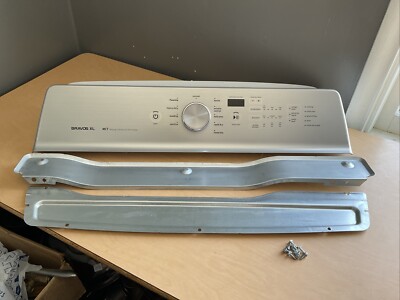
Credit: www.ebay.com
Frequently Asked Questions
Why Is My Maytag Bravos Xl Washer Control Panel Unresponsive?
The control panel may be unresponsive due to power issues or a faulty control board.
How Do I Reset The Maytag Bravos Xl Washer Control Panel?
Unplug the washer for one minute, then plug it back in to reset the panel.
Can A Faulty Door Lock Affect The Control Panel?
Yes, the washer won’t start if the door lock is broken or not secured.
What Causes The Control Panel Lights To Blink On The Washer?
Blinking lights usually signal an error or a problem with the control board.
Should I Call A Technician For Control Panel Problems?
Calling a technician is best if simple resets don’t fix the control panel issue.
Conclusion
Fixing the Maytag Bravos XL washer control panel can feel tricky. Small steps help solve the problem faster. Check power sources and connections first. Clean the panel gently to remove dirt. Resetting the washer may clear simple errors. If issues stay, call a technician for help.
Regular care keeps your washer working well. Don’t let control panel problems stop your laundry. A little attention goes a long way. Stay patient and follow these tips for best results.