
Is your Samsung fridge not making or dispensing ice like it used to? You rely on that steady stream of ice cubes for your drinks, especially on hot days, and when it stops working, it’s frustrating.
You might feel stuck, wondering what went wrong and how to fix it quickly. Don’t worry—you’re not alone, and this problem is often easier to solve than you think. Keep reading to discover simple steps you can take to get your ice maker back up and running, so you can enjoy chilled drinks without hassle.

Credit: smartapplianceservices.com
Common Ice Maker Issues
Samsung fridges are popular for their ice makers, but sometimes problems occur. Common ice maker issues can stop ice production or block ice dispensing. Understanding these problems helps fix them quickly. It saves time and keeps your fridge working well.
Ice Maker Not Turning On
The ice maker may not start due to power issues. Check if the fridge is plugged in properly. A tripped circuit breaker can also cause this. Sometimes, the ice maker’s switch is off. Make sure it is turned on. A faulty motor or thermostat may need repair.
No Ice Dispensing
Ice may be stuck in the chute and not come out. The dispenser motor or auger might be broken. Check for ice blockages inside the ice bin. The dispenser switch could be faulty. Cleaning the dispenser area can help. In some cases, the control board needs attention.
Slow Ice Production
Slow ice making often happens when the water filter is dirty. Replace the water filter regularly. Low water pressure can also reduce ice speed. The freezer temperature might be too high. Keep it between 0°F and 5°F for best results. A frozen water line can block water flow.
Checking The Water Supply
Checking the water supply is the first step when your Samsung fridge stops making or dispensing ice. The ice maker needs a steady flow of water to work well. Problems often start with the water supply itself. A simple issue like a loose connection or low water pressure can stop ice production completely.
Before calling for help, make sure the water supply is working correctly. This saves time and money. The water supply check includes inspecting the water line connection, checking water pressure, and ensuring the water line is not frozen.
Water Line Connection
Check the water line behind your fridge. It must be tightly connected to the fridge and the water source. A loose or damaged connection can cause leaks or stop water flow. Turn off the water supply before tightening the connections. Use pliers if needed, but do not force them.
Water Pressure Problems
Low water pressure can stop your ice maker. The pressure should be between 20 and 120 psi. Test the pressure with a gauge if possible. If the pressure is too low, ice production will slow or stop. Call a plumber if you cannot fix the pressure yourself.
Frozen Water Line
A frozen water line blocks water flow to the ice maker. Check if the line feels cold or has ice inside. Thaw the line by turning off the fridge and letting it warm up. Use a hairdryer carefully on the frozen part. Never use sharp tools to break the ice.
Inspecting The Ice Maker Components
Checking the ice maker parts helps find why your Samsung fridge does not make or dispense ice. Each component has a role in ice production. Understanding these parts helps fix the problem faster.
Ice Maker Assembly
The ice maker assembly controls the entire ice-making process. It fills the ice mold with water and ejects ice cubes. Dirt or damage here can stop ice from forming. Inspect the assembly for cracks or blockages. Clean any dirt or debris carefully.
Ice Mold Heater
The ice mold heater helps release ice cubes. It warms the mold slightly to loosen frozen ice. If the heater fails, ice sticks in the mold. Check for signs of damage or corrosion. Test the heater with a multimeter for proper function.
Ice Level Sensor
The ice level sensor stops ice making when the bin is full. A faulty sensor may think the bin is full all the time. This stops ice production even if space is available. Clean the sensor and check for wiring issues. Replace the sensor if it does not work.
Resetting The Ice Maker
Resetting the ice maker can fix many common ice problems with your Samsung fridge. It helps clear any errors and restarts the system. This process often restores ice production and dispensing functions quickly.
Resetting is simple and requires no special tools. Follow the steps carefully for best results. You can reset the ice maker manually or by using the control panel.
Manual Reset Steps
First, find the ice maker inside the freezer. Locate the power switch or reset button on the ice maker unit. Turn off the ice maker by switching it to the off position.
Wait for about 30 seconds to 1 minute. Turn the ice maker back on by switching it to the on position. This restarts the ice maker and clears errors.
Close the freezer door and wait a few hours. Check if the ice maker starts making ice again. Repeat if needed to ensure the reset worked.
Using The Control Panel
Press and hold the ice maker reset button on the fridge control panel. Hold it for 10 seconds or until you hear a beep sound. This beep signals the reset process has started.
Release the button and wait for the ice maker to restart. The control panel will show a message or indicator light during reset. This confirms the ice maker is resetting.
Give the ice maker time to resume ice production. Watch for ice to appear in the bin after a few hours. This method is quick and user-friendly for most Samsung fridge models.
Cleaning And Maintenance Tips
Cleaning and maintenance keep your Samsung fridge’s ice maker working well. Dirt and blockages stop ice from forming or coming out. Regular care helps avoid common ice problems. Simple steps can restore ice production quickly.
Removing Ice Blockages
Ice can build up and block the dispenser. Turn off the ice maker before clearing ice. Use warm water or a cloth to melt the ice. Avoid using sharp tools to prevent damage. Check for ice inside the dispenser chute too.
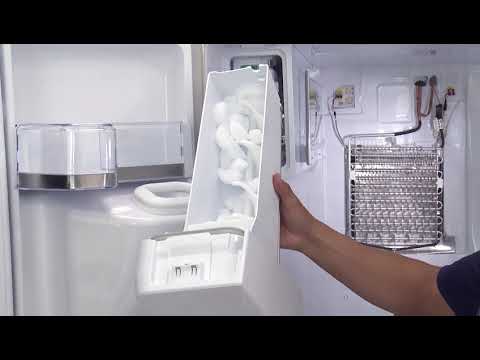
Cleaning The Ice Bin
Take out the ice bin carefully. Wash it with warm, soapy water. Rinse the bin well to remove soap. Dry it completely before putting it back. Clean the bin every few weeks to stop odors and buildup.
Replacing Water Filters
Old filters reduce water flow and ice quality. Find the water filter in your fridge. Replace it every six months or as needed. Follow the user manual for correct installation. Fresh filters keep ice tasting clean and clear.
Credit: www.youtube.com
When To Call A Professional
Knowing when to call a professional for your Samsung fridge ice maker saves time and stress. Some problems need expert tools and skills to fix. Ignoring serious issues can cause more damage and higher costs. Understanding signs that require help is important for all fridge owners.
Persistent Ice Maker Problems
Simple fixes may solve ice maker glitches. But, if the ice maker stops working after many attempts, call a technician. Persistent problems show deeper issues inside the machine. A professional can check parts that are not easy to reach. They find and fix hidden faults quickly.
Electrical And Mechanical Issues
Ice makers rely on electrical and mechanical parts. If these parts fail, the ice maker stops working. Strange noises, no power, or no ice are warning signs. Handling electrical parts without training can be dangerous. A trained technician knows how to test and replace these parts safely.

Credit: aappliance.ca
Frequently Asked Questions
Why Is My Samsung Fridge Not Making Ice?
Ice production stops if the water supply is off, the freezer is too warm, or the ice maker is turned off.
How To Fix Samsung Fridge Ice Dispenser Not Working?
Check water line, reset the ice maker, and ensure the dispenser control is on.
Can A Frozen Water Line Cause No Ice In Samsung Fridge?
Yes, a frozen water line blocks water flow and stops ice production.
How Often Should I Replace The Water Filter In My Samsung Fridge?
Replace the water filter every 6 months to keep ice clean and the dispenser working.
What Does It Mean If Samsung Fridge Ice Tastes Bad?
Bad taste usually means the water filter is old or the ice bin needs cleaning.
Conclusion
A Samsung fridge not making or dispensing ice can be frustrating. Check water supply and ice maker settings first. Clean the ice bin and inspect for any blockages. Sometimes, resetting the fridge helps fix minor issues quickly. Regular care keeps your ice maker working well.
If problems continue, contacting a professional might be best. Keeping these tips in mind saves time and effort. Your fridge will be back to making ice soon. Simple steps often fix common ice maker problems.