
Is your Vivint thermostat not working the way it should? You rely on it to keep your home comfortable, but when it stops responding, frustration quickly sets in.
Don’t worry—you’re not alone, and there are simple steps you can take to fix the problem. You’ll discover easy solutions that get your thermostat back on track fast. Keep reading to take control of your home’s temperature again without stress.
Common Vivint Thermostat Issues
Vivint thermostats are popular for smart home comfort. Yet, some users face issues that stop these devices from working well. Knowing common problems helps fix them fast. This saves money and keeps your home cozy.
Power And Display Problems
Sometimes the thermostat does not turn on. The screen stays blank. This can happen from power loss or wiring issues. Check the circuit breaker or fuse. Weak batteries also cause display problems. Replace batteries to see if the screen lights up. Loose wires can interrupt power. Secure all connections carefully.
Connectivity Errors
Vivint thermostats rely on Wi-Fi to work smartly. Loss of connection stops remote control. The thermostat may show a “no connection” error. Restart the router and thermostat to refresh links. Check the Wi-Fi password is correct. Distance from the router can weaken signals. Move the router closer for stronger connection.
Temperature Inconsistencies
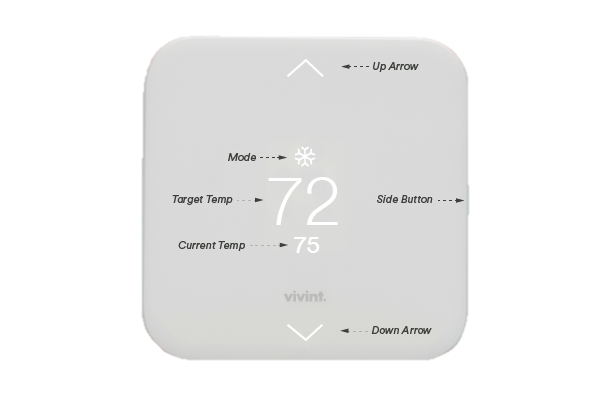
The thermostat might show wrong room temperature. It could overheat or cool too much. This happens if the sensor is dirty or broken. Dust blocks the sensor from reading correctly. Clean the device gently with a soft cloth. Placement near heat sources or vents also causes errors. Move the thermostat to a better spot.
Credit: support.vivint.com
Basic Troubleshooting Steps
When your Vivint thermostat stops working, basic troubleshooting can solve many issues. These steps help identify simple problems before calling for help. Try each step carefully to see if it fixes your thermostat. Most problems come from power, software, or network issues.
Restarting The Thermostat
Restarting can clear minor glitches in the system. To restart, press and hold the power button for 10 seconds. Wait a few moments, then turn it back on. This refreshes the device and often restores normal function.
Checking The Power Source
Make sure the thermostat gets power. Check the circuit breaker or fuse for any trips or breaks. Confirm batteries inside the thermostat are not dead. Replace batteries if they look old or weak. A steady power supply is key for proper operation.
Resetting Network Connections
Network issues can cause the thermostat to stop working. Turn off the Wi-Fi on the thermostat and router. Wait for 30 seconds, then turn both back on. Reconnect the thermostat to your Wi-Fi network. This step helps fix communication problems between devices.
Advanced Fixes
Advanced fixes for a Vivint thermostat not working can solve deeper problems. These steps go beyond simple resets and power cycles. They require more attention but often restore your thermostat’s function.
Follow these techniques carefully to avoid further damage. Each fix targets a common cause of thermostat failure. Understanding these can help you maintain a comfortable home.
Firmware Updates
Thermostat firmware controls its basic operations and features. Outdated firmware can cause errors or stop the device from working properly. Check the Vivint app or website for update instructions. Installing the latest firmware can fix bugs and improve performance. Updates often include new features and better security. Make sure your thermostat stays connected to Wi-Fi during the update. Avoid interrupting the process to prevent corrupting the system.
Replacing Batteries
Many Vivint thermostats use batteries for backup power. Dead or weak batteries can stop the device from responding. Remove the thermostat from its base to access the battery compartment. Use fresh batteries with the correct size and type. Replace both batteries to ensure consistent power. After replacement, test the thermostat to see if it works. Battery replacement is a simple fix that often solves power issues.
Inspecting Wiring And Sensors
Loose or damaged wires can disrupt thermostat function. Turn off power to the HVAC system before inspecting wiring. Check all connections for signs of wear or corrosion. Tighten any loose wires carefully without forcing them. Sensors inside the thermostat detect temperature and control heating or cooling. Dust or damage to sensors can cause errors. Clean sensors gently with a soft cloth. Replace damaged sensors to restore accurate readings.

Credit: www.youtube.com
Using The Vivint App For Diagnostics
The Vivint app offers a simple way to check your thermostat’s health. It helps find problems without calling support. This saves time and lets you fix issues fast. The app connects directly to your thermostat. It gives clear information about how the system works.
Using the app can guide you through easy steps. These steps show what might be wrong. You can also change settings from anywhere. This control helps keep your home comfortable all day.
Running System Checks
The app runs automatic tests on your thermostat. It looks at temperature sensors and wiring. The app checks if the thermostat talks to your heating and cooling system. It finds errors and shows messages on the screen. These messages tell you what needs fixing. Running system checks often keeps problems small.
Adjusting Settings Remotely
Change your thermostat settings using the app anytime. Set the temperature higher or lower from your phone. Turn the system on or off without touching the device. Adjust schedules to save energy during the day. Remote control lets you manage comfort even when away. It helps avoid big energy bills and keeps your home cozy.
When To Call Professional Support
Knowing when to call professional support for your Vivint thermostat saves time and stress. Some problems need expert help to fix properly. Understanding these moments helps keep your home comfortable and your system safe.
Identifying Complex Issues
Some thermostat problems look simple but have deep causes. If the screen stays blank or the device won’t respond, it could be a wiring issue. Strange noises or inconsistent temperature changes may show system faults. Troubleshooting beyond basic resets needs a trained technician.
Scheduling A Technician Visit
Contact support when your thermostat shows persistent problems. Set an appointment quickly if your heating or cooling stops working. A technician checks your system and finds hidden faults. Timely service prevents bigger damage and higher repair costs.

Credit: www.reddit.com
Preventive Tips For Long-term Comfort
Keeping your Vivint thermostat working well means more comfort at home. Small steps can prevent many issues. These tips help your system last longer and work better.
Regular Maintenance
Check your thermostat often. Clean the screen and buttons gently with a soft cloth. Dust and dirt can cause errors. Replace batteries every year or as needed. Update the software if the system allows it. These actions keep the thermostat responsive and accurate.
Optimizing Thermostat Placement
Place the thermostat in a central spot inside the house. Avoid areas near windows, doors, or vents. Direct sunlight can make it read wrong temperatures. Keep it away from heat sources like lamps and appliances. Correct placement helps the thermostat control your home’s temperature properly.
Frequently Asked Questions
Why Is My Vivint Thermostat Not Responding?
Your thermostat may have a power issue or a faulty connection. Check batteries and wiring first.
How Do I Reset A Vivint Thermostat?
Press and hold the reset button or follow the manual’s steps to restart the device.
Can Wi-fi Problems Affect Vivint Thermostat?
Yes, a weak or lost Wi-Fi signal can stop the thermostat from working properly.
What Should I Do If Vivint Thermostat Shows Error Codes?
Look up the error code in the manual or app for quick troubleshooting steps.
How To Update Vivint Thermostat Software?
Use the Vivint app to check for and install any available software updates.
Conclusion
A Vivint thermostat not working can cause discomfort and frustration. Small fixes like checking power or Wi-Fi often help. Resetting the device may solve common issues quickly. Sometimes, replacing batteries or updating the app makes a difference. Don’t ignore signs of bigger problems like wiring faults.
Regular maintenance keeps your thermostat running smoothly. Taking quick action saves energy and money. Stay calm and follow simple steps to restore comfort. Your home deserves a thermostat that works well every day.