
Is your Samsung TV turning on and off repeatedly, leaving you stuck with a frustrating black screen? You’re not alone, and this issue can ruin your viewing experience.
But don’t worry—there are simple steps you can take to fix it. Keep reading to discover why this happens and how you can get your TV back to working smoothly, so you can enjoy your favorite shows without interruption.
Common Causes
The issue of a Samsung TV turning on and off repeatedly with a black screen can frustrate many users. This problem often stems from a few common causes. Identifying these causes helps in finding the right solution quickly. Understanding the root can save time and effort.
Power Supply Issues
Power supply problems often cause the TV to restart endlessly. A faulty power cable or adapter may disrupt the flow of electricity. Loose connections in the power cord can also trigger this issue. Sometimes, power surges damage internal components. Checking the power source and cables is a simple first step.
Firmware Glitches
Firmware controls the TV’s software functions. Bugs or errors in firmware can cause the TV to reboot repeatedly. An incomplete or failed update often leads to glitches. Old firmware versions may have bugs that affect performance. Updating or reinstalling the firmware can fix these problems.
Hardware Faults
Internal hardware faults are another common cause. Problems with the motherboard or power board can cause restarts. Defective capacitors or circuits may fail to support the TV’s power needs. Overheating parts inside the TV can also lead to shutdowns. Hardware repairs usually require professional help.
External Device Conflicts
Connected devices may cause conflicts with the TV. Faulty HDMI cables or devices can trigger the TV to turn off. Some external devices send signals that confuse the TV’s system. Disconnecting all devices helps to check if one causes the problem. Testing devices one by one can identify the culprit.

Credit: www.ifixit.com
Basic Troubleshooting Steps
When your Samsung TV turns on and off repeatedly with a black screen, basic troubleshooting can help fix the issue. These simple steps check common problems that cause this behavior. Try each step carefully to find the cause.
Check Power Connections
Start by examining the power cable and plug. Make sure the cable is fully connected to the TV and the wall outlet. Look for any damage to the cord. Try a different outlet to rule out power problems. A loose or broken connection often causes power cycling.
Restart The Tv
Turn off the TV and unplug it from the power source. Wait for at least 60 seconds to let the TV reset. Plug it back in and turn it on. This simple restart can clear minor glitches causing the TV to restart repeatedly.
Inspect Remote Control
Check the remote control buttons. A stuck power button can send continuous on/off commands. Remove the batteries and press all buttons to release any stuck ones. Using the TV’s power button directly can help test if the remote is the problem.
Disconnect External Devices
Unplug all devices connected to the TV, like HDMI cables, gaming consoles, or USB drives. Sometimes, faulty devices cause the TV to reboot. Turn on the TV with no devices attached. Add devices back one at a time to find the troublemaker.
Advanced Solutions
Advanced solutions can fix a Samsung TV that turns on and off repeatedly with a black screen. These steps go beyond basic checks. They help solve deeper software or power issues. Follow these methods carefully to avoid damage.
Update Firmware
Firmware controls your TV’s functions. Outdated firmware can cause problems like black screens. Check the TV menu for updates. Connect to Wi-Fi and download the latest version. Installing updates can fix bugs and improve performance.
Reset Tv To Factory Settings
Resetting clears all settings and apps. This removes any errors causing the issue. Use the TV menu to find the reset option. Confirm the reset and wait for the TV to restart. This step returns the TV to its original state.
Perform A Power Cycle
Power cycling refreshes the TV’s system. Turn off the TV and unplug it from power. Wait for one minute to drain all power. Plug the TV back in and turn it on. This process can fix minor glitches and improve stability.
Test With Different Power Outlet
Power issues may cause the TV to turn off. Plug the TV into a different outlet. Avoid using power strips or extension cords. A stable power source helps the TV work correctly. Check if the problem continues with the new outlet.
When To Contact Support
Knowing when to contact support for your Samsung TV is important. Some problems need expert help. Trying to fix serious issues alone may cause more damage. Watch for signs that show your TV needs professional care.
Persistent Power Cycling
Your Samsung TV turns on and off repeatedly without stopping. This is called persistent power cycling. It shows a deep problem with the TV’s power or software. If the issue continues after simple resets, contact support. A technician can find the exact cause and fix it safely.
Black Screen Without Sound
The screen stays black but no sound plays from the TV. This means the TV is on but not displaying images or sound. Basic steps like checking cables or power might not help here. Support can test internal parts and repair what is broken. Don’t wait too long to ask for help.
Physical Damage Indicators
Look for cracks, dents, or broken buttons on your TV. Physical damage often causes power and display problems. Do not try to open or fix the TV yourself. Contact support to prevent further damage. Professionals can replace parts or guide you on repairs.
Preventive Tips
Preventing your Samsung TV from turning on and off repeatedly is easier than you think. Simple steps can keep your screen black-free and your viewing smooth. Follow these tips to avoid common issues and enjoy your TV without interruptions.
Stable Power Supply
Ensure your TV plugs into a reliable power outlet. Avoid using extension cords or power strips that may fail. Power fluctuations can cause the TV to restart or show a black screen. Use a surge protector to shield your TV from power spikes. Consistent power keeps the TV running without sudden restarts.
Regular Firmware Updates
Keep your TV’s software up to date. Samsung releases updates that fix bugs and improve performance. Check for updates in the settings menu often. An outdated firmware can cause glitches like screen blackouts or random restarts. Regular updates help your TV run smoothly and avoid common errors.
Safe Device Connections
Connect devices carefully to your TV. Loose or faulty cables can cause the screen to flicker or turn black. Use high-quality HDMI or AV cables and secure connections tightly. Disconnect any devices that cause the TV to act strangely. Safe connections prevent unwanted interruptions and protect your TV.

Credit: www.youtube.com
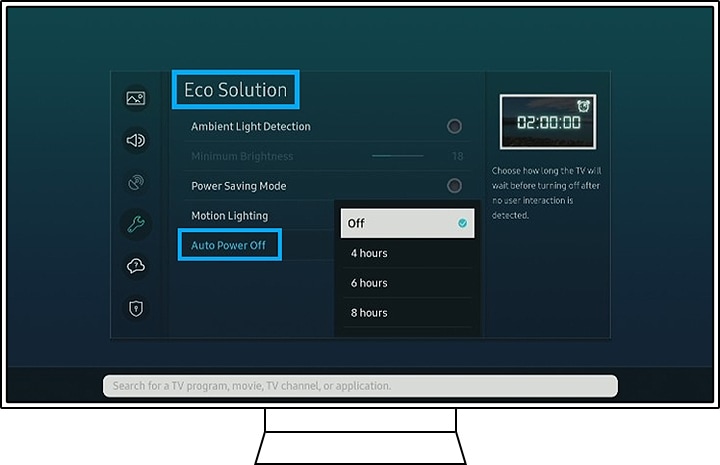
Credit: www.samsung.com
Frequently Asked Questions
Why Does My Samsung Tv Turn On And Off Repeatedly?
This often happens due to software glitches, power issues, or faulty hardware components.
How Can I Fix My Samsung Tv’s Black Screen Problem?
Try restarting the TV, checking the cables, or resetting the TV to factory settings.
Can A Power Surge Cause Samsung Tv To Reboot Repeatedly?
Yes, power surges can damage TV components, causing it to turn off and on repeatedly.
Is Outdated Software Causing My Samsung Tv To Blink And Restart?
Outdated software may cause glitches; updating the TV’s firmware often solves these issues.
When Should I Call A Technician For Samsung Tv Issues?
Call a technician if the TV keeps restarting after resets and software updates.
Conclusion
A Samsung TV turning on and off with a black screen can be frustrating. Simple fixes like checking cables or resetting the TV often help. Sometimes, a software update or power cycle solves the problem. If issues persist, professional support might be needed.
Regular care can keep your TV running smoothly. Stay patient and try each step carefully. Your TV will likely work properly again soon.