
Is your Samsung fridge not cooling after a power outage? That can be frustrating and worrying, especially when your food starts to spoil.
You rely on your fridge to keep things fresh, and when it stops working properly, it feels like everything is at risk. But don’t panic just yet. There are simple steps you can take to fix the problem and get your fridge back to normal.
You’ll discover why your fridge may not be cooling and what you can do right now to solve it quickly. Keep reading to protect your food and save yourself time and money.

Credit: www.reddit.com
Common Causes After Power Outage
After a power outage, your Samsung fridge might stop cooling properly. This happens due to a few common reasons. Understanding these causes helps in fixing the problem quickly. These issues affect the fridge’s ability to return to normal cooling after the power comes back.
Power Surge Effects
A power outage often causes a power surge when electricity returns. This surge can damage the fridge’s electronic parts. The control board or sensors might stop working right. Without these parts working well, the fridge cannot cool as it should.
Compressor Restart Delay
The compressor is the fridge’s heart. It pumps the refrigerant to cool the inside. After a power cut, the compressor needs time to restart safely. Many fridges have a delay to protect the compressor. This delay can last several minutes or longer, causing the fridge not to cool immediately.
Thermostat Reset Issues
The thermostat controls the fridge temperature. A power outage can reset the thermostat settings. The fridge might be set to a warmer temperature by mistake. This causes the fridge to stop cooling well. Checking and resetting the thermostat often solves this problem.
Initial Checks To Perform
After a power outage, a Samsung fridge might stop cooling properly. Start with some simple checks before calling for help. These steps can save time and fix common issues fast.
Verify Power Supply
Ensure the fridge is plugged in securely. Check the outlet with another device to confirm power. Look for any tripped circuit breakers in your home. A steady power flow is essential for cooling.
Inspect Door Seals
Open the fridge door and examine the seals closely. Look for cracks, tears, or dirt that block closure. A poor seal lets cold air escape and warm air enter. Clean or replace the seals if needed.
Check Temperature Settings
Verify the fridge temperature is set correctly. The ideal setting is usually between 37°F and 40°F (3°C to 4°C). Sometimes settings reset during a power outage. Adjust the temperature and wait for the fridge to cool.
Quick Fixes To Try
After a power outage, your Samsung fridge may stop cooling properly. This problem can feel frustrating. Some simple steps can help fix it fast. These quick fixes can save you time and money before calling a technician.
Resetting The Fridge
Unplug the fridge from the power outlet. Wait for about five minutes. Plug it back in to reset the system. This can clear minor electronic glitches. The fridge may start cooling normally again.
Cleaning Condenser Coils
Locate the condenser coils at the back or bottom of the fridge. Dust and dirt block airflow. Use a soft brush or vacuum to clean the coils gently. Clean coils help the fridge cool better and save energy.
Allowing Compressor To Cool Down
The compressor may overheat after a power cut. This stops the cooling process. Let the fridge rest unplugged for 30 minutes. This cools down the compressor. After that, plug it in and check if it cools.
When To Contact Support
Knowing when to contact support for your Samsung fridge is key. After a power outage, some issues may clear up on their own. Others need expert help to avoid food spoilage or damage.
Act quickly if problems last longer than a few hours. Early support can save time and money. Watch for clear signs that your fridge needs professional care.
Persistent Cooling Problems
If your fridge still does not cool properly after several hours, call support. Constant warm temperatures can spoil food and waste electricity. A technician can check the compressor, thermostat, and cooling system for faults.
Unusual Noises Or Smells
Strange sounds like buzzing, clicking, or rattling may signal a mechanical issue. Bad odors could mean mold or electrical problems. These signs need prompt attention to prevent bigger damage or health risks.
Error Codes On Display
Samsung fridges often show error codes after a power outage. These codes point to specific problems inside the appliance. Contact support with the code ready for faster, accurate diagnosis and repair.
Preventive Tips For Future Outages
Power outages can disrupt your Samsung fridge’s cooling. Preventive steps help avoid damage and keep food safe. Small actions today save big problems later.
Using Surge Protectors
Surge protectors stop sudden voltage spikes. These spikes can harm your fridge’s compressor and electronics. Plug your fridge into a surge protector. It acts as a shield during power returns.
Choose a surge protector with high joule ratings. This rating shows how much energy it can absorb. Replace protectors every few years for best defense.
Regular Maintenance
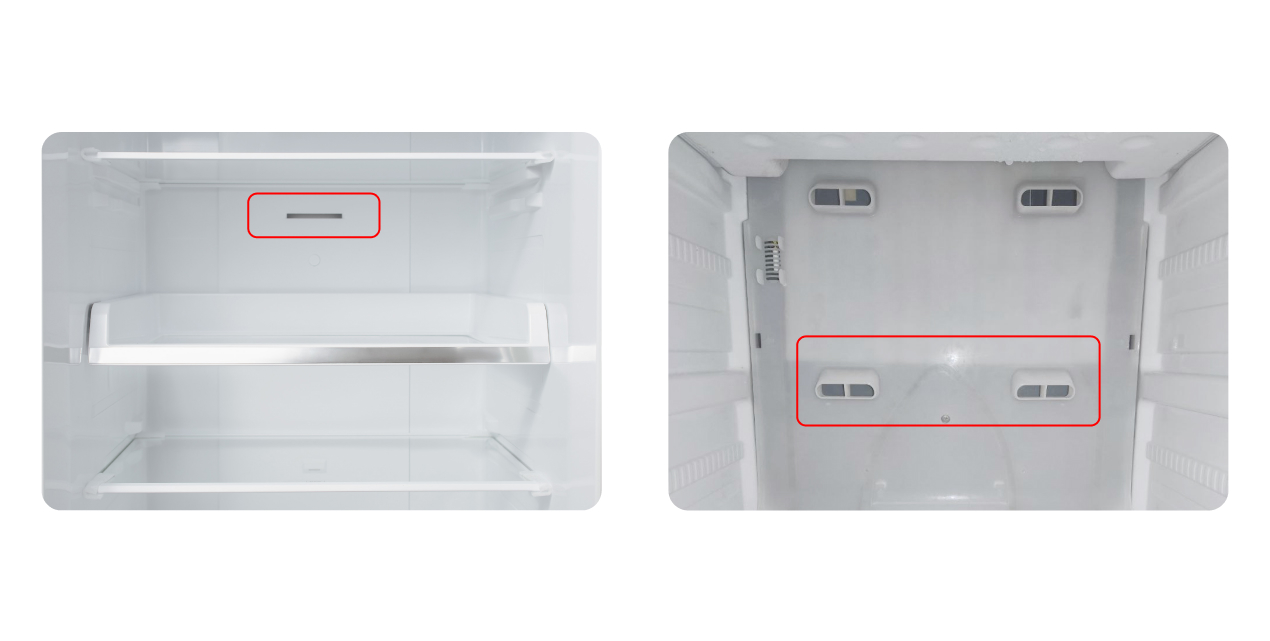
Keep your fridge clean and well-maintained. Dust buildup on coils makes cooling harder. Check and clean coils every few months. Clear any blockages in vents for good air flow.
Inspect door seals regularly. Tight seals keep cold air inside. Replace any damaged or loose seals quickly. Maintenance prevents small issues from causing big failures.
Backup Power Solutions
Consider a backup power source during outages. A small generator or battery backup can keep the fridge running. This protects your food from spoiling.
Test your backup system often. Make sure it starts quickly and works well. Having power ready saves you from sudden cooling loss.
Credit: appliancerepairexpert.ca

Credit: www.youtube.com
Frequently Asked Questions
Why Is My Samsung Fridge Not Cooling After A Power Outage?
Power outages can reset fridge settings or cause compressor issues, stopping it from cooling properly.
How Long Does A Samsung Fridge Take To Cool After Power Returns?
It usually takes 4 to 6 hours for the fridge to reach the right temperature.
Can A Power Outage Damage My Samsung Fridge’s Cooling System?
Yes, sudden power loss can harm the compressor or thermostat, affecting cooling.
How Can I Fix My Samsung Fridge Not Cooling Post Power Outage?
Try resetting the fridge, checking the power supply, and ensuring vents are clear.
When Should I Call A Technician For Samsung Fridge Cooling Issues?
Call a technician if the fridge stays warm after 24 hours or makes strange noises.
Conclusion
A power outage can stop your Samsung fridge from cooling properly. Check the power supply and reset the fridge to help it start working again. Clean the coils and make sure the door seals are tight. If the problem stays, contact a professional for help.
Regular care keeps your fridge cold and fresh. Stay calm and take small steps to fix the issue quickly. Your fridge will cool properly soon.