
Is your Samsung TV not turning on when you press the power button? It’s frustrating, especially when you just want to relax and watch your favorite show.
You might wonder if it’s a simple fix or if you need to call for expensive repairs. Don’t worry—you’re not alone, and there are easy steps you can take right now to bring your TV back to life. Keep reading, and you’ll discover quick tips and solutions that anyone can follow to get your Samsung TV working again.

Credit: www.youtube.com
Common Reasons For Power Issues
Samsung TVs not turning on often relate to power issues. These problems stop the TV from receiving or using power correctly. Understanding common causes helps fix the issue fast. Below are key reasons why your Samsung TV may not power on.
Power Supply Problems
Power supply issues are the main cause of TV power failures. A loose or damaged power cord can stop electricity flow. Faulty power outlets also prevent the TV from turning on. Surge protectors or extension cords can fail and block power. Checking these parts is a simple first step.
Remote Control Malfunctions
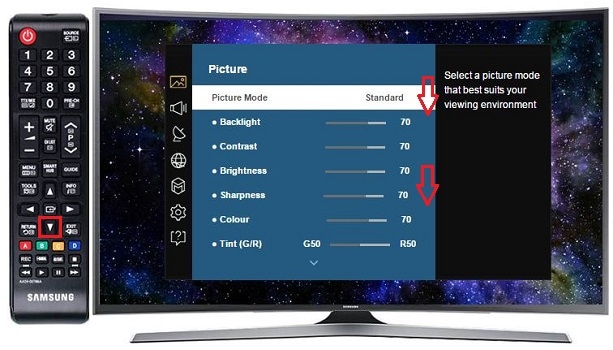
Sometimes the remote control causes the TV to stay off. Dead batteries stop the remote from sending signals. Dirt or damage to buttons can block commands. Infrared sensor problems on the TV also affect remote use. Testing the remote with new batteries helps find this issue.
Internal Hardware Faults
Inside the TV, hardware faults can stop power functions. Faulty capacitors or circuit boards can break the power flow. Overheating or electrical surges may damage internal parts. These problems usually need professional repair. Signs include blinking lights or no response when pressing buttons.
Credit: www.samsung.com
Basic Troubleshooting Steps
Samsung TV not turning on can be frustrating. Basic troubleshooting steps help fix simple issues fast. Try these easy checks before calling for service. They save time and often solve the problem.
Check Power Cord And Outlet
First, ensure the power cord is plugged in firmly. Check the outlet by plugging in another device. If the outlet works, the cord might be damaged. Replace the cord or use a different outlet to test.
Use The Tv Power Button
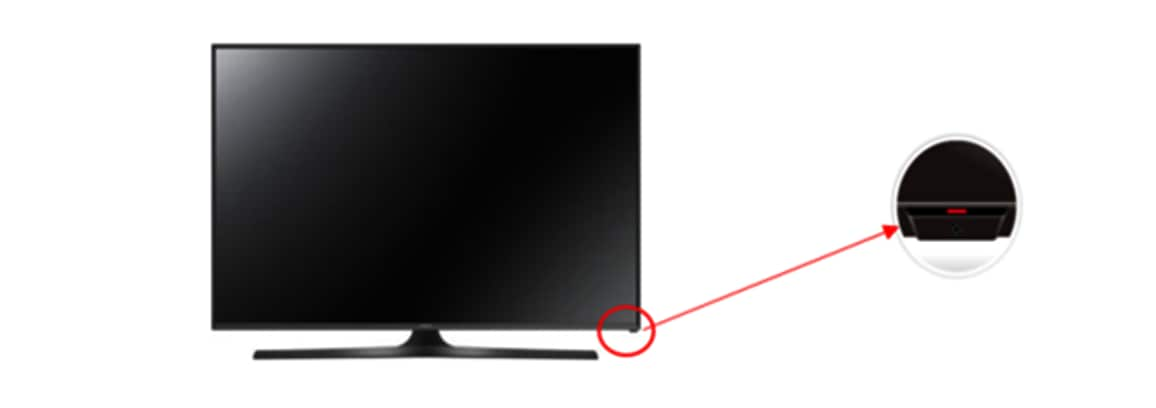
Sometimes the remote control does not work properly. Try pressing the power button on the TV itself. This can bypass remote issues and turn the TV on directly. Look for a small button on the side or bottom of the TV.
Reset The Remote Control
The remote might need a reset to work again. Remove the batteries and press all buttons once. Put new batteries in and try again. This can fix minor remote control problems and help turn the TV on.
Advanced Fixes To Try
Advanced fixes can help if your Samsung TV does not turn on. These steps go beyond basic checks. They involve actions that require more care but can solve deeper issues. Follow these tips carefully for better results.
Perform A Soft Reset
Unplug the TV from the power outlet. Wait for about 60 seconds to let it fully power down. Press and hold the power button on the TV for 10 seconds. Release the button and plug the TV back in. Press the power button again to turn it on. This reset can clear minor glitches causing startup problems.
Inspect And Replace The Power Board
Unplug the TV and open the back panel carefully. Look for any signs of damage on the power board, like burnt marks or swollen capacitors. If you find damage, the power board may need replacement. Use a compatible power board designed for your TV model. Replace it with caution or seek professional help to avoid further damage.
Update Firmware Via Usb
Download the latest firmware from Samsung’s official website using a computer. Copy the update file to a USB drive formatted in FAT32. Insert the USB drive into your TV’s USB port. Follow the TV’s menu instructions to start the firmware update. This process can fix software bugs that prevent the TV from turning on.
When To Seek Professional Help
Knowing when to seek professional help for a Samsung TV that won’t turn on is important. Some problems need expert skills to fix safely and correctly. Trying to repair complex issues alone might cause more damage or be unsafe.
Recognizing signs of internal damage helps decide when to call a technician. Also, understanding your warranty and repair options saves time and money. Below are key points to consider before making the call.
Signs Of Internal Damage
Look for unusual smells like burning plastic or smoke. Flickering lights or strange noises inside the TV show internal issues. The TV might try to start but fail repeatedly. Screen remains black with no sound or response. These signs mean the problem is beyond simple fixes.
Warranty And Repair Options
Check if your TV is still under warranty before any repair. Samsung may cover repairs or replacement costs. Contact authorized service centers for safe, reliable repairs. Avoid unauthorized repair shops that might void your warranty. Professional help ensures quality parts and proper service.
Preventive Tips For Power Issues
Power issues can stop your Samsung TV from turning on. Taking steps to prevent these problems helps keep your TV working longer. Simple actions can protect your TV from damage and save you repair costs. Follow these tips to avoid power troubles.
Use Surge Protectors
Surge protectors guard your TV against sudden power spikes. These spikes can damage your TV’s internal parts. Plug your TV into a surge protector instead of a regular outlet. This small device reduces the risk of electrical damage. It is a cheap and easy way to protect your investment.
Regular Maintenance Checks
Check your TV and power connections often. Dust and dirt can build up around vents and plugs. Clean these areas gently to prevent overheating. Make sure power cords are not frayed or loose. Tight connections help maintain steady power flow. Regular checks catch problems before they worsen.
Credit: www.samsung.com
Frequently Asked Questions
Why Is My Samsung Tv Not Turning On At All?
Check the power cable and outlet. Make sure the remote has working batteries.
How To Fix A Samsung Tv Stuck On A Black Screen?
Try unplugging the TV for 60 seconds. Then plug it back and press the power button.
Can A Faulty Power Supply Cause Samsung Tv Power Issues?
Yes. A damaged power supply can stop the TV from turning on properly.
What Does It Mean If Samsung Tv’s Standby Light Is Blinking?
A blinking standby light shows a hardware or software issue that may need service.
How To Reset Samsung Tv When It Won’t Turn On?
Unplug the TV for a few minutes, then press and hold the power button for 30 seconds. Plug it back in and try again.
Conclusion
Samsung TVs may fail to turn on for many reasons. Check the power source and remote control first. Try unplugging the TV and plugging it back in. Look for any visible damage or loose cables. Resetting the TV can sometimes fix the issue.
If the problem stays, contacting a professional helps. Don’t ignore small signs of trouble. Acting early can save money and stress. Your TV should work smoothly with the right care and attention. Keep these tips handy for future reference.